- fuzzy completion in bash
$ cat **<tab>$ unset **<tab>$ unalias **<tab>$ export **<tab>$ ssh **<tab>$ kill -9 **<tab>- fzf
[!NOTE|label:references:]
- * fzf - FuZzy Finder Tutorial
- * junegunn/fzf
- usage
- ** A Practical Guide to fzf: Building a File Explorer
- * Find anything you need with fzf, the Linux fuzzy finder tool
- * Improving shell workflows with fzf
- Introduction to fzf command
- Why you should be using fzf, the command line fuzzy finder
- Linux下搜索神器fzf的配置和使用
- serenevoid/fzf_config.md
- 4 Useful fzf Tricks for Your Terminal
- Day 18 - Awesome command-line fuzzy finding with fzf
- more tools
- vim
- Improving Vim Workflow With fzf
- * How to search faster in Vim with FZF.vim
- * How FZF and ripgrep improved my workflow | SidOfc/vim-rg-outdated-command.vim
" fzf.vim now supports this command out of the box " so this code is no longer needed. command! -bang -nargs=* Rg \ call fzf#vim#grep( \ 'rg --column --line-number --hidden --ignore-case --no-heading --color=always '.shellescape(<q-args>), 1, \ <bang>0 ? fzf#vim#with_preview({'options': '--delimiter : --nth 4..'}, 'up:60%') \ : fzf#vim#with_preview({'options': '--delimiter : --nth 4..'}, 'right:50%:hidden', '?'), \ <bang>0)- customize
install
[!NOTE|label:references:]
$ brew install fzf fd
$ type -P fzf >/dev/null && eval "$(command fzf --bash)"
# -- or --
$ ln -sf $(brew --prefix fd)/share/bash-completion/completions/fd "$(brew --prefix)"/etc/bash_completion.d/fd

# linux
$ DOWNLOAD_URL="$(curl -fsSL https://api.github.com/repos/junegunn/fzf/releases/latest | jq --arg pattern "linux_$(dpkg --print-architecture)" -r '.assets[] | select(.name | contains($pattern)) | .browser_download_url')"
$ curl -fsSL "${DOWNLOAD_URL}" | sudo tar xz -C /usr/local/bin/ fzf
$ sudo chmod +x /usr/local/bin/fzf
$ command fzf --bash > /usr/share/bash-completion/completions/fzf
$ sudo apt install fd
# -- cleanup --
$ rm -rf /tmp/fzf.tar.gz
# build from source
$ git clone https://github.com/junegunn/fzf.git && cd fzf
$ make
GOARCH=arm64 go build -a -ldflags "-s -w -X main.version=0.72.0 -X main.revision=e0d08190" -tags "" -trimpath -o target/fzf-darwin_arm8
# config
FZF_DEFAULT_OPTS="${FZF_DEFAULT_OPTS:+$FZF_DEFAULT_OPTS} "
FZF_DEFAULT_OPTS+="--height 35% --min-height 8+ " # https://github.com/junegunn/fzf/issues/4226
FZF_DEFAULT_OPTS+="--layout=reverse --multi --cycle --ansi --gutter ' ' "
FZF_DEFAULT_OPTS+="--marker=' ' --pointer='▌' "
FZF_DEFAULT_OPTS+="--prompt=' ' --info='inline: ' "
FZF_DEFAULT_OPTS+="--info-command='printf \"\x1b[33;1m%s\x1b[m ~ %s\" \"\$FZF_POS\" \"\$FZF_INFO\"' "
FZF_DEFAULT_OPTS+="--bind 'ctrl-s:select-all,ctrl-d:deselect-all,ctrl-t:toggle-all' "
FZF_DEFAULT_OPTS+="--bind 'ctrl-y:execute-silent(/bin/echo -n {+} | ${COPY})' "
FZF_DEFAULT_OPTS+="--color=gutter:0,bg+:-1,query:italic,spinner:#e6db74,prompt:#404945,header:italic:#504945,info:#928374,pointer:#A66584,marker:#d79921,fg:#ebdbb2:dim,fg+:#A7A44E:regular,hl:#845069:italic,hl+:#A66584:bold:italic"
FZF_DEFAULT_COMMAND="fd --type f "
FZF_DEFAULT_COMMAND+="--strip-cwd-prefix "
FZF_DEFAULT_COMMAND+="--hidden "
FZF_DEFAULT_COMMAND+="--follow "
FZF_DEFAULT_COMMAND+="--exclude .git --exclude node_modules"
export FZF_DEFAULT_OPTS FZF_DEFAULT_COMMAND
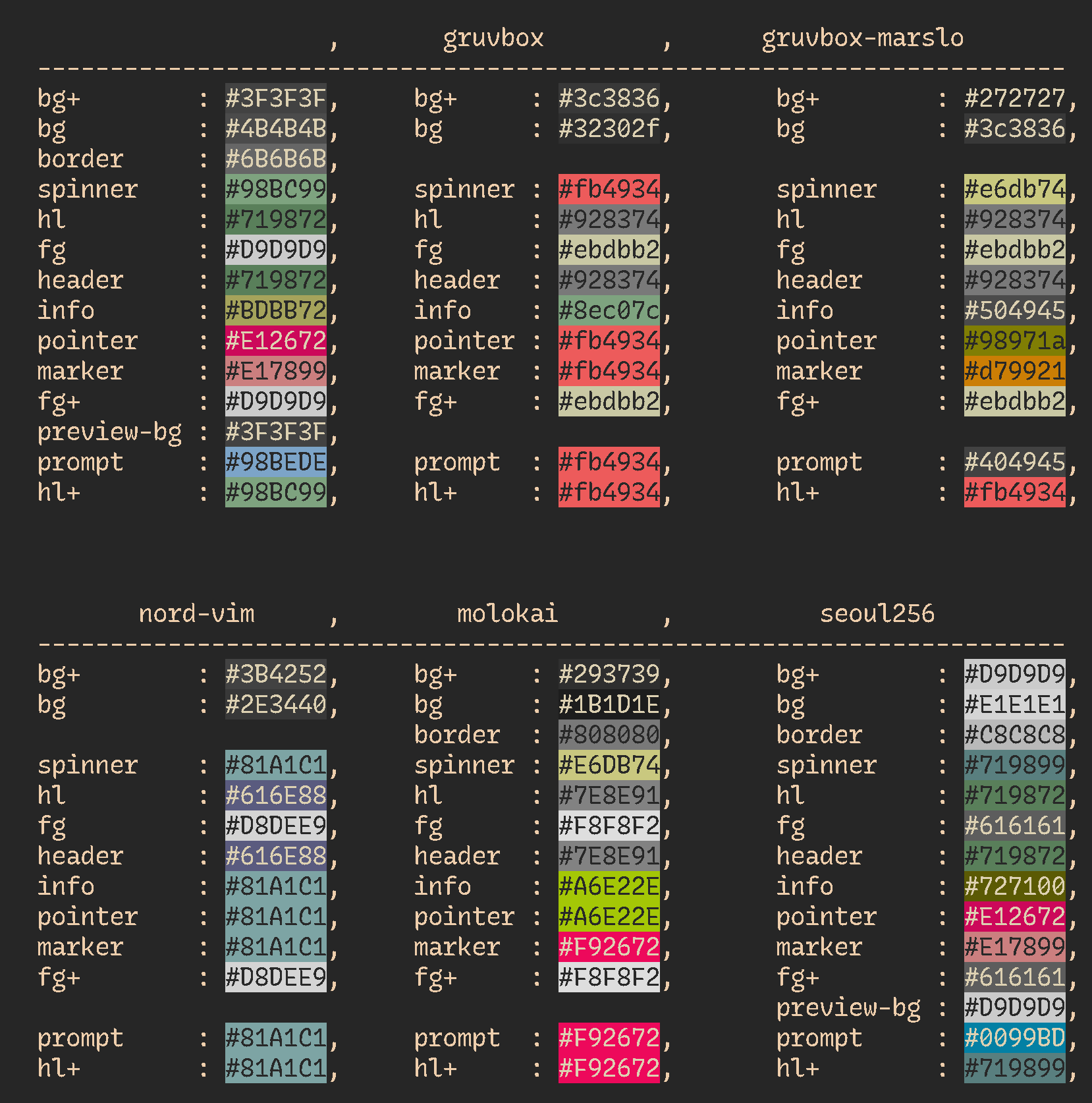
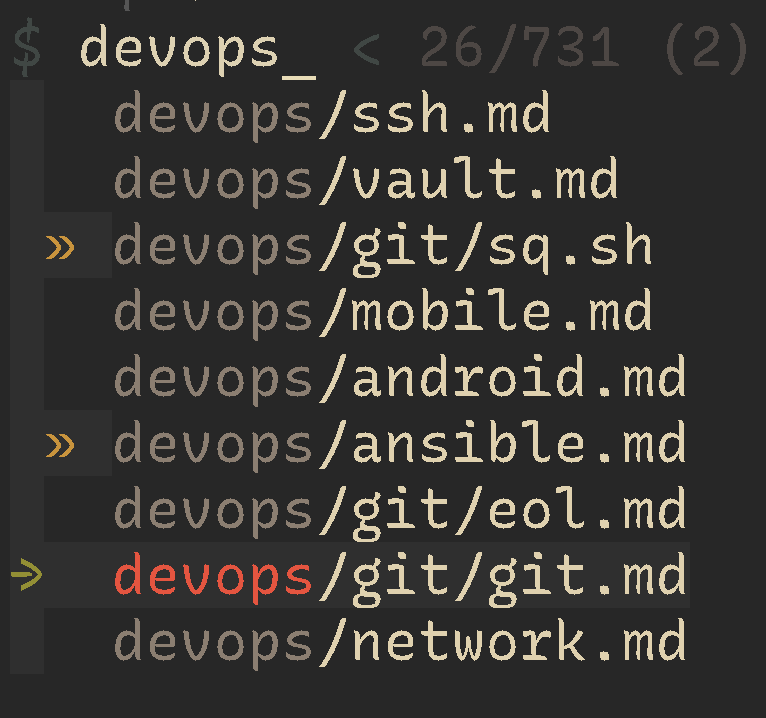
| NAME | VALUE |
|---|---|
| pointer | ▏, ▕, ┃, ▎, ▌, ▊, ▉, ▒, ⵗ |
# -- or --
FZF_DEFAULT_OPTS+="--prompt=' ' --info='inline: ' "
# -- or --
FZF_DEFAULT_OPTS+="--prompt='ᑹ ∷ ' "
# or
FZF_DEFAULT_OPTS+="--prompt=' ' "
# -- or --
FZF_DEFAULT_OPTS+='--style full --layout reverse '
FZF_DEFAULT_OPTS+='--header-lines-border bottom --no-list-border '
# -- or --
FZF_DEFAULT_OPTS+="--no-bold "
# -- or --
FZF_DEFAULT_OPTS+="--color=fg+:#ebdbb2,pointer:#e6db74,hl+:#fb4934,prompt:#334D35"
FZF_DEFAULT_OPTS="--height 35%"
FZF_DEFAULT_OPTS+=" --layout=reverse"
FZF_DEFAULT_OPTS+=" --pointer='→' --marker='» ' --prompt='$ '"
FZF_DEFAULT_OPTS+=" --multi"
FZF_DEFAULT_OPTS+=" --inline-info"
FZF_DEFAULT_OPTS+=" --color=spinner:#e6db74,hl:#928374,fg:#ebdbb2,header:#928374,info:#504945,pointer:#98971a,marker:#d79921,fg+:#ebdbb2,prompt:#404945,hl+:#fb4934"

FZF_DEFAULT_COMMAND="fd --type f"
FZF_DEFAULT_COMMAND+=" --strip-cwd-prefix"
FZF_DEFAULT_COMMAND+=" --hidden"
FZF_DEFAULT_COMMAND+=" --follow"
FZF_DEFAULT_COMMAND+=" --exclude .git --exclude node_modules"
install from source code for wsl
[!NOTE|label:this solution for install latest fzf in wsl]
- in wsl Ubuntu, the fzf version is
0.29$ sudo apt search fzf Sorting... Done Full Text Search... Done fzf/jammy 0.29.0-1 amd64 general-purpose command-line fuzzy finder - * Fzf – A Quick Fuzzy File Search from Linux Terminal
$ git clone git@github.com:junegunn/fzf.git $ bash -x install --all $ sudo cp bin/fzf* /usr/local/bin/- in wsl Ubuntu, the fzf version is
offline install
[!NOTE]
curl: (60) SSL certificate problem: self-signed certificate in certificate chain:$ curl -fL https://github.com/junegunn/fzf/releases/download/0.44.1/fzf-0.44.1-linux_amd64.tar.gz curl: (60) SSL certificate problem: self-signed certificate in certificate chain More details here: https://curl.se/docs/sslcerts.html curl failed to verify the legitimacy of the server and therefore could not establish a secure connection to it. To learn more about this situation and how to fix it, please visit the web page mentioned above.- How to fix curl: (60) SSL certificate: Invalid certificate chain
~/.curlrc$ echo '--insecure' >> ~/.curlrcoffline installation
################ for offline installation only ################
# check current version for offline installation
$ uname -sm
Linux x86_64

# download correct package according https://github.com/junegunn/fzf/blob/master/install#L170
# i.e.: Linux x86_64 -> fzf-$version-linux_amd64.tar.gz
$ cp fzf-0.42.0-linux_amd64.tar.gz /tmp/fzf.tar.gz

# modify install script `try_curl` function to not download but use local tar.gz directly
$ cat << 'EOF' | git apply --inaccurate-eof --ignore-whitespace
diff --git a/install b/install
index 5ac191b..342bc49 100755
--- a/install
+++ b/install
@@ -115,10 +115,8 @@ link_fzf_in_path() {
try_curl() {
 command -v curl > /dev/null &&
 if [[ $1 =~ tar.gz$ ]]; then
-    curl -fL $1 | tar -xzf -
-  else
-    local temp=${TMPDIR:-/tmp}/fzf.zip
-    curl -fLo "$temp" $1 && unzip -o "$temp" && rm -f "$temp"
+    local temp=${TMPDIR:-/tmp}/fzf.tar.gz
+    tar -xzf "$temp" && rm -rf "$temp"
 fi
}
EOF

### or modify manually ###
# try_curl() {
#   command -v curl > /dev/null &&
#   if [[ $1 =~ tar.gz$ ]]; then
#     local temp=${TMPDIR:-/tmp}/fzf.tar.gz
#     tar -xzf "$temp" && rm -rf "$temp"
#   fi
# }
################ for offline installation only ################
shortcuts
[!NOTE|label:references:]
- Using the finder
- multiple select
- enable via :
--multior-m- disable via :
--no-multior+m- Customizing fzf Keybindings
KEYSTROKE BASH FUNCTION ZSH FUNCTION ENVIRONMENT VARIABLE CTRL-t __fzf_select____fselFZF_CTRL_T_COMMANDCTRL-r __fzf_history__fzf-history-widgetFZF_CTRL_R_OPTSALT-c __fzf_cd__fzf-cd-widgetFZF_ALT_C_COMMAND
action and select
| OPEN | SELECT ALL | DESELECT ALL | TOGGLE ALL | MULTIPLE SELECT |
|---|---|---|---|---|
| ⏎ | ctrl + s | ctrl + d | ctrl + t | ⇥ |
| shift + ⇥ |
movement
| PREVIOUS | NEXT | MULTIPLE SELECT |
|---|---|---|
| ↑ | ↓ | ⇥ |
| ctrl + k | ctrl + j | |
| ctrl + p | ctrl + n | shift + ⇥ |
| ctrl + k | ctrl + j |
ctrl-t
[!TIP]
- customized shortcut key via:
export FZF_CTRL_T_OPTS="${FZF_CTRL_T_OPTS} --bind 'ctrl-p:preview-up,ctrl-n:preview-down'" export FZF_CTRL_T_OPTS="${FZF_CTRL_T_OPTS} --bind 'ctrl-/:change-preview-window(down|hidden|)'"- #358: Keyboard bindings for scrolling preview window?
- #211: Scroll inside preview?
file list:
PREVIOUS NEXT CHANGE PREVIEW WINDOWS ↑ ↓ ctrl + / ctrl + k ctrl + j ctrl + p ctrl + n preview content:
PREVIOUS NEXT shift + ↑ shift + ↓ ctrl + ↑ ctrl + ↓ ctrl + p ctrl + n
usage
[!NOTE|label:references:]
magic vim
[!TIP]
-
# usage: eval "$( _load_fzf_context )" # ... | fzf "${fzfopt[@]}" function _load_fzf_context() { local -a CAT=( "$(type -P cat)" ) type -P bat >/dev/null && CAT=( "$(type -P bat)" --theme='Nord' --color=always --line-range :500 ) local previewCmd="if file -bL --mime-encoding {} | grep -iq 'binary' && ! iconv -f utf-8 -t utf-8 {} >/dev/null 2>&1; then file -bL {}; else ${CAT[*]} {}; fi" local -a fzfopt=( --exit-0 --height 50% --multi --cycle --preview "${previewCmd}" --preview-window 'right,60%,nowrap,rounded,+15' --bind 'ctrl-/:toggle-preview' --bind='ctrl-o:execute(bat {} > /dev/tty)' ) typeset -p fzfopt } # magic vim : fzf list in recent modified order # @author : marslo # @source : https://github.com/marslo/dotfiles/blob/main/.marslo/bin/ffunc.sh # @description : # - if `nvim` installed using `nvim` instead of `vim` # - using `-v` to force using `vim` instead of `nvim` even if nvim installed # - if `vim` commands without parameters, then call fzf and using vim to open selected file # - if `vim` commands with parameters # - if single parameters and parameters is directory, then call fzf in target directory and using vim to open selected file # - otherwise call regular vim to open file(s) # - to respect fzf options by: `type -t _fzf_opts_completion >/dev/null 2>&1 && complete -F _fzf_opts_completion -o bashdefault -o default vim` # shellcheck disable=SC2155 function vim() { # magic vim - fzf list in most recent modified order local -a voption=() local orgv=false # force using vim instead of nvim local -a fdopt=( --type f --hidden --follow --unrestricted --ignore-file "$HOME/.fdignore" ) test -d "${1:-}" && [[ "$1" == "." || "$1" == ./* ]] && fdopt+=( --strip-cwd-prefix ) local -a ignores=( '*.pem' '*.p12' '*.png' '*.jpg' '*.jpeg' '*.gif' '*.svg' '*.ico' '*.pdf' '*.mp4' '*.mp3' '*.zip' '*.tar' '*.gz' '*.bz2' '*.xz' '*.7z' '*.rar' '*.o' '*.a' '*.so' '*.ko' '*.bin' '*.exe' '*.dll' '*.dylib' '*.pyc' '*.pyd' '*.pyo' '*.node' '*.class' '*.jar' '*.db' '*.sqlite' '*.sqlite3' 'Music' '.target_book' '_book' 'OneDrive*' ) for pattern in "${ignores[@]}"; do fdopt+=( --exclude "${pattern}" ); done { test "$HOME" = "$(pwd)" || [[ "$HOME" = $(realpath ${1:-}) ]]; } && fdopt+=( --max-depth 3 ) isWSL || fdopt+=( --exec-batch ls -t ) eval "$( _load_fzf_context )" while [[ $# -gt 0 ]]; do case "$1" in -v ) orgv=true ; shift ;; -h | --help ) voption+=( "$1" ) ; shift ;; --version ) voption+=( "$1" ) ; shift ;; -c ) voption+=( "$1" "$2" ) ; shift ;; --startuptime ) voption+=( "$1" "$2" ) ; shift 2 ;; -Nu ) voption+=( "$1" "$2" ) ; shift 2 ;; --cmd ) voption+=( "$1" "$2" ) ; shift 2 ;; -* ) fzfopt+=( "$1" "$2" ) ; shift 2 ;; * ) break ;; esac done local VIM="$(type -P vim)" ! "${orgv}" && command -v nvim >/dev/null && VIM="$(type -P nvim)" if [[ 0 -eq "$#" ]] && [[ 0 -eq "${#voption}" ]]; then fd . "${fdopt[@]}" | fzf "${fzfopt[@]}" --bind="enter:become(${VIM} {+})" elif [[ 1 -eq "$#" ]] && [[ -d "${1}" ]]; then [[ '.' = "${1}" ]] && finalTarget=("${1}") || finalTarget=('.' "${1}") fd "${finalTarget[@]}" "${fdopt[@]}" | fzf "${fzfopt[@]}" --bind="enter:become(${VIM} {+})" else "${VIM}" "${voption[@]}" "$@" fi } -
# v : open files in ~/.vim_mru_files # https://github.com/junegunn/fzf/wiki/Examples#v # @author : marslo # @source : https://github.com/marslo/dotfiles/blob/main/.marslo/bin/ffunc.sh # @description : list 10 most recently used files via fzf, and open by regular vim function v() { # v - open files in ~/.vim_mru_files local files files=$( grep --color=none -v '^#' ~/.vim_mru_files | while read -r line; do [ -f "${line/\~/$HOME}" ] && echo "${line}"; done | fzf-tmux -d -m -q "$*" -1 ) && vim ${files//\~/$HOME} } -
# vimr : open files by [vim] in whole [r]epository # same series: [`cdr`](https://github.com/marslo/dotfiles/blob/main/.marslo/bin/ffunc.sh#L411-L419) # similar with [`:Gfiles`](https://github.com/junegunn/fzf.vim?tab=readme-ov-file#commands) # @author : marslo # @source : https://github.com/marslo/dotfiles/blob/main/.marslo/bin/ffunc.sh # @description : # - if pwd inside the repo, then filter all files within current git repository via data modified and open by vim # - if pwd not inside the repo, then call `vim` function vimr() { # vimr - open file(s) via [vim] in whole [r]epository local repodir # shellcheck disable=SC2155 local VIM="$(type -P vim)" type -P nvim >/dev/null && VIM="$(type -P nvim)" local -a fdopt=( --type f --hidden --ignore-file "$HOME/.fdignore" ) local -a ignores=( '*.pem' '*.p12' '*.png' '*.jpg' '*.jpeg' '*.gif' '*.svg' '*.zip' '*.tar' '*.gz' '*.bz2' '*.xz' '*.7z' '*.rar' 'Music' '.target_book' '_book' 'OneDrive*' ) while read -r pattern; do fdopt+=( --exclude "${pattern}" ); done <<< "$(printf '%s\n' "${ignores[@]}" | sort -u)" fdopt+=( --exec-batch ls -t ) if git rev-parse --is-inside-work-tree >/dev/null 2>&1; then repodir="$( git rev-parse --show-toplevel )" local -a files=() mapfile -t files < <( fd . "${repodir}" "${fdopt[@]}" | sed "s|^${repodir}/||" | fzf --multi \ --bind "ctrl-r:reload(fd . ${repodir} ${fdopt[*]@Q} | sed 's|^${repodir}/||')" \ --preview "cd \"${repodir}\" && bat --color=always --line-range :500 {}" \ --preview-window '60%:nowrap,+15' \ --height 50% | awk -v prefix="${repodir}/" '{print prefix $0}' ) [[ ${#files[@]} -gt 0 ]] && "${VIM}" "${files[@]}" else ${VIM} fi } -
# vimrc        : open rc files list from "${rcPaths}" to quick update/modify rc files
#                same series: runrc
# @author      : marslo
# @source      : https://github.com/marslo/dotfiles/blob/main/.marslo/bin/ffunc.sh
# @description :
#   - default rcPaths: ~/.marslo ~/.config/nvim ~/.*rc ~/.*profile ~/.*ignore
#   - using nvim if `command -v nvim` is true
#   - using `-v` force using `command vim` instead of `command nvim`
# shellcheck disable=SC2155
function vimrc() {                         # vimrc - fzf list all rc files in data modified order
  local orgv=false                         # force using vim instead of nvim
  local VIM="$(type -P vim)"
  local -a foption=( --multi --cycle )

  while [[ $# -gt 0 ]]; do
    case "$1" in
      -v ) orgv=true               ; shift   ;;
      -q ) foption+=(--query "$2") ; shift 2 ;;
       * ) break                             ;;
    esac
  done

  eval "$( _load_fzf_context  )"

  "${orgv}" || command -v nvim >/dev/null && VIM="$(type -P nvim)"
  fdInRC -x | sed -rn 's/^[^|]* \| (.+)$/\1/p' \
            | fzf "${foption[@]}" "${fzfopt[@]}" \
                  --bind="enter:become(${VIM} {+})" \
                  --preview-window 'right,55%,nowrap,rounded,+15' \
                  --bind "ctrl-y:execute-silent(printf '%s' {+} | ${COPY})" \
                  --header 'Press CTRL-Y to copy name into clipboard'
}
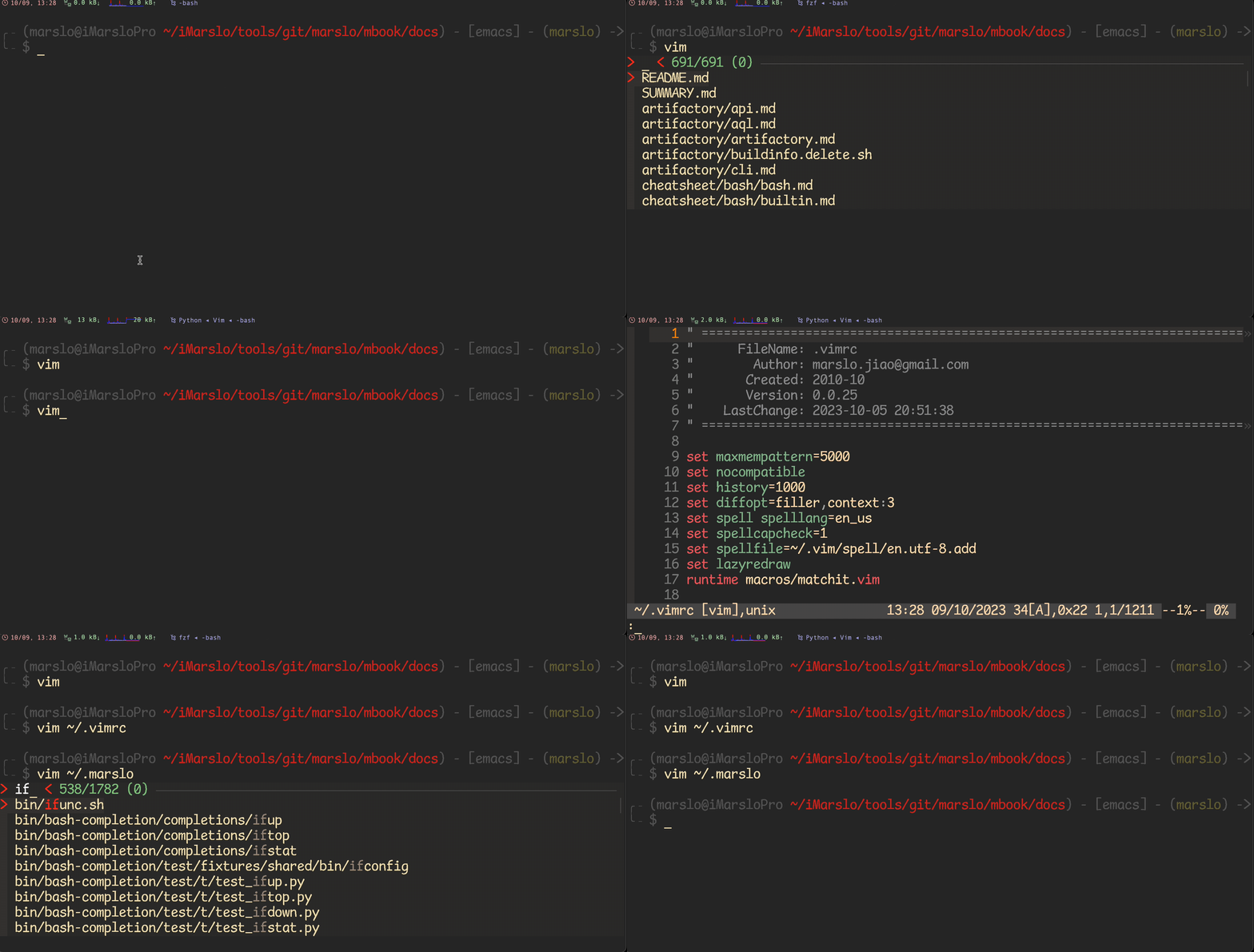
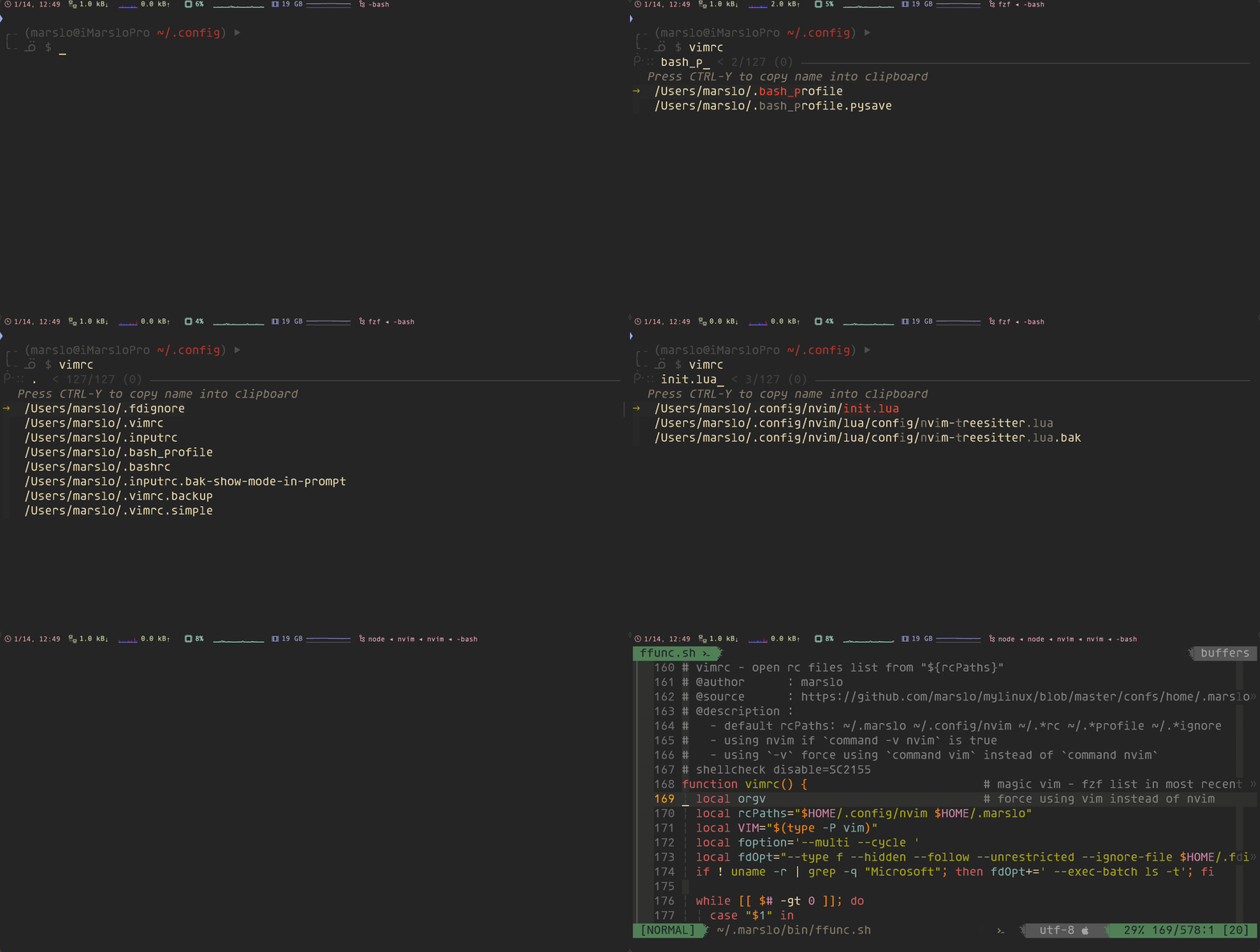
smart vimdiff
-
# vimdiff : magic vimdiff, using fzf list in recent modified order # @author : marslo # @source : https://github.com/marslo/dotfiles/blob/main/.marslo/bin/ffunc.sh # @description : # - if any of parameters is directory, then get file path via fzf in target path first # - if `vimdiff` commands without parameter , then compare files in `.` and `~/.marslo` # - if `vimdiff` commands with 1 parameter , then compare files in current path and `$1` # - if `vimdiff` commands with 2 parameters, then compare files in `$1` and `$2` # - otherwise ( if more than 2 parameters ) , then compare files in `${*: -2:1}` and `${*: -1}` with parameters of `${*: 1:$#-2}` # - to respect fzf options by: `type -t _fzf_opts_completion >/dev/null 2>&1 && complete -F _fzf_opts_completion -o bashdefault -o default vimdiff` function vimdiff() { # smart vimdiff local lFile local rFile local -a var=() local -a options=() local -a fzfopt=( --cycle --multi --header 'filter in rc paths:' ) while [[ $# -gt 0 ]]; do case "$1" in --help ) options+=( "$1" ) ; shift ;; -* ) options+=( "$1" "$2" ) ; shift 2 ;; * ) break ;; esac done fzfopt+=( "${options[@]}" ) if [[ 0 -eq $# ]]; then lFile=$(fzfInPath '.' "${options[@]}" true) [[ -z "${lFile}" ]] && return 1 rFile=$(fdInRC -x | sed -rn 's/^[^|]* \| (.+)$/\1/p' | fzf "${fzfopt[@]}" ) elif [[ 1 -eq $# ]]; then lFile=$(fzfInPath '.' "${options[@]}" true) [[ -z "${lFile}" ]] && return 1 [[ -d "$1" ]] && rFile=$(fzfInPath "$1" "${options[@]}") || rFile="$1" elif [[ 2 -eq $# ]]; then [[ -d "$1" ]] && lFile=$(fzfInPath "$1" "${options[@]}") || lFile="$1" [[ -z "${lFile}" ]] && return 1 [[ -d "$2" ]] && rFile=$(fzfInPath "$2" "${options[@]}") || rFile="$2" else var=( "${@:1:$#-2}" ) [[ -d "${*: -2:1}" ]] && lFile=$(fzfInPath "${*: -2:1}") || lFile="${*: -2:1}" [[ -z "${lFile}" ]] && return 1 [[ -d "${*: -1}" ]] && rFile=$(fzfInPath "${*: -1}") || rFile="${*: -1}" fi [[ -f "${lFile}" ]] && [[ -f "${rFile}" ]] && $(type -P vim) -d "${var[@]}" "${lFile}" "${rFile}" } -
# vd           : open vimdiff loaded files from ~/.vim_mru_files
# @author      : marslo
# @source      : https://github.com/marslo/dotfiles/blob/main/.marslo/bin/ffunc.sh
# @description : list 10 most recently used files via fzf, and open by vimdiff
#   - if `vd` commands without parameter, list 10 most recently used files via fzf, and open selected files by vimdiff
#   - if `vd` commands with `-a` ( [q]uiet ) parameter, list 10 most recently used files via fzf and automatic select top 2, and open selected files by vimdiff
function vd() {                            # vd - open [v]im[d]iff loaded files from ~/.vim_mru_files
  [[ 1 -eq $# ]] && [[ '-q' = "$1" ]] && opt='--bind start:select+down+select+accept' || opt=''

  local -a files=()
  mapfile -t files < <(
    grep --color=none -v '^#' ~/.vim_mru_files |
     xargs -r -d'\n' -I_ bash -c "sed 's:\~:$HOME:' <<< _" |
     fzf --multi 3 --sync --cycle --reverse ${opt}
  )
  [[ ${#files[@]} -lt 2 ]] || vimdiff "${files[@]}"
}
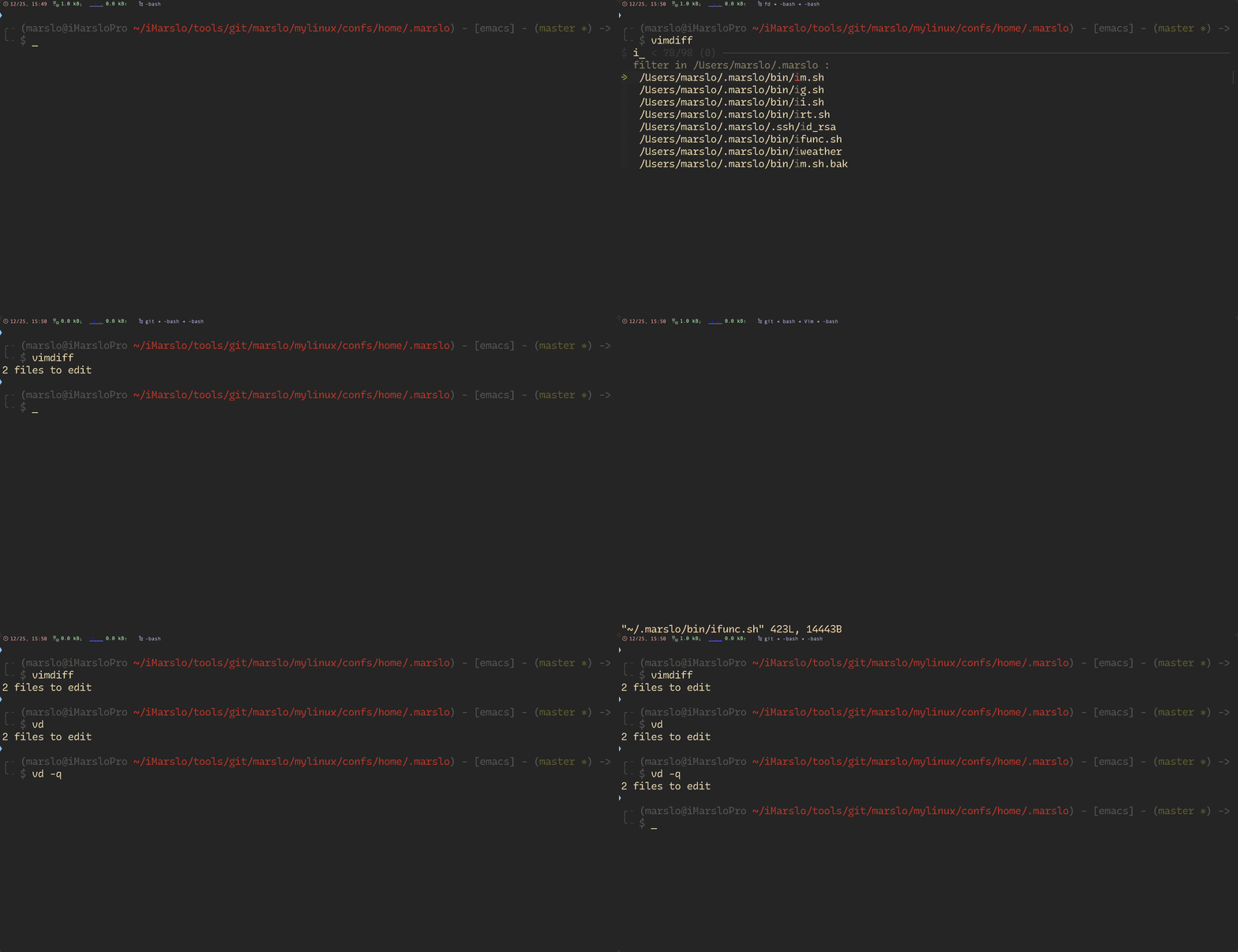
smart cat
[!NOTE|label:references:]
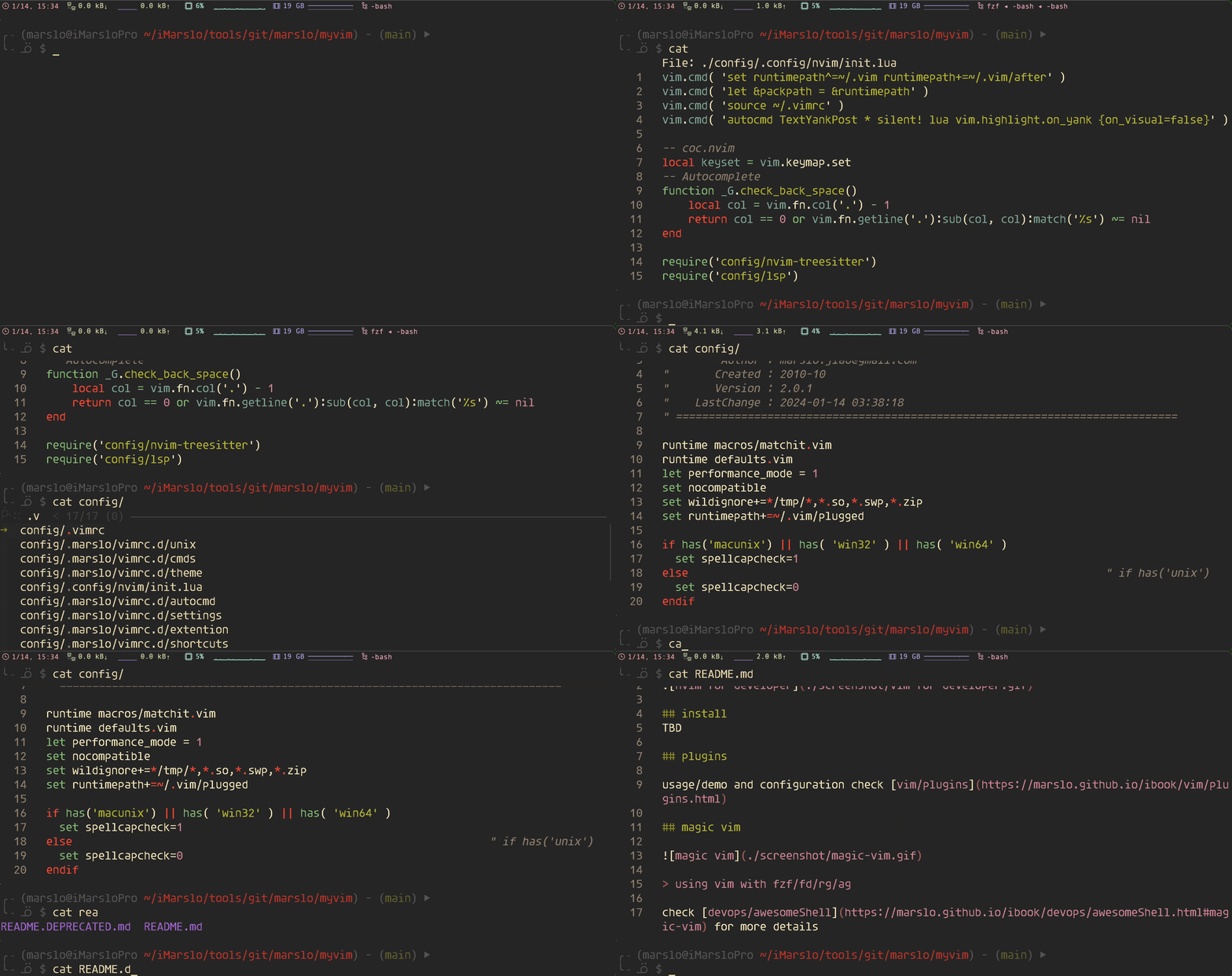
# smart cat    : using bat by default for cat content, respect bat options
# @author      : marslo
# @source      : https://github.com/marslo/dotfiles/blob/main/.marslo/bin/ffunc.sh
# @description :
#   - using `bat` by default if `command -v bat`
#     - using `-c` ( `c`at ) as 1st parameter, to force using `type -P cat` instead of `type -P bat`
#   - if `bat` without  parameter, then search file via `fzf` and shows via `bat`
#   - if `bat` with 1   parameter, and `$1` is directory, then search file via `fzf` from `$1` and shows via `bat`
#   - otherwise respect `bat` options, and shows via `bat`
# shellcheck disable=SC2046,SC2155
function cat() {                           # smart cat
  local -a CAT=( "$(type -P cat)" )
  command -v bat >/dev/null && CAT=( "$(type -P bat)" --theme='gruvbox-dark' --color=always )

  # reading from pipe == [[ -p /dev/stdin ]]
  [[ ! -t 0      ]] && { "${CAT[@]}" "$@"; return; }
  # force use cat
  [[ '-c' = "$1" ]] && { $(type -P cat) "${@:2}"; return; }

  eval "$( _load_fd_context  )"
  eval "$( _load_fzf_context )"

  # reading from fd + fzf
  if [[ 0 -eq $# ]]; then
    local selected=$( fd . "${fdopt[@]}" | fzf --exit-0 "${fzfopt[@]}" )
    # using IFS to handle file name with space
    [[ -n "${selected}" ]] && echo "${selected}" | xargs -d '\n' "${CAT[@]}"
  elif [[ 1 -eq $# ]] && [[ -d $1 ]]; then
    local target=$1;
    fd . "${target}" "${fdopt[@]}" | fzf --bind="enter:become(${CAT[*]} {+})" "${fzfopt[@]}";
  else
    "${CAT[@]}" "${@:1:$#-1}" "${@: -1}"
  fi
}
smart copy
[!NOTE|label:references:]
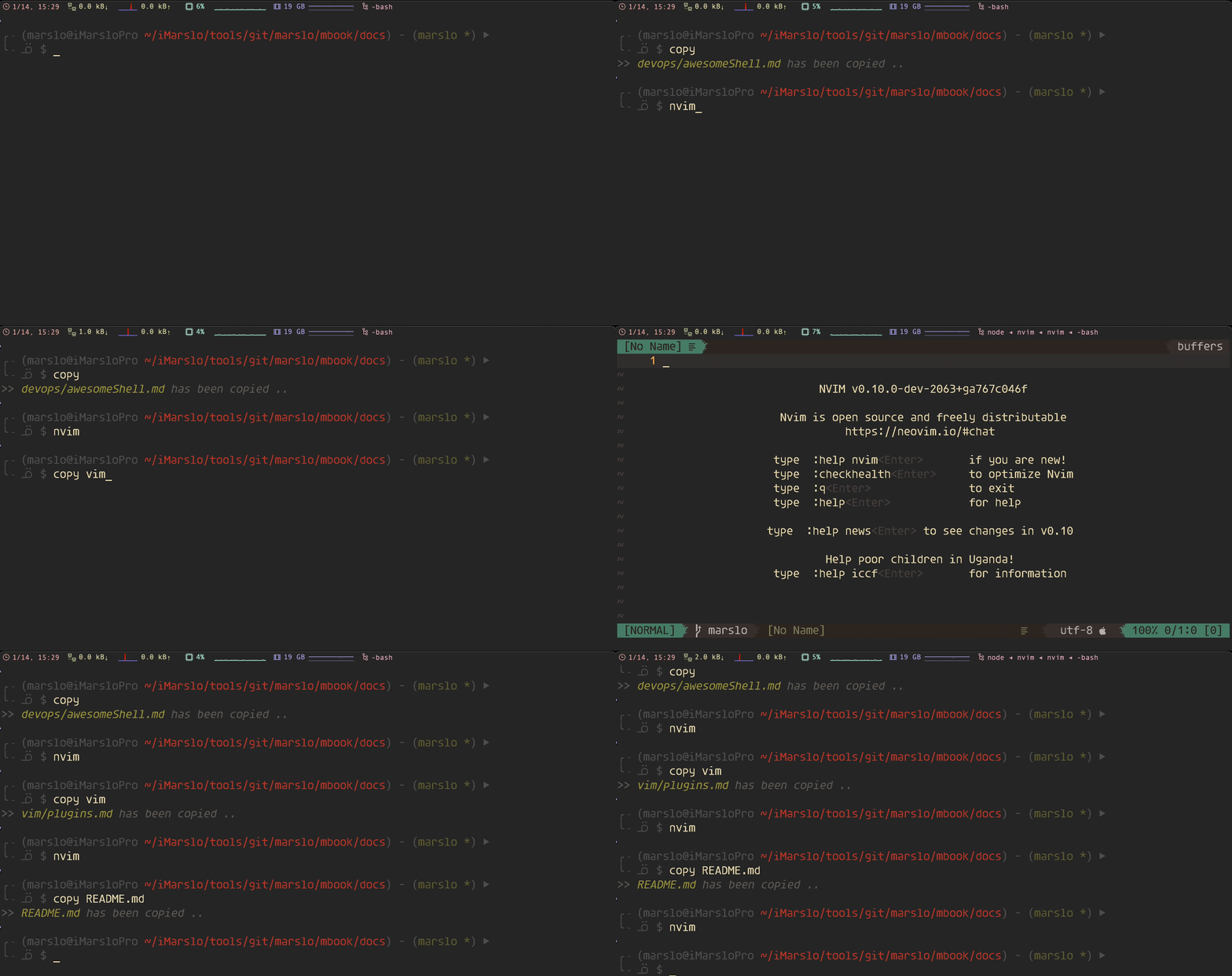
# smart copy   : using `fzf` to list files and copy the selected file
# @author      : marslo
# @source      : https://github.com/marslo/dotfiles/blob/main/.marslo/bin/ffunc.sh
# @description :
#   - if `copy` without parameter, then list file via `fzf` and copy the content
#     - "${COPY}"
#       - `pbcopy` in osx
#       - `/mnt/c/Windows/System32/clip.exe` in wsl
#   - otherwise copy the content of parameter `$1` via `pbcopy` or `clip.exe`
# shellcheck disable=SC2317
function copy() {                          # smart copy
  [[ -z "${COPY}" ]] && echo -e "$(c Rs)ERROR: 'copy' function NOT support :$(c) $(c Ri)$(uanme -v)$(c)$(c Rs). EXIT..$(c)" && return;

  eval "$( _load_fd_context  )"
  eval "$( _load_fzf_context )"

  if [[ 0 -eq $# ]]; then
    file=$( fd . "${fdopt[@]}" | fzf "${fzfopt[@]}" ) &&
         "${COPY}" < "${file}" &&
         printf "$(c Wd)>>$(c) $(c Gis)%s$(c) $(c Wdi)has been copied ..$(c)" "${file}"
  elif [[ 1 -eq $# ]] && [[ -d "$1" ]]; then
    local target=$1;
    file=$( fd . "${target}" "${fdopt[@]}" | fzf "${fzfopt[@]}" ) &&
         "${COPY}" < "${file}" &&
         printf "$(c Wd)>>$(c) $(c Gis)%s$(c) $(c Wdi)has been copied ..$(c)" "${file}"
  else
    "${COPY}" < "$1" &&
       printf "$(c Wd)>>$(c) $(c Gis)%s$(c) $(c Wdi)has been copied ..$(c)" "${1}"
  fi
}
smart open
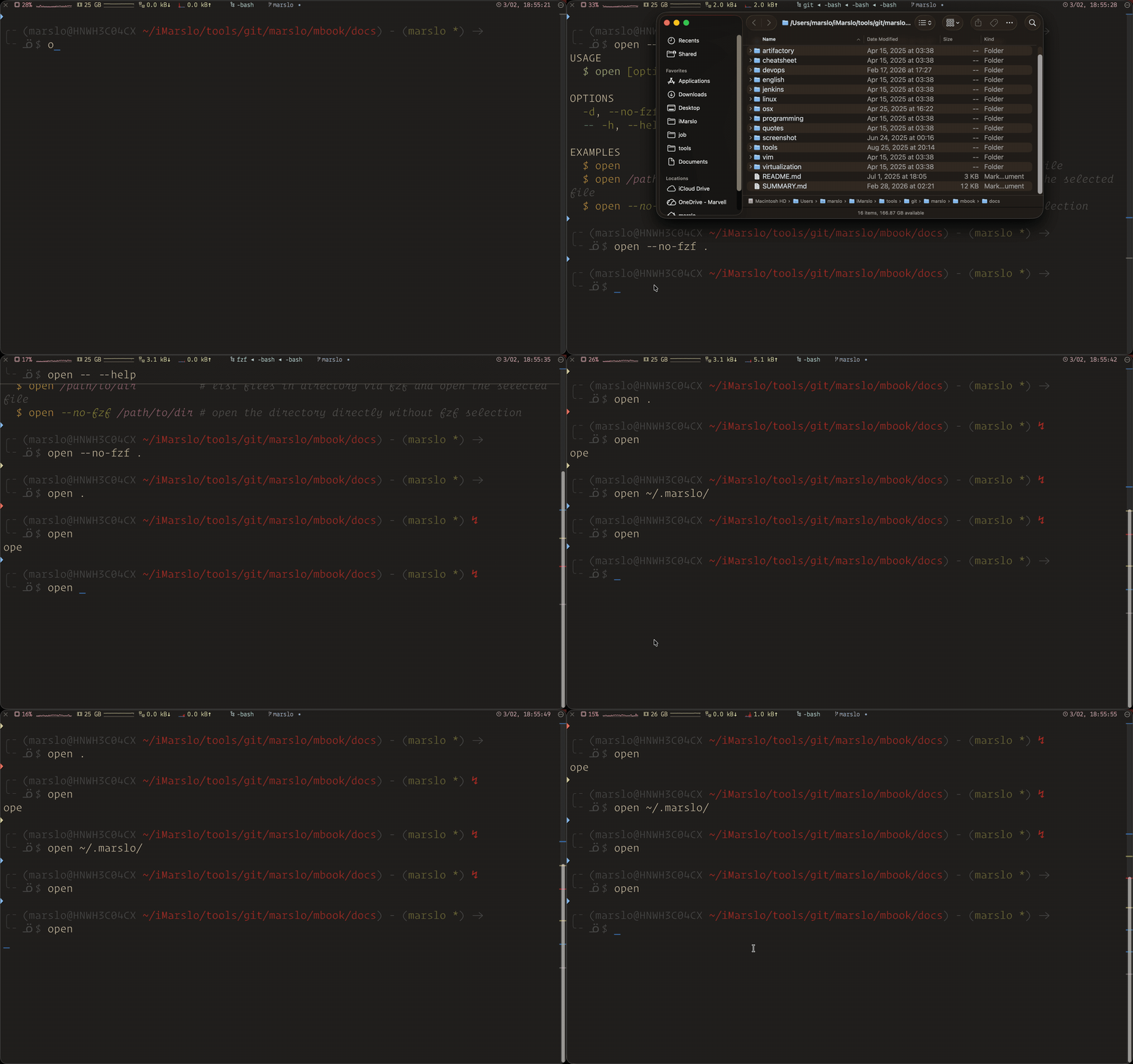
# smart open   : using `fzf` to list files and open the selected file with default application
# @author      : marslo
# @source      : https://github.com/marslo/dotfiles/blob/main/.marslo/bin/ffunc.sh
# shellcheck disable=SC2317
function open() {                          # smart open
  [[ "Darwin" != "$(uname -s)" ]] && echo -e "$(c Rs)ERROR: 'open' function currently only support macOS :$(c) $(c Ri)$(uanme -v)$(c)$(c Rs). EXIT..$(c)" && return;

  local ORG_OPEN=false
  local USAGE='USAGE'
  USAGE+="\n  $(c Cs)\$ open $(c 0G)[options] $(c 0Mi)[file|dir ...]$(c)"
  USAGE+="\n\nOPTIONS"
  USAGE+="\n  $(c G)-d$(c), $(c G)--no-fzf$(c)    open directory directly without fzf selection"
  USAGE+="\n  $(c C)-- $(c 0G)-h$(c), $(c 0G)--help$(c)   show this help message"
  USAGE+="\n\nEXAMPLES"
  USAGE+="\n  $(c Y)\$ open$(c)                       $(c 0Wdi)# list files via fzf and open the selected file$(c)"
  USAGE+="\n  $(c Y)\$ open $(c 0Mi)/path/to/dir$(c)          $(c 0Wdi)# list files in directory via fzf and open the selected file$(c)"
  USAGE+="\n  $(c Y)\$ open $(c 0Gi)--no-fzf $(c 0Mi)/path/to/dir$(c) $(c 0Wdi)# open the directory directly without fzf selection$(c)"

  eval "$( _load_fd_context  )"
  eval "$( _load_fzf_context )"

  while [[ $# -gt 0 ]]; do
    case "$1" in
      -d | --no-fzf ) ORG_OPEN=true     ; shift  ;;
      --            ) shift;
                      for arg in "$@"; do
                        case "${arg}" in
                          -h | --help ) echo -e "${USAGE}"; return ;;
                        esac
                      done; break   ;;
      -*            ) command open "$1" ; return ;;
      *             ) break                      ;;
    esac
  done

  if [[ 0 -eq $# ]]; then
    local selected=$( fd . "${fdopt[@]}" | fzf --exit-0 "${fzfopt[@]}" )
    [[ -n "${selected}" ]] && echo "${selected}" | tr '\n' '\0' | xargs -0 command open
  elif [[ -d "${1:-}" ]]; then
    local target=$1;
    "${ORG_OPEN}" && command open "${target}" && return;
    fd . "${target}" "${fdopt[@]}" | fzf --bind="enter:become(command open {+})" "${fzfopt[@]}";
  else
    command open "${@}"
  fi
}
others
image view
[!NOTE]
-
# imgview : fzf list and preview images # @author : marslo # @source : https://github.com/marslo/dotfiles/blob/main/.marslo/bin/ffunc.sh # @description : # - to respect fzf options by: `type -t _fzf_opts_completion >/dev/null 2>&1 && complete -F _fzf_opts_completion -o bashdefault -o default imgview` # - disable `gif` due to imgcat performance issue # shellcheck disable=SC2215 function imgview() { # [view] [im]a[g]e via [imgcat](https://github.com/eddieantonio/imgcat) fd --unrestricted --type f --exclude .git --exclude node_modules '^*\.(png|jpeg|jpg|xpm|bmp)$' | fzf "$@" --height 100% \ --preview "imgcat -W \$FZF_PREVIEW_COLUMNS -H \$FZF_PREVIEW_LINES {}" \ --bind "ctrl-y:execute-silent(printf '%s' {+} | pbcopy)+abort" \ --bind 'ctrl-/:toggle-preview' \ --header 'Press CTRL-Y to copy name into clipboard' \ --preview-window 'up:80%:nowrap' \ --exit-0 \ >/dev/null || true } -
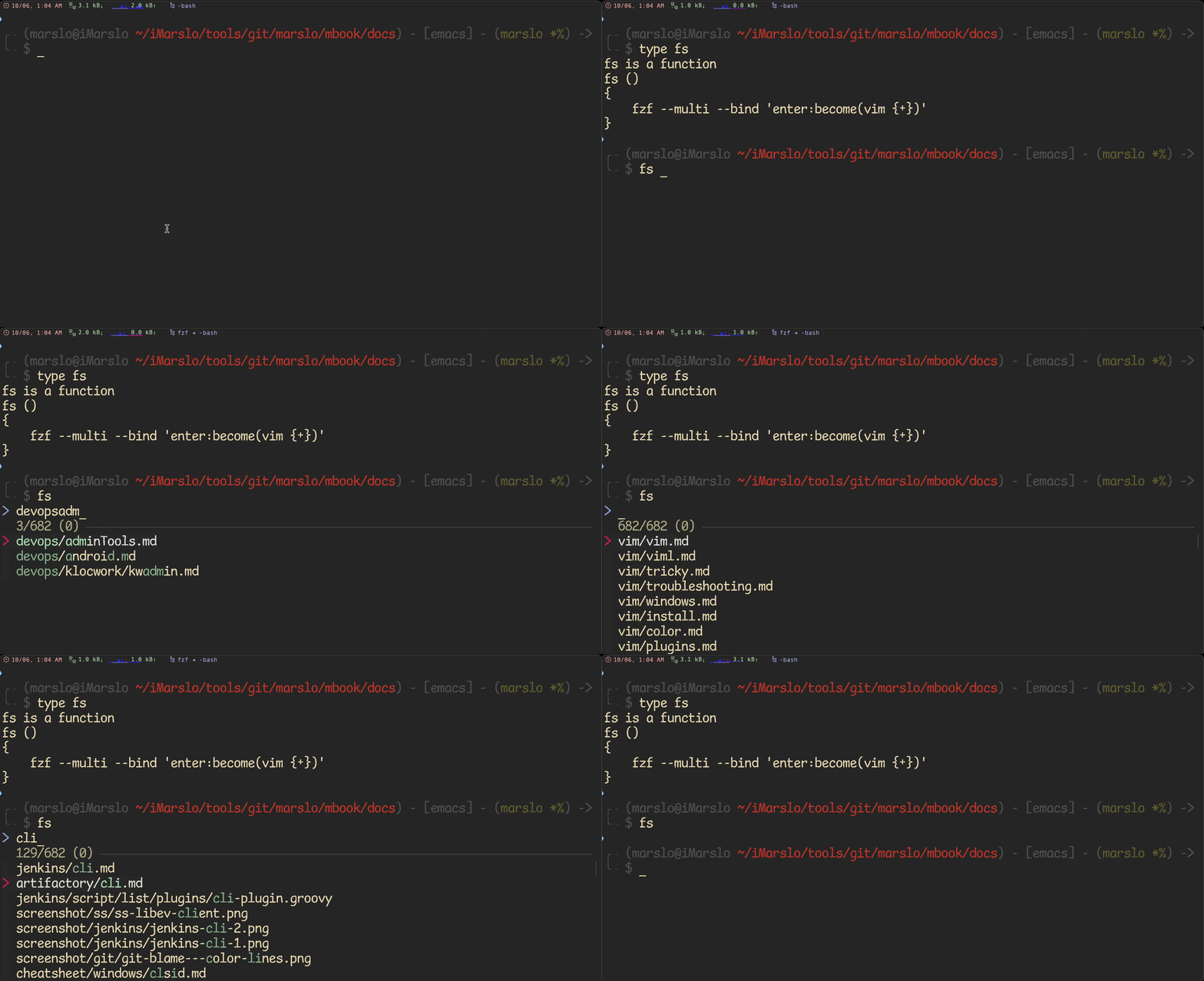
fs$ function fs() { fzf --multi --bind 'enter:become(vim {+})' }fe# fe [FUZZY PATTERN] - Open the selected file with the default editor # - Bypass fuzzy finder if there's only one match (--select-1) # - Exit if there's no match (--exit-0) fe() { IFS=$'\n' files=($(fzf-tmux --query="$1" --multi --select-1 --exit-0)) [[ -n "$files" ]] && ${EDITOR:-vim} "${files[@]}" }fo# Modified version where you can press # - CTRL-O to open with `open` command, # - CTRL-E or Enter key to open with the $EDITOR fo() { IFS=$'\n' out=("$(fzf-tmux --query="$1" --exit-0 --expect=ctrl-o,ctrl-e)") key=$(head -1 <<< "$out") file=$(head -2 <<< "$out" | tail -1) if [ -n "$file" ]; then [ "$key" = ctrl-o ] && open "$file" || ${EDITOR:-vim} "$file" fi }
-
[!NOTE]
# references:
# - https://github.com/junegunn/fzf/blob/master/ADVANCED.md#using-fzf-as-the-secondary-filter
# - https://github.com/junegunn/fzf/issues/3572#issuecomment-1887735150
# shellcheck disable=SC2154
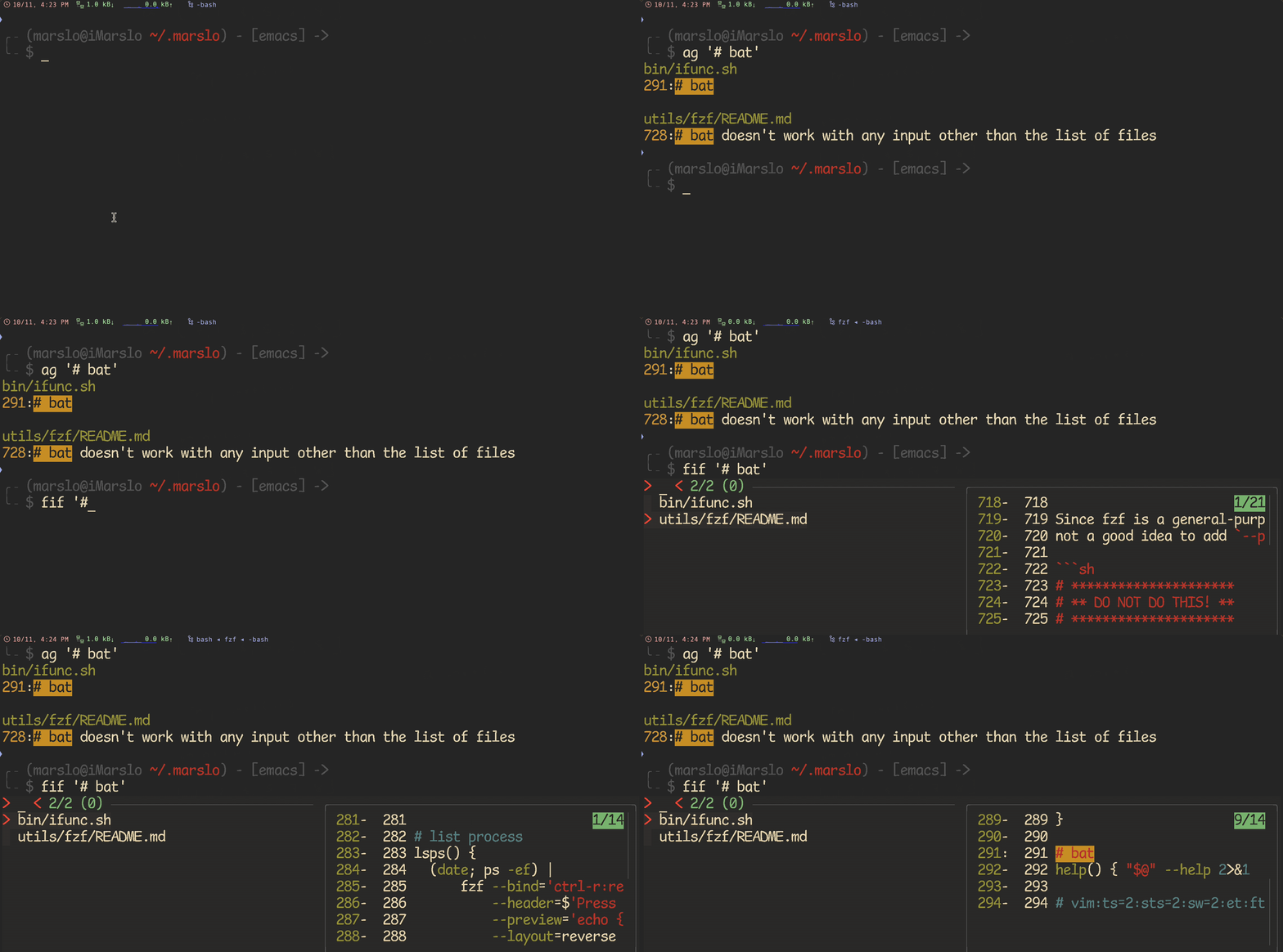
function fif() {                           # [f]ind-[i]n-[f]ile
  if [ ! "$#" -gt 0 ]; then
    bash "${iRCHOME}"/bin/rfv
  else
    $(type -P rg) --files-with-matches --no-messages --hidden --follow --smart-case "$1" |
    fzf --height 80% \
        --bind 'ctrl-p:preview-up,ctrl-n:preview-down' \
        --bind "enter:become($(type -P vim) {+})" \
        --header 'CTRL-N/CTRL-P or CTRL-↑/CTRL-↓ to view contents' \
        --preview "bat --color=always --style=plain {} |
                   rg --no-line-number --colors 'match:bg:yellow' --ignore-case --pretty --context 10 \"$1\" ||
                   rg --no-line-number --ignore-case --pretty --context 10 \"$1\" {} \
                  "
  fi
}

# or highlight as preview tool
function fif() {                           # [f]ind-[i]n-[f]ile
  if [ ! "$#" -gt 0 ]; then echo "Need a string to search for!"; return 1; fi
  rg --color never --files-with-matches --no-messages "$1" |
  fzf --bind 'ctrl-p:preview-up,ctrl-n:preview-down' \
      --preview "highlight -O ansi {} 2> /dev/null |
                 rg --colors 'match:bg:yellow' --ignore-case --pretty --context 10 '$1' ||
                 rg --no-line-number --ignore-case --pretty --context 10 '$1' {} \
                "
}
1.4.1.1.10 -- rg+fzf changing directory
[!NOTE|label:references:]
-
function cd() { if [[ "$#" != 0 ]]; then # shellcheck disable=SC2164 builtin cd "$@"; return fi while true; do # shellcheck disable=SC2155,SC2010 local lsd=$(echo ".." && ls -A --color=none -p | grep --color=none '/$' | sed 's;/$;;') # shellcheck disable=SC2155,SC2016 local dir="$(printf '%s\n' "${lsd[@]}" | fzf --reverse --preview ' __cd_nxt="$(echo {})"; __cd_path="$(echo $(pwd)/${__cd_nxt} | sed "s;//;/;")"; echo $__cd_path; echo; ls -p --color=always "${__cd_path}"; ')" [[ ${#dir} != 0 ]] || return 0 # shellcheck disable=SC2164 builtin cd "$dir" &> /dev/null done }fd[!DANGER] conflict with fd-find
# fd - cd to selected directory fd() { local dir dir=$(find ${1:-.} -path '*/\.*' -prune \ -o -type d -print 2> /dev/null | fzf +m) && cd "$dir" } # Another fd - cd into the selected directory # This one differs from the above, by only showing the sub directories and not # showing the directories within those. fd() { DIR=$(find * -maxdepth 0 -type d -print 2> /dev/null | fzf-tmux) && cd "$DIR" }fda# fda - including hidden directories fda() { local dir dir=$(find ${1:-.} -type d 2> /dev/null | fzf +m) && cd "$dir" }
advanced usage
command fill
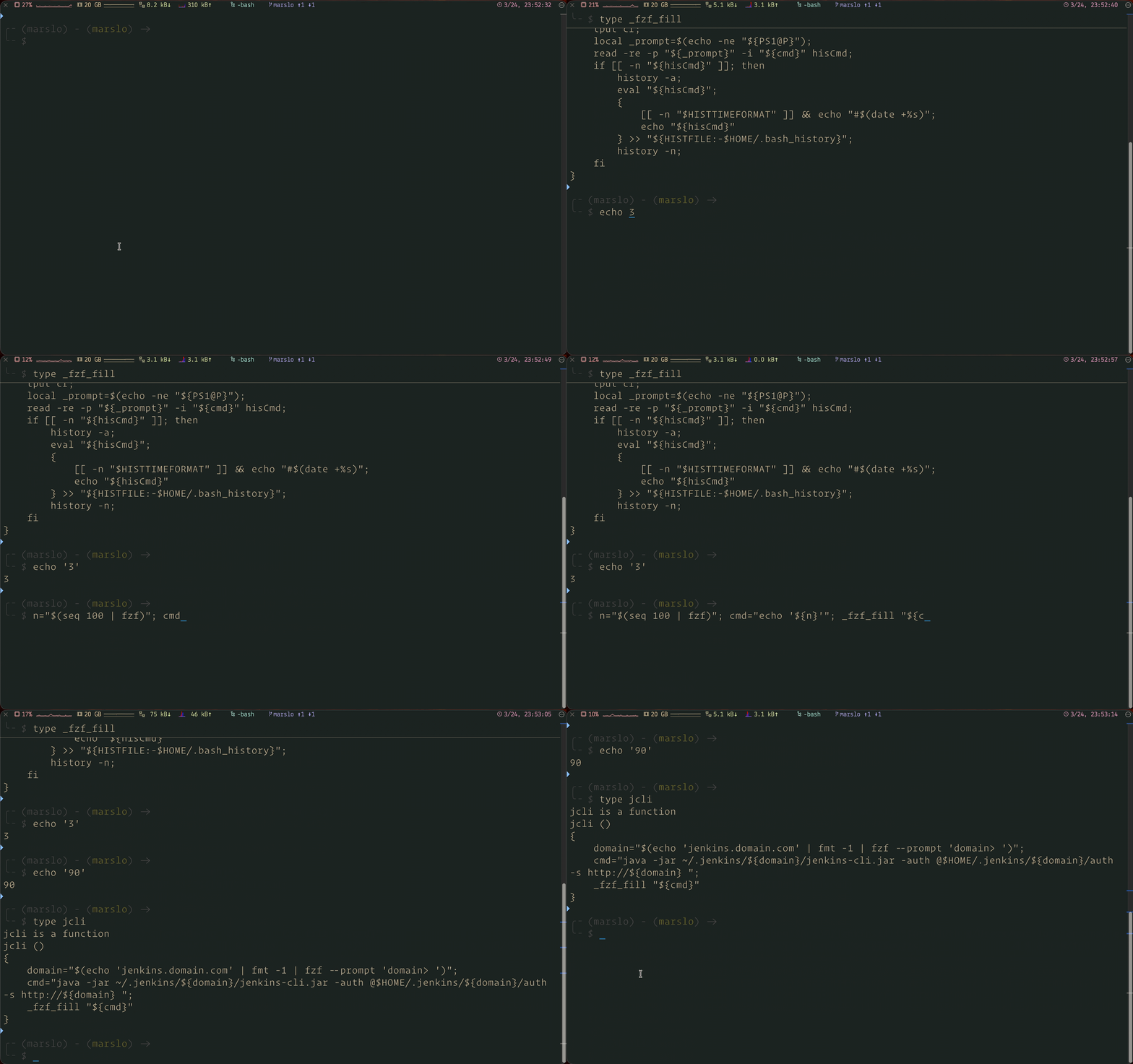
# usage: _fzf_fill "${cmd}" - similar to `Ctrl+R` in bash
# i.e.:  _fzf_fill seq 10
_fzf_fill() {
  local cmd

  if [[ $# -gt 1 ]] || type "$1" &>/dev/null; then
    cmd=$("$@" | fzf --height 40% --reverse)
  else
    cmd="$*"
  fi

  [ -z "${cmd}" ] && return

  # check count of '\n' in PS1
  # _rows = number of '\n' + 1 (current input line)
  local n_count
  n_count=$(echo -n "$PS1" | grep -o "\\\\n" | wc -l)
  local _rows=$(( n_count + 1 ))

  # cleanup cursor: move up `_rows` lines, clear to the end of line, and return cursor to the beginning of line
  tput cuu "${_rows}"
  tput ed
  tput cr

  # render PS1 with prompt expansion and handle escape sequences properly
  local _prompt=$(echo -ne "${PS1@P}")
  read -re -p "${_prompt}" -i "${cmd}" hisCmd

  # to remove the original command from history - 毁尸灭迹
  # history -d $((HISTCMD)) 2>/dev/null
  if [[ -n "${hisCmd}" ]]; then
    history -a
    eval "${hisCmd}"
    # adding timestamp if HISTTIMEFORMAT is set, to keep consistent with the format in HISTFILE
    {
      [[ -n "$HISTTIMEFORMAT" ]] && echo "#$(date +%s)"
      echo "${hisCmd}"
    } >> "${HISTFILE:-$HOME/.bash_history}"
    # read all history
    history -n
  fi
}
venv selector
# activate venv - using `fzf` to list and activate python venv
# @author      : marslo
# @inspired    : https://seb.jambor.dev/posts/improving-shell-workflows-with-fzf/#virtual-env
# @source      : https://github.com/marslo/dotfiles/blob/main/.marslo/bin/ffunc.sh
function avenv() {
  # shellcheck disable=SC2155
  local _venv=$(command ls --color=never "$HOME/.venv" | fzf)
  [[ -n "${_venv}" ]] &&
    source "$HOME/.venv/${_venv}/bin/activate" &&
    echo -e "$(c Wd)>>$(c) $(c Gis)${_venv}$(c) $(c Wdi)has been activated ..$(c)"
}
chrome
-
# https://github.com/junegunn/fzf/wiki/Examples#bookmarks
# shellcheck disable=SC2016
function b() {                             # chrome [b]ookmarks browser with jq
  local ghome="${HOME}/Library/Application Support/Google"
  local bookmark=''
  if [ "$(uname)" = "Darwin" ]; then
    if test -e "${ghome}/Chrome/Default/Bookmarks"; then
      bookmark="${ghome}/Chrome/Default/Bookmarks"
    elif test -e "${ghome}/Chrome Canary/Default/Bookmarks"; then
      bookmark="${ghome}/Chrome Canary/Default/Bookmarks"
    fi
    open=open
  else
    bookmark="$HOME/.config/google-chrome/Default/Bookmarks"
    open=xdg-open
  fi

  local template='
     def ancestors: while( . | length >= 2; del(.[-1,-2]) );
     . as $in | paths(.url?) as $key | $in | getpath($key) | {name,url, path: [$key[0:-2] | ancestors as $a | $in | getpath($a) | .name?] | reverse | join("/") } | .path + "/" + .name + "\t" + .url'

  urls=$( jq -r "${template}" < "${bookmark}" \
             | sed -E $'s/(.*)\t(.*)/\\1\t\x1b[36m\\2\x1b[m/g' \
             | fzf --ansi --wrap \
             | cut -d$'\t' -f2
        )
  # shellcheck disable=SC2046
  [[ -z "${urls}" ]] || "${open}" $(xargs -r <<< "${urls}")
}
man page
[!NOTE]
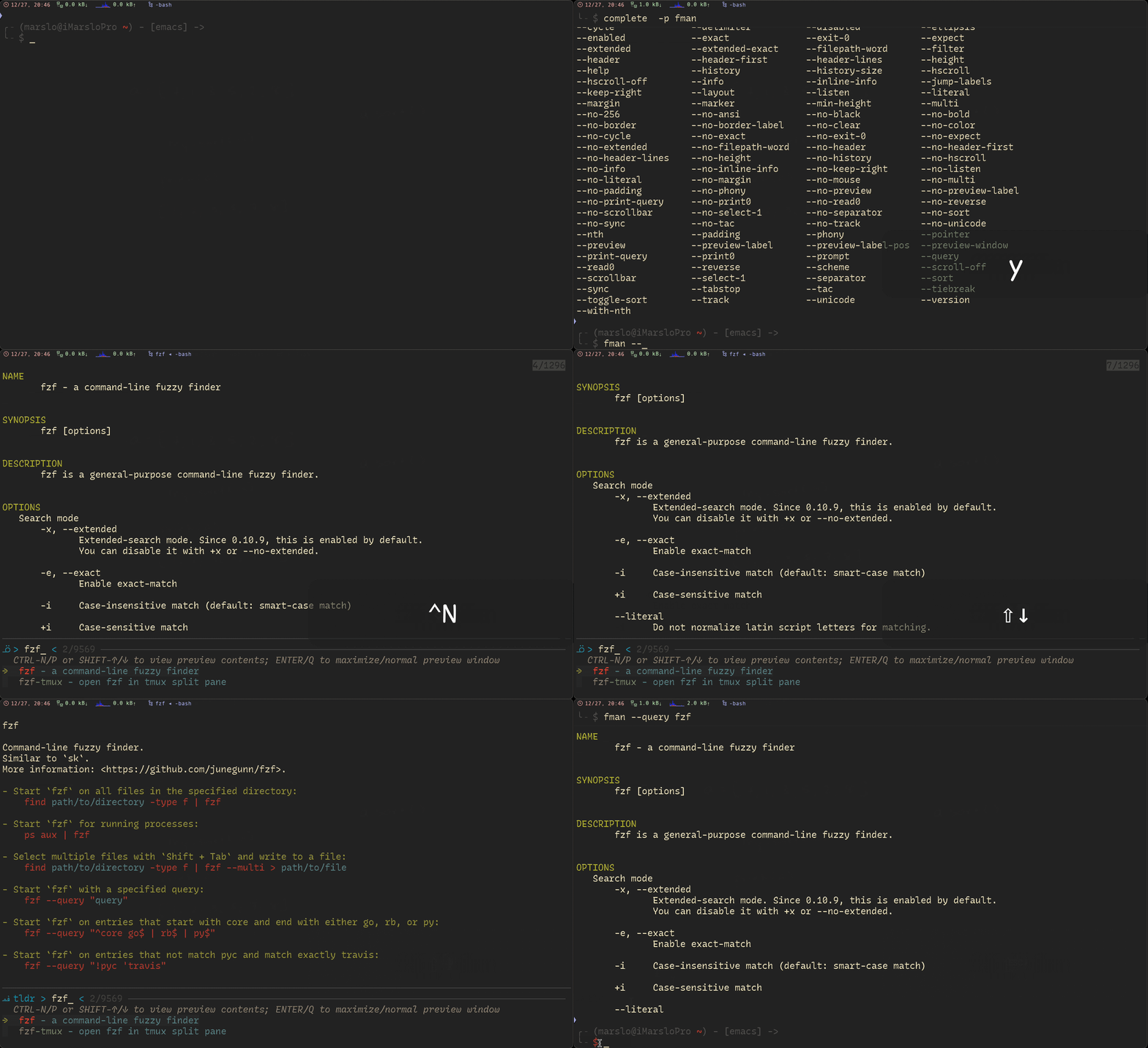
# fman - fzf list and preview for manpage:
# @source      : https://github.com/junegunn/fzf/wiki/examples#fzf-man-pages-widget-for-zsh
# @description :
#   - CTRL-N/CTRL-P or SHIFT-↑/↓ for view preview content
#   - ENTER/Q for toggle maximize/normal preview window
#   - CTRL+O  for toggle tldr in preview window
#   - CTRL+I  for toggle man in preview window
#   - to respect fzf options by: `type -t _fzf_opts_completion >/dev/null 2>&1 && complete -F _fzf_opts_completion -o bashdefault -o default fman`
# shellcheck disable=SC2046
function fman() {
  unset MANPATH
  local option
  local batman="man {1} | col -bx | bat --language=man --plain --color always --theme='gruvbox-dark'"

  while [[ $# -gt 0 ]]; do
    case "$1" in
          -* ) option+="$1 $2 "; shift 2 ;;
           * ) break                     ;;
    esac
  done

  man -k . |
  sort -u |
  sed -r 's/(\(.+\))//g' |
  grep -v -E '::' |
  awk -v cyan=$(tput setaf 6) -v blue=$(tput setaf 4) -v res=$(tput sgr0) -v bld=$(tput bold) '{ $1=cyan bld $1; $2=res blue $2;} 1' |
  fzf ${option:-} \
      -d ' ' \
      --nth 1 \
      --height 100% \
      --ansi \
      --no-multi \
      --tiebreak=begin \
      --prompt='ᓆ > ' \
      --color='prompt:#0099BD' \
      --preview-window 'up,70%,wrap,rounded,<50(up,85%,border-bottom)' \
      --preview "${batman}" \
      --bind 'ctrl-p:preview-up,ctrl-n:preview-down' \
      --bind "ctrl-o:+change-preview(tldr --color {1})+change-prompt(ﳁ tldr > )" \
      --bind "ctrl-i:+change-preview(${batman})+change-prompt(ᓆ  man > )" \
      --bind "enter:execute(${batman})+change-preview(${batman})+change-prompt(ᓆ > )" \
      --header 'CTRL-N/P or SHIFT-↑/↓ to view preview contents; ENTER/Q to maximize/normal preview window' \
      --exit-0
}
- simple version
$ apropos . |
  fzf -d ') ' --nth 1 \
              --height 100% \
              --bind 'ctrl-p:preview-up,ctrl-n:preview-down' \
              --header 'CTRL-N/CTRL-P or CTRL-↑/CTRL-↓ to view contents' \
              --preview-window=up:88%:wrap \
              --preview 'echo {} | sed -r "s/([^\(]+).*$/\1/" | xargs man' \
              --exit-0 |
  sed -r "s/([^\(]+).*$/\1/" |
  xargs man
git alias
[!TIP]
- * iMarslo : git-del to delete both local and remote branches automatically
- junegunn/fzf-git.sh
[alias]
  ### checkout sorted [b]ranch
  bb    = "! bash -c 'branch=$(git for-each-ref refs/remotes refs/heads --sort=-committerdate --format=\"%(refname:short)\" | \n\
                      grep --color=never -v \"origin$\" | \n\
                      fzf +m --prompt=\"branch> \" | \n\
                      sed -rn \"s:\\s*(origin/)?(.*)$:\\2:p\") && \n\
                      [[ -n \"${branch}\" ]] && \n\
                      echo -e \"\\033[1;33m~~> ${branch}\\033[0m\" && \n\
                      git checkout \"${branch}\"; \n\
                     '"

  ### [b]ranch [copy]
  bcopy = "! bash -c 'branch=$(git for-each-ref refs/remotes refs/heads --sort=-committerdate --format=\"%(refname:short)\" | \n\
                      grep --color=never -v \"origin$\" | \n\
                      fzf +m --prompt=\"branch> \" | \n\
                      sed -rn \"s:\\s*(origin/)?(.*)$:\\2:p\") && \n\
                      [[ -n \"${branch}\" ]] && \n\
                      echo -e \"\\033[0;33;1m~~> branch \\033[0m\\033[0;32;3m${branch}\\033[0m \\033[0;33;1mcopied\\033[0m\" && \n\
                      pbcopy <<< \"${branch}\" \n\
                     '"
environment
export
# mkexp - compilation environment variable export, support multiple select
# @author      : marslo
# @source      : https://github.com/marslo/mylinux/blob/master/confs/home/.marslo/bin/ffunc.sh
# @description : list compilation environment variable via `fzf`, and export selected items
#   - if parameter is [ -f | --full ], then load full tool paths
# shellcheck disable=SC1090
function mkexp() {                         # [m]a[k]e environment variable [e][x][p]ort
  if [[ 1 -eq $# ]] && [[ '-f' = "$1" || '--full' = "$1" ]]; then
    source ~/.marslo/.imac
  fi

  LDFLAGS="${LDFLAGS:-}"
  test -d "${HOMEBREW_PREFIX}"      && LDFLAGS+=" -L${HOMEBREW_PREFIX}/lib"
  test -d '/usr/local/opt/readline' && LDFLAGS+=' -L/usr/local/opt/readline/lib'
  test -d "${OPENLDAP_HOME}"        && LDFLAGS+=" -L${OPENLDAP_HOME}/lib"
  test -d "${CURL_OPENSSL_HOME}"    && LDFLAGS+=" -L${CURL_OPENSSL_HOME}/lib"
  test -d "${BINUTILS}"             && LDFLAGS+=" -L${BINUTILS}/lib"
  test -d "${PYTHON_HOME}"          && LDFLAGS+=" -L${PYTHON_HOME}/lib"
  test -d "${RUBY_HOME}"            && LDFLAGS+=" -L${RUBY_HOME}/lib"
  test -d "${TCLTK_HOME}"           && LDFLAGS+=" -L${TCLTK_HOME}/lib"
  test -d "${SQLITE_HOME}"          && LDFLAGS+=" -L${SQLITE_HOME}/lib"
  test -d "${OPENSSL_HOME}"         && LDFLAGS+=" -L${OPENSSL_HOME}/lib"
  test -d "${NODE_HOME}"            && LDFLAGS+=" -L${NODE_HOME}/lib"                       # ${NODE_HOME}/libexec/lib for node@12
  test -d "${LIBRESSL_HOME}"        && LDFLAGS+=" -L${LIBRESSL_HOME}/lib"
  test -d "${ICU4C_711}"            && LDFLAGS+=" -L${ICU4C_711}/lib"
  test -d "${EXPAT_HOME}"           && LDFLAGS+=" -L${EXPAT_HOME}/lib"
  test -d "${NCURSES_HOME}"         && LDFLAGS+=" -L${NCURSES_HOME}/lib"
  test -d "${LIBICONV_HOME}"        && LDFLAGS+=" -L${LIBICONV_HOME}/lib"
  test -d "${ZLIB_HOME}"            && LDFLAGS+=" -L${ZLIB_HOME}/lib"
  test -d "${LLVM_HOME}"            && LDFLAGS+=" -L${LLVM_HOME}/lib"
  test -d "${LLVM_HOME}"            && LDFLAGS+=" -L${LLVM_HOME}/lib/c++ -Wl,-rpath,${LLVM_HOME}/lib/c++"  # for c++
  LDFLAGS=$( echo "$LDFLAGS" | tr ' ' '\n' | uniq | sed '/^$/d' | paste -s -d' ' )

  CFLAGS="${CFLAGS:-}"
  CFLAGS+=" -I/usr/local/include"
  test -d "${TCLTK_HOME}" && CFLAGS+=" -I${TCLTK_HOME}/include"
  CFLAGS=$( echo "$CFLAGS" | tr ' ' '\n' | uniq | sed '/^$/d' | paste -s -d' ' )

  CPPFLAGS="${CPPFLAGS:-}"
  test -d "${HOMEBREW_PREFIX}"      && CPPFLAGS+=" -I${HOMEBREW_PREFIX}/include"
  test -d "${JAVA_HOME}"            && CPPFLAGS+=" -I${JAVA_HOME}/include"
  test -d "${OPENLDAP_HOME}"        && CPPFLAGS+=" -I${OPENLDAP_HOME}/include"
  test -d "${CURL_OPENSSL_HOME}"    && CPPFLAGS+=" -I${CURL_OPENSSL_HOME}/include"
  test -d "${BINUTILS}"             && CPPFLAGS+=" -I${BINUTILS}/include"
  test -d "${SQLITE_HOME}"          && CPPFLAGS+=" -I${SQLITE_HOME}/include"
  test -d '/usr/local/opt/readline' && CPPFLAGS+=' -I/usr/local/opt/readline/include'
  test -d "${OPENSSL_HOME}"         && CPPFLAGS+=" -I${OPENSSL_HOME}/include"
  test -d "${NODE_HOME}"            && CPPFLAGS+=" -I${NODE_HOME}/include"
  test -d "${LIBRESSL_HOME}"        && CPPFLAGS+=" -I${LIBRESSL_HOME}/include"
  test -d "${TCLTK_HOME}"           && CPPFLAGS+=" -I${TCLTK_HOME}/include"
  test -d "${RUBY_HOME}"            && CPPFLAGS+=" -I${RUBY_HOME}/include"
  test -d "${ICU4C_711}"            && CPPFLAGS+=" -I${ICU4C_711}/include"
  test -d "${LLVM_HOME}"            && CPPFLAGS+=" -I${LLVM_HOME}/include"
  test -d "${LIBICONV_HOME}"        && CPPFLAGS+=" -I${LIBICONV_HOME}/include"
  test -d "${EXPAT_HOME}"           && CPPFLAGS+=" -I${EXPAT_HOME}/include"
  test -d "${NCURSES_HOME}"         && CPPFLAGS+=" -I${NCURSES_HOME}/include"
  test -d "${ZLIB_HOME}"            && CPPFLAGS+=" -I${ZLIB_HOME}/include"
  CPPFLAGS=$( echo "$CPPFLAGS" | tr ' ' '\n' | uniq | sed '/^$/d' | paste -s -d' ' )

  PKG_CONFIG_PATH=${PKG_CONFIG_PATH:-}
  PKG_CONFIG_PATH+=":${HOMEBREW_PREFIX}/lib/pkgconfig"
  test -d "${CURL_OPENSSL_HOME}"  && PKG_CONFIG_PATH+=":${CURL_OPENSSL_HOME}/lib/pkgconfig"
  test -d "${TCLTK_HOME}"         && PKG_CONFIG_PATH+=":${TCLTK_HOME}/lib/pkgconfig"
  command -v brew >/dev/null 2>&1 && PKG_CONFIG_PATH+=':/usr/local/Homebrew/Library/Homebrew/os/mac/pkgconfig/14'
  test -d "${SQLITE_HOME}"        && PKG_CONFIG_PATH+=":${SQLITE_HOME}/lib/pkgconfig"
  test -d "${OPENSSL_HOME}"       && PKG_CONFIG_PATH+=":${OPENSSL_HOME}/lib/pkgconfig"
  test -d "${PYTHON_HOME}"        && PKG_CONFIG_PATH+=":${PYTHON_HOME}/lib/pkgconfig"
  test -d "${RUBY_HOME}"          && PKG_CONFIG_PATH+=":${RUBY_HOME}/lib/pkgconfig"
  test -d "${LIBRESSL_HOME}"      && PKG_CONFIG_PATH+=":${LIBRESSL_HOME}/lib/pkgconfig"
  test -d "${ICU4C_711}"          && PKG_CONFIG_PATH+=":${ICU4C_711}/lib/pkgconfig"
  test -d "${EXPAT_HOME}"         && PKG_CONFIG_PATH+=":${EXPAT_HOME}/lib/pkgconfig"
  test -d "${NCURSES_HOME}"       && PKG_CONFIG_PATH+=":${NCURSES_HOME}/lib/pkgconfig"
  test -d "${ZLIB_HOME}"          && PKG_CONFIG_PATH+=":${ZLIB_HOME}/lib/pkgconfig"
  PKG_CONFIG_PATH=$( echo "$PKG_CONFIG_PATH" | tr ':' '\n' | uniq | sed '/^$/d' | paste -s -d: )

  LIBRARY_PATH="${HOMEBREW_PREFIX}/lib"
  test -d "${LIBICONV_HOME}" && LIBRARY_PATH+=":${LIBICONV_HOME}/lib"
  LIBRARY_PATH=$( echo "$LIBRARY_PATH" | tr ':' '\n' | uniq | sed '/^$/d' | paste -s -d: )

  LD_LIBRARY_PATH=/usr/local/lib
  LD_LIBRARY_PATH=$( echo "$LD_LIBRARY_PATH" | tr ':' '\n' | uniq | sed '/^$/d' | paste -s -d: )

  while read -r _env; do
    export "${_env?}"
    echo -e "$(c Ys)>> ${_env}$(c)\n$(c Wi).. $(eval echo \$${_env})$(c)"
  done < <( echo 'LDFLAGS CFLAGS CPPFLAGS PKG_CONFIG_PATH LIBRARY_PATH LD_LIBRARY_PATH' |
                  fmt -1 |
                  fzf -1 --exit-0 \
                         --no-sort \
                         --multi \
                         --cycle \
                         --prompt 'env> ' \
                         --header 'TAB/SHIFT-TAB to select multiple items, CTRL-D to deselect-all, CTRL-S to select-all'
          )
}
unset
- alternative:
$ unset ,,<TAB>
# by default
$ unset **<TAB>
- alternative:
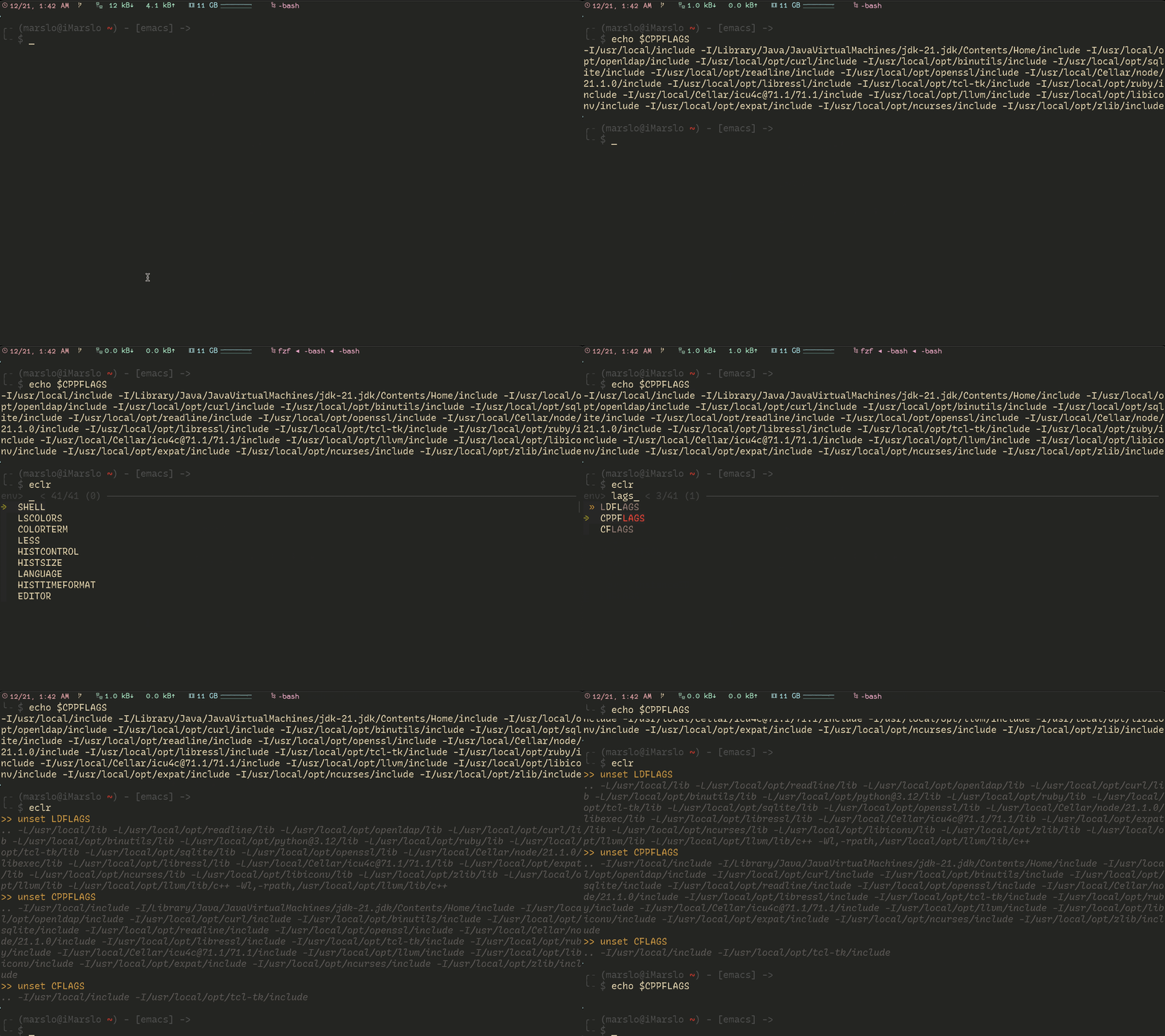
# eclr - environment variable clear, support multiple select
# @author      : marslo
# @source      : https://github.com/marslo/mylinux/blob/master/confs/home/.marslo/bin/ffunc.sh
# @description : list all environment variable via `fzf`, and unset for selected items
function eclr() {                          # [e]nvironment variable [c][l]ea[r]
  while read -r _env; do
    echo -e "$(c Ys)>> unset ${_env}$(c)\n$(c Wdi).. $(eval echo \$${_env})$(c)"
    unset "${_env}"
  done < <( env |
            sed -rn 's/^([a-zA-Z0-9]+)=.*$/\1/p' |
            fzf -1 --exit-0 --no-sort --multi --prompt='env> ' --header 'TAB to select multiple items'
          )
}
or unset limited to environment list
# mkclr - compilation environment variable clear, support multiple select
# @author      : marslo
# @source      : https://github.com/marslo/mylinux/blob/master/confs/home/.marslo/bin/ffunc.sh
# @description : list compilation environment variable via `fzf`, and unset for selected items
function mkclr() {                         # [m]a[k]e environment variable [c][l]ea[r]
  while read -r _env; do
    echo -e "$(c Ys)>> unset ${_env}$(c)\n$(c Wdi).. $(eval echo \$${_env})$(c)"
    unset "${_env}"
  done < <( echo 'LDFLAGS CFLAGS CPPFLAGS PKG_CONFIG_PATH LIBRARY_PATH LD_LIBRARY_PATH' |
                  fmt -1 |
                  fzf -1 --exit-0 \
                         --no-sort \
                         --multi \
                         --cycle \
                         --prompt 'env> ' \
                         --header 'TAB/SHIFT-TAB to select multiple items, CTRL-D to deselect-all, CTRL-S to select-all'
          )
  # echo -e "\n$(c Wdi)[TIP]>> to list all env via $(c)$(c Wdiu)\$ env | sed -rn 's/^([a-zA-Z0-9]+)=.*$/\1/p'$(c)"
}
1.4.1.1.13 -- fzf for unset environment print and copy
[!NOTE|label:references:]
environ – user environment: (man environ)printenv
# penv - print environment variable, support multiple select
# @author      : marslo
# @source      : https://github.com/marslo/mylinux/blob/master/confs/home/.marslo/bin/ffunc.sh
# @description : list all environment variable via `fzf`, and print values for selected items
#   - to copy via `-c`
#     - "${COPY}"
#       - `pbcopy` in osx
#       - `/mnt/c/Windows/System32/clip.exe` in wsl
#   - to respect fzf options via `type -t _fzf_opts_completion >/dev/null 2>&1 && complete -F _fzf_opts_completion -o bashdefault -o default penv`
#   - more options: https://github.com/junegunn/fzf/issues/3599#issuecomment-1907233847
# shellcheck disable=SC2215,SC2016
function penv() {                          # [p]rint [env]ironment variable
  local option
  local -a array

  while [[ $# -gt 0 ]]; do
    case "$1" in
      -c ) option+="$1 "   ; shift   ;;
      -* ) option+="$1 $2 "; shift 2 ;;
       * ) break                     ;;
    esac
  done

  option+='-1 --exit-0 --sort --multi --cycle'
  _echo_values() { echo -e "$(c Ys)>> $1$(c)\n$(c Wi).. $(eval echo \$$1)$(c)"; }

  while read -r _env; do
    _echo_values $_env
    array+=( "${_env}=$(eval echo \$${_env})" )
  done < <( env |
            sed -r 's/^([a-zA-Z0-9_-]+)=.*$/\1/' |
            fzf ${option//-c\ /} \
                --prompt 'env> ' \
                --height '50%' \
                --preview-window 'top,30%,wrap,rounded' \
                --preview='source ~/.marslo/bin/bash-color.sh; _env={}; echo -e "$(c Gs)${_env}=${!_env}$(c)"' \
                --header 'TAB/SHIFT-TAB to select multiple items, CTRL-D to deselect-all, CTRL-S to select-all'
          )
  [[ "${option}" == *-c\ * ]] && [[ -n "${COPY}" ]] && "${COPY}" < <( printf '%s\n' "${array[@]}" | head -c-1 )
}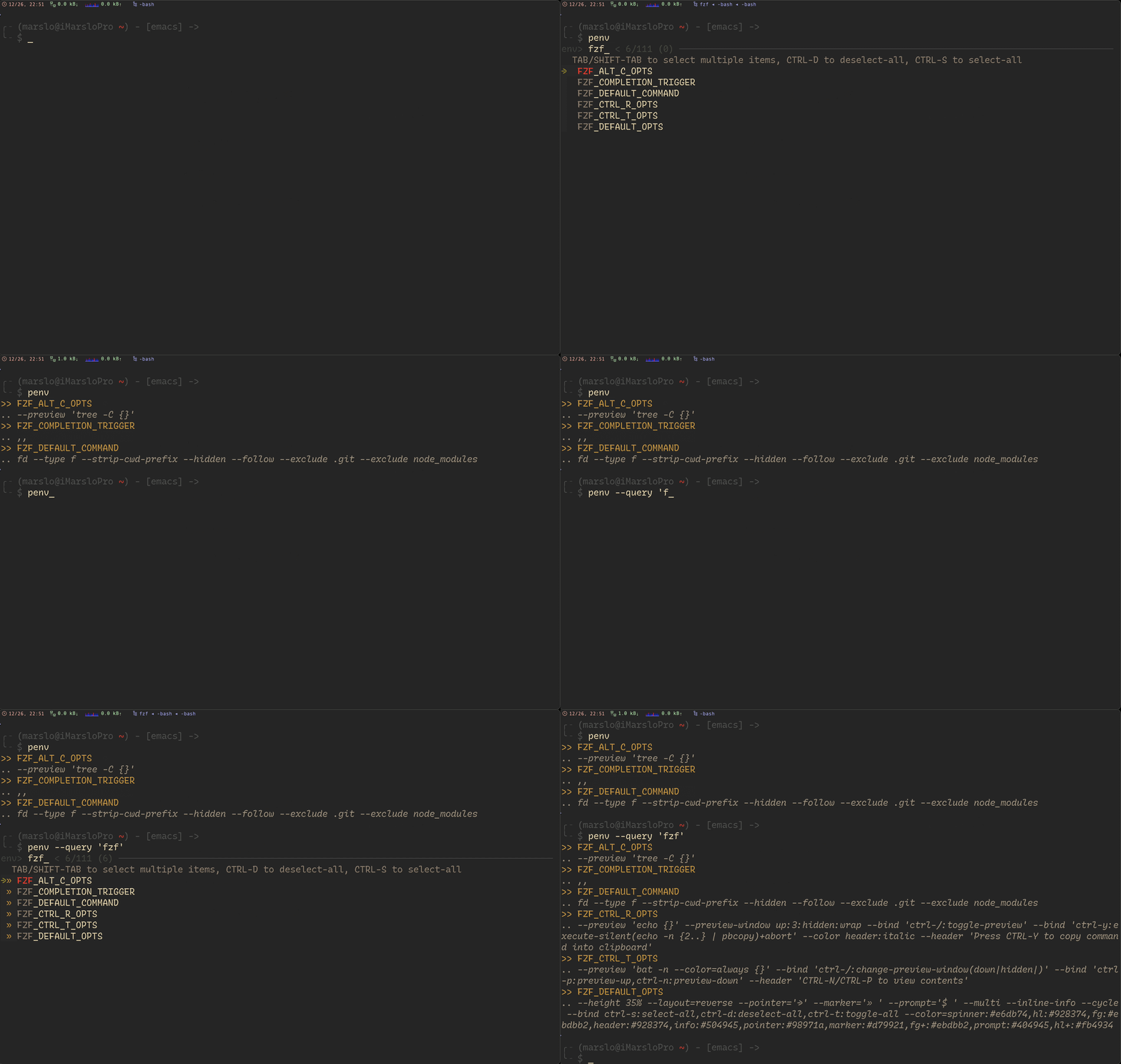
1.4.1.1.14 -- penv
process
[!NOTE]
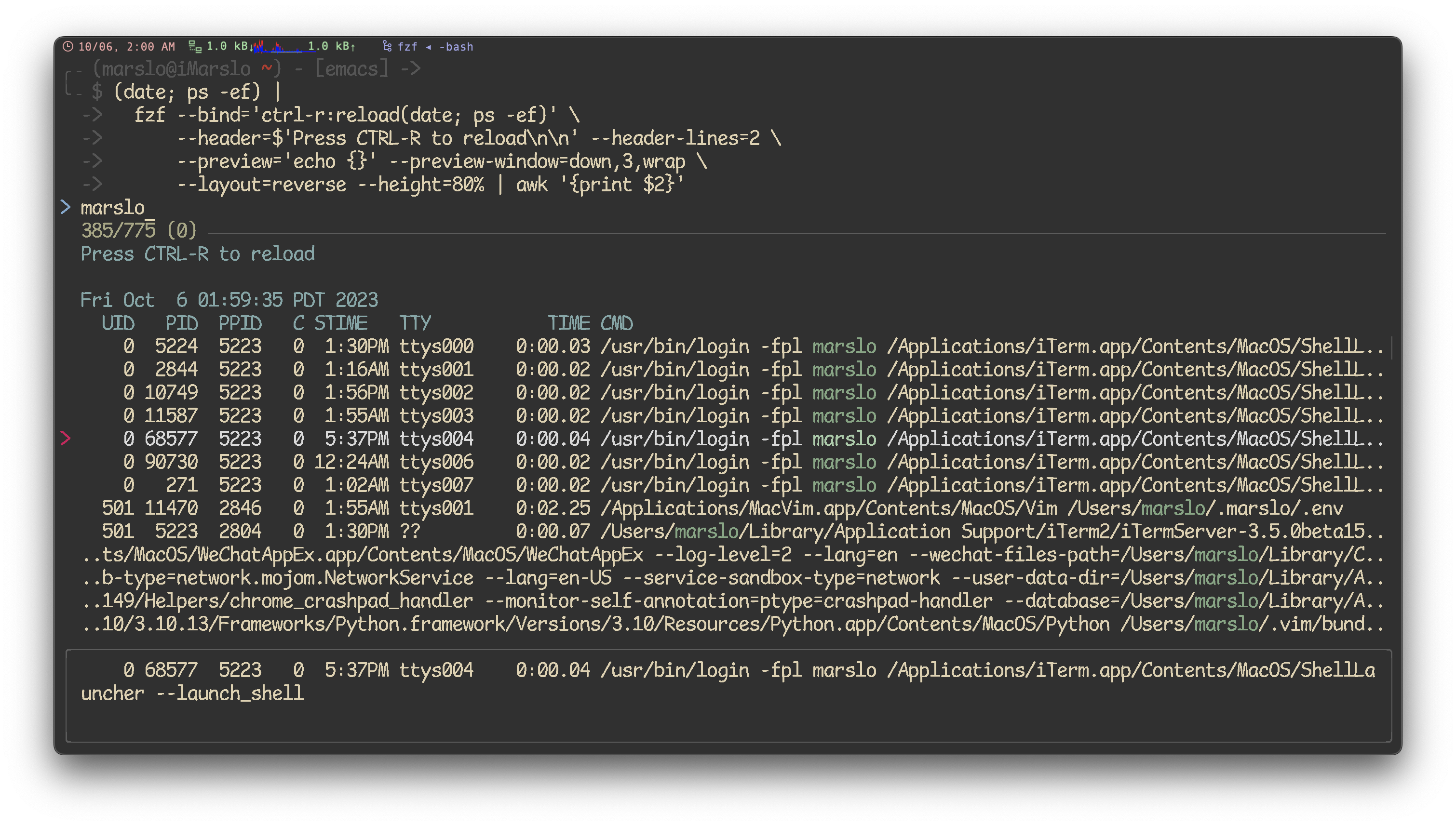
$ (date; ps -ef) |
  fzf --bind='ctrl-r:reload(date; ps -ef)' \
      --header=$'Press CTRL-R to reload\n\n' --header-lines=2 \
      --preview='echo {}' --preview-window=down,3,wrap \
      --layout=reverse --height=80% |
  awk '{print $2}'

# or kill
$ (date; ps -ef) |
  fzf --bind='ctrl-r:reload(date; ps -ef)' \
      --header=$'Press CTRL-R to reload\n\n' --header-lines=2 \
      --preview='echo {}' --preview-window=down,3,wrap \
      --layout=reverse --height=80% |
  awk '{print $2}' |
  xargs kill -9
functions
function lsps() {                          # [l]i[s]t [p]roces[s]
  (date; ps -ef) |
  fzf --bind='ctrl-r:reload(date; ps -ef)' \
      --header=$'Press CTRL-R to reload\n\n' --header-lines=2 \
      --preview='echo {}' --preview-window=down,3,wrap \
      --layout=reverse --height=80% |
  awk '{print $2}'
}

function killps() {                        # [kill] [p]roces[s]
  (date; ps -ef) |
  fzf --bind='ctrl-r:reload(date; ps -ef)' \
      --header=$'Press CTRL-R to reload\n\n' --header-lines=2 \
      --preview='echo {}' --preview-window=down,3,wrap \
      --layout=reverse --height=80% |
  awk '{print $2}' |
  xargs kill -9
}
1.4.1.1.15 -- ps fzf 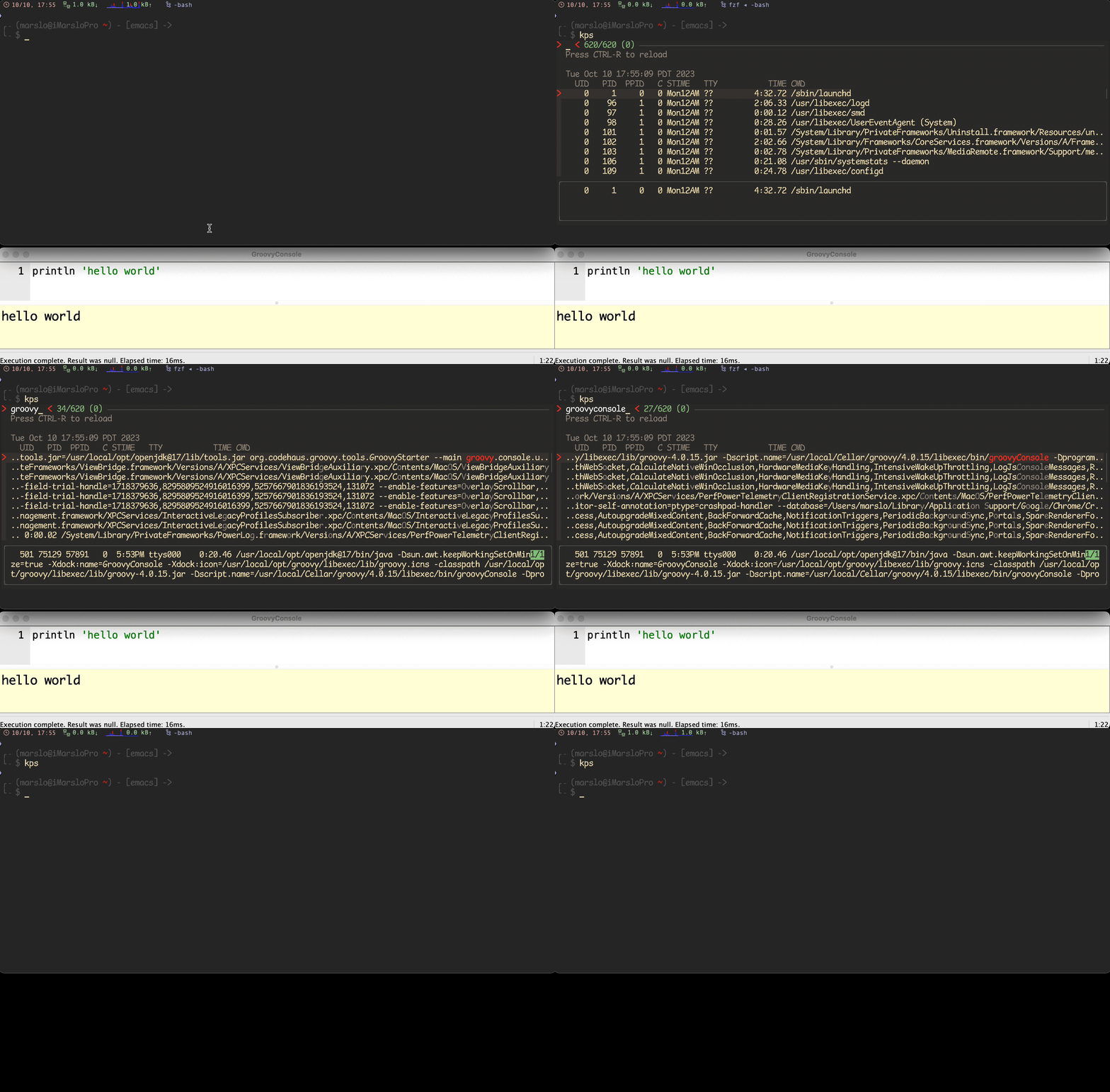
1.4.1.1.16 -- kill ps fzf
kubectl
kns# kns - kubectl set default namespace # @author : marslo # @source : https://github.com/marslo/mylinux/blob/master/confs/home/.marslo/bin/ffunc.sh # @description : using `fzf` to list all available namespaces and use the selected namespace as default # [k]ubectl [n]ame[s]pace function kns() { # [k]ubectl [n]ame[s]pace local krn=$(kubecolor config get-contexts --no-headers $(kubectl config current-context) | awk "{print \$5}" | sed "s/^$/default/") kubectl get -o name namespace | sed "s|^.*/| |;\|^ $(krn)$|s/ /*/" | fzf -e | sed "s/^..//" | xargs -i bash -c "echo -e \"\033[1;33m~~> {}\\033[0m\"; kubecolor config set-context --current --namespace {}; kubecolor config get-contexts; " } # or limited with `kubectl get namespace` function kns() { echo 'namespace-1 namespace-2 namespace-3 ...' | fmt -1 | fzf -1 -0 --no-sort +m --prompt='namespace> ' | xargs -i bash -c "echo -e \"\033[1;33m~~> {}\\033[0m\"; kubectl config set-context --current --namespace {}; kubecolor config get-contexts; " }kcani# kcani - kubectl check permission (auth can-i) # @author : marslo # @source : https://github.com/marslo/mylinux/blob/master/confs/home/.marslo/bin/ffunc.sh # @description : check whether an action is allowed in given namespaces. support multiple selection # [k]ubectl [can]-[i] function kcani() { # [k]ubectl [can]-[i] local namespaces='' local actions='list get watch create update delete' local components='sts deploy secrets configmap ingressroute ingressroutetcp' namespaces=$( echo 'namespace-1 namespace-2 namespace-3 ...' | fmt -1 | fzf -1 -0 --no-sort --prompt='namespace> ' \ --bind 'ctrl-y:execute-silent(echo -n {+} | pbcopy)+abort' \ --header 'Press CTRL-Y to copy name into clipboard' ) [[ -z "${namespaces}" ]] && echo "$(c Rs)ERROR: select at least one namespace !$(c)" && return while read -r namespace; do echo -e "\n>> $(c Ys)${namespace}$(c)" k-p-cani ${namespace} # for pods component for _c in ${components}; do local res='' echo -e ".. $(c Ms)${_c}$(c) :" for _a in ${actions}; do r=$(_can_i -n "${namespace}" "${_a}" "${_c}") res+="${r} "; done; # in actions echo -e "${actions}\n${res}" | "${COLUMN}" -t | sed 's/^/\t/g' done; # in components done< <(echo "${namespaces}" | fmt -1) } # _can_i - kubectl check permission (auth can-i) for pods component # @author : marslo # @source : https://github.com/marslo/mylinux/blob/master/confs/home/.marslo/bin/ifunc.sh # @description : check whether given action is allowed in given namespaces; if namespace not provide, using default namespace function _can_i() { local namespace namespace=$(command kubectl config view --minify -o jsonpath='{..namespace}') while [[ $# -gt 0 ]]; do case "$1" in -n | --namespace ) namespace="$2" ; shift 2 ;; * ) break ;; esac done [[ 0 = "$#" ]] && echo -e "$(c Rs)>> ERROR: must provide action to check with$(c)\n\nUSAGE$(c Gis)\n\t\$ $0 list pod\n\t\$ $0 -n <namespace> create deploy$(c)" && return checker=$* r="$(kubectl auth can-i ${checker} -n ${namespace})"; [[ 'yes' = "${r}" ]] && r="$(c Gs)${r}$(c)" || r="$(c Rs)${r}$(c)"; echo -e "${r}"; } # k-p-cani - kubectl check permission (auth can-i) for pods component # @author : marslo # @source : https://github.com/marslo/mylinux/blob/master/confs/home/.marslo/bin/ifunc.sh # @description : check whether certain action is allowed in given namespaces # [k]ubectl [can]-[i] function k-p-cani() { local components='pods' declare -A pactions pactions=( ['0_get']="get ${components}" ['1_get/exec']="get ${components}/exec" ['2_get/sub/exec']="get ${components} --subresource=exec" ['2_get/sub/log']="get ${components} --subresource=log" ['3_list']="list ${components}" ['4_create']="create ${components}" ['5_create/exec']="create ${components}/exec" ['6_get/sub/exec']="get ${components} --subresource=exec" ) while read -r pnamespace; do local headers='' local pres='' while read -r _a; do headers+="$(sed -rn 's/^[0-9]+_(.+)$/\1/p' <<< ${_a}) " r=$(_can_i -n "${pnamespace}" "${pactions[${_a}]}") pres+="${r} " done < <( for _act in "${!pactions[@]}"; do echo "${_act}"; done | sort -h ) echo -e ".. $(c Ms)pods$(c) :" echo -e "${headers}\n${pres}" | "${COLUMN}" -t | sed 's/^/\t/g' done< <(echo "$*" | fmt -1) }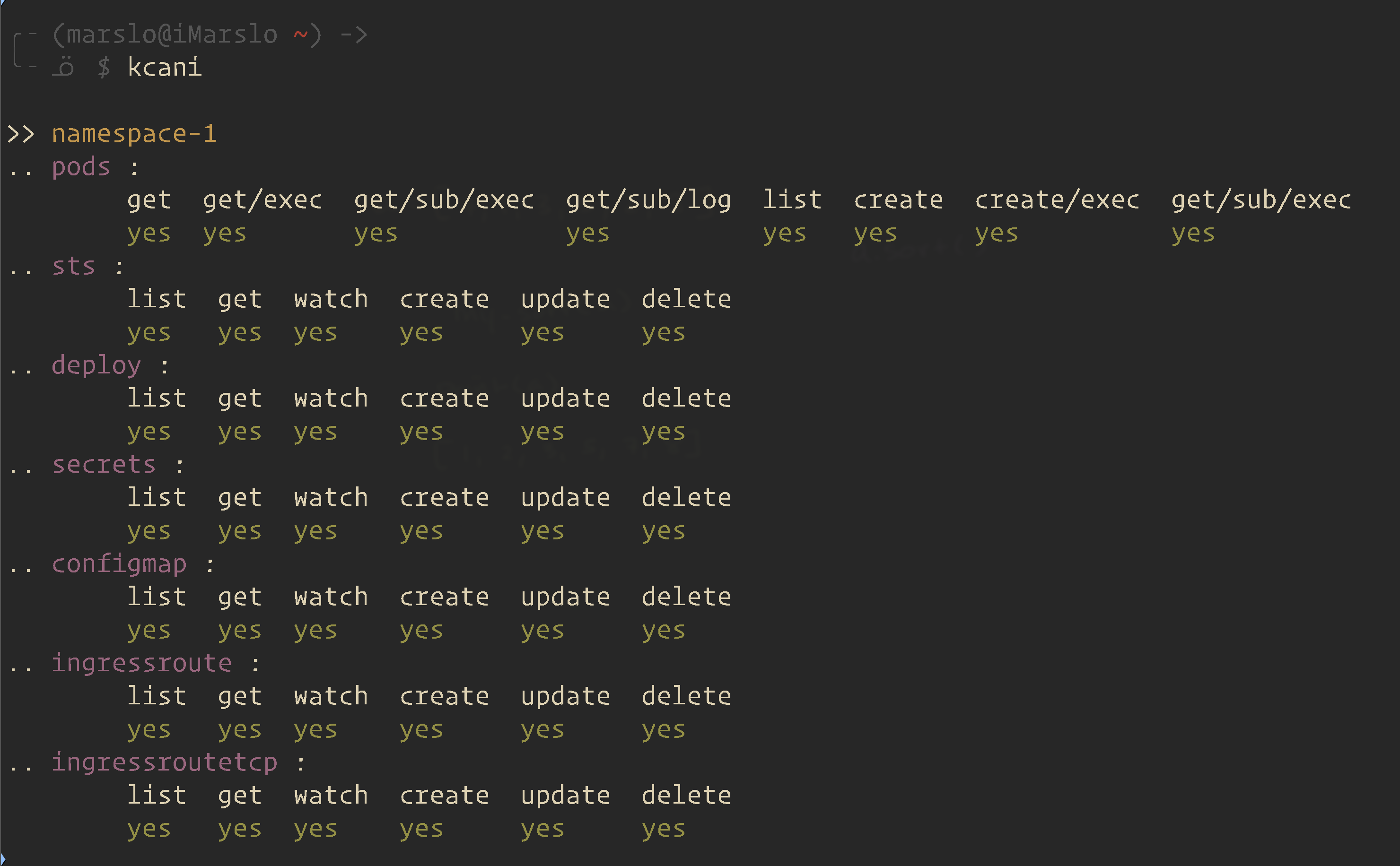
1.4.1.1.17 -- kcani -
pods() {
  : | command='kubectl get pods --all-namespaces' fzf \
    --info=inline --layout=reverse --header-lines=1 \
    --prompt "$(kubectl config current-context | sed 's/-context$//')> " \
    --header $'╱ Enter (kubectl exec) ╱ CTRL-O (open log in editor) ╱ CTRL-R (reload) ╱\n\n' \
    --bind 'start:reload:$command' \
    --bind 'ctrl-r:reload:$command' \
    --bind 'ctrl-/:change-preview-window(80%,border-bottom|hidden|)' \
    --bind 'enter:execute:kubectl exec -it --namespace {1} {2} -- bash > /dev/tty' \
    --bind 'ctrl-o:execute:${EDITOR:-vim} <(kubectl logs --all-containers --namespace {1} {2}) > /dev/tty' \
    --preview-window up:follow \
    --preview 'kubectl logs --follow --all-containers --tail=10000 --namespace {1} {2}' "$@"
}
homebrew
bip# Install (one or multiple) selected application(s) # using "brew search" as source input # mnemonic [B]rew [I]nstall [P]ackage bip() { local inst=$(brew search "$@" | fzf -m) if [[ $inst ]]; then for prog in $(echo $inst); do; brew install $prog; done; fi }bup# Update (one or multiple) selected application(s) # mnemonic [B]rew [U]pdate [P]ackage bup() { local upd=$(brew leaves | fzf -m) if [[ $upd ]]; then for prog in $(echo $upd); do; brew upgrade $prog; done; fi }
fancy usage
show functions
# https://github.com/junegunn/fzf/releases/tag/v0.58.0 $ declare -f | perl -0 -pe 's/^}\n/}\0/gm' | bat --plain --language bash --color always | fzf --read0 --ansi --layout reverse --multi --highlight-line --gap--gap# https://github.com/junegunn/fzf/releases/tag/v0.56.0 $ fzf --info inline-right --gap --color gutter:-1hyperlinks
# https://github.com/junegunn/fzf/releases/tag/v0.55.0
$ printf '<< \e]8;;http://github.com/junegunn/fzf\e\\Link to \e[32mfz\e[0mf\e]8;;\e\\ >>' | fzf --ansi
$ fzf --preview "printf '<< \e]8;;http://github.com/junegunn/fzf\e\\Link to \e[32mfz\e[0mf\e]8;;\e\\ >>'"
toggle-wrap
# https://github.com/junegunn/fzf/releases/tag/v0.54.0
$ history | fzf --tac --wrap --bind 'ctrl-/:toggle-wrap' --wrap-sign $'\t↳ '
loading
# https://github.com/junegunn/fzf/releases/tag/v0.54.0
$ fzf --header 'Loading ...' --header-lines 1 \
  --bind 'start:reload:sleep 1; ps -ef' \
  --bind 'load:change-header:Loaded!'
gem list
# https://github.com/junegunn/fzf/releases/tag/0.51.0
$ gem list | fzf --with-shell 'ruby -e' \
  --preview 'pp Gem::Specification.find_by_name({1})' \
  --bind 'ctrl-o:execute-silent:
      spec = Gem::Specification.find_by_name({1})
      [spec.homepage, *spec.metadata.filter { _1.end_with?("uri") }.values].uniq.each do
        system "open", _1
      end
  '
jump
# https://github.com/junegunn/fzf/releases/tag/0.50.0
$ fzf --bind space:jump
$ fzf --bind space:jump,jump:accept
$ fzf --bind 'space:change-header(Type jump label)+jump,jump-cancel:change-header:Jump cancelled'
footer
# https://github.com/junegunn/fzf/releases/tag/v0.65.0
$ fzf --footer $'[Edit] [View]\n[Copy to clipboard]' \
      --with-shell 'bash -c' \
      --bind 'click-footer:transform:
        [[ $FZF_CLICK_FOOTER_WORD =~ Edit ]] && echo "execute:vim \{}"
        [[ $FZF_CLICK_FOOTER_WORD =~ View ]] && echo "execute:view \{}"
        (( FZF_CLICK_FOOTER_LINE == 2 )) && (( FZF_CLICK_FOOTER_COLUMN < 20 )) &&
            echo "execute-silent(echo -n \{} | pbcopy)+bell"
      '
# You can click on each key name to trigger the actions bound to that key
$ fzf --footer 'Ctrl-E: Edit / Ctrl-V: View / Ctrl-Y: Copy to clipboard' \
      --with-shell 'bash -c' \
      --bind 'ctrl-e:execute:vim {}' \
      --bind 'ctrl-v:execute:view {}' \
      --bind 'ctrl-y:execute-silent(echo -n {} | pbcopy)+bell' \
      --bind 'click-footer:transform:
        [[ $FZF_CLICK_FOOTER_WORD =~ Ctrl ]] && echo "trigger(${FZF_CLICK_FOOTER_WORD%:})"
      '
ansi
# https://github.com/junegunn/fzf/releases/tag/v0.63.0
$ for i in $(seq 16 255); do
    echo -e "\x1b[48;5;${i}m\x1b[0Khello"
  done | fzf --ansi
resize
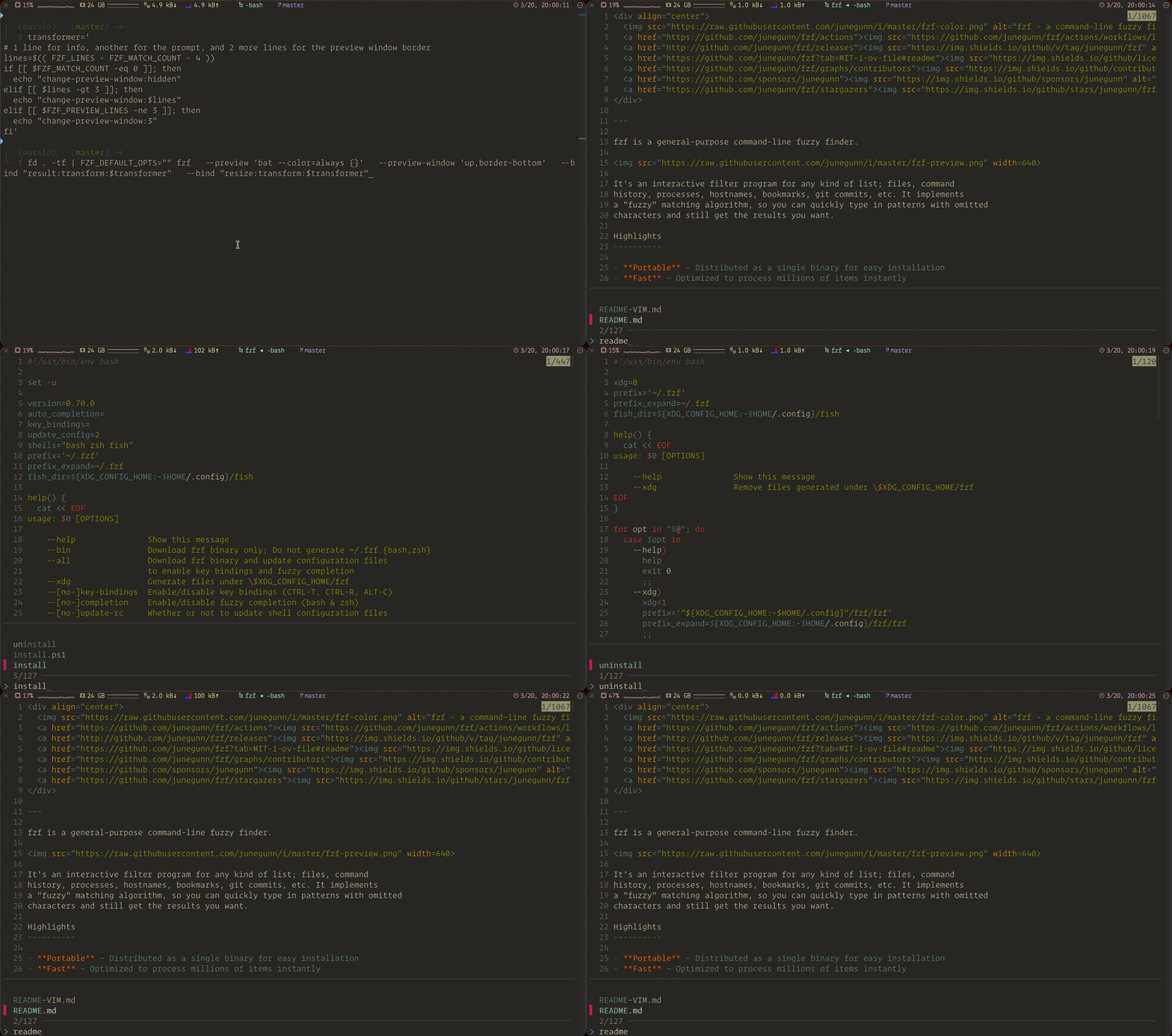
# https://github.com/junegunn/fzf/releases/tag/0.46.0
# Script to dynamically resize the preview window
$ transformer='
  # 1 line for info, another for prompt, and 2 more lines for preview window border
  lines=$(( FZF_LINES - FZF_MATCH_COUNT - 4 ))
  if [[ $FZF_MATCH_COUNT -eq 0 ]]; then
    echo "change-preview-window:hidden"
  elif [[ $lines -gt 3 ]]; then
    echo "change-preview-window:$lines"
  elif [[ $FZF_PREVIEW_LINES -ne 3 ]]; then
    echo "change-preview-window:3"
  fi
'
$ seq 10000 | fzf --preview 'seq {} 10000' --preview-window up \
                  --bind "result:transform:$transformer" \
                  --bind "resize:transform:$transformer"
fzf environment
FZF_PORT
# https://github.com/junegunn/fzf/releases/tag/v0.54.0
$ fzf --listen --sync --bind 'focus:transform-header:curl -s localhost:$FZF_PORT?limit=0 | jq .'
FZF_POS
# https://github.com/junegunn/fzf/releases/tag/0.51.0
# Toggle selection to the top or to the bottom
$ seq 30 | fzf --multi --bind 'load:pos(10)' \
  --bind 'shift-up:transform:for _ in $(seq $FZF_POS $FZF_MATCH_COUNT); do echo -n +toggle+up; done' \
  --bind 'shift-down:transform:for _ in $(seq 1 $FZF_POS); do echo -n +toggle+down; done'
FZF_API_KEY
# https://github.com/junegunn/fzf/releases/tag/0.44.0
$ export FZF_API_KEY="$(head -c 32 /dev/urandom | base64)"

# server
$ fzf --listen 0.0.0.0:6266
$ fzf --listen-unsafe 0.0.0.0:6266
# client
$ curl localhost:6266 -H "x-api-key: $FZF_API_KEY" -d 'change-query(yo)'

# -- or https://github.com/junegunn/fzf/releases/tag/0.39.0 --
# server
$ fzf --listen --bind 'start:execute-silent:echo $FZF_PORT > /tmp/fzf-port'
# client
$ curl "localhost:$(cat /tmp/fzf-port)" -d 'preview:echo Hello, fzf is listening on $FZF_PORT.'
fzf-preview.sh
[!NOTE|label:references:]
$ fzf --preview='fzf-preview.sh {}'
git
# https://github.com/junegunn/fzf/releases/tag/0.49.0
$ git ls-files |
  fzf --header 'Press CTRL-P to change preview mode' \
      --bind='ctrl-p:transform:[[ $FZF_PREVIEW_LABEL =~ cat ]] \
      && echo "change-preview(git log --color=always \{})+change-preview-label([[ log ]])" \
      || echo "change-preview(bat --color=always \{})+change-preview-label([[ cat ]])"'
lolcat
[!NOTE|label:references:]
$ brew install lolcat
# https://github.com/junegunn/fzf/releases/tag/0.35.0

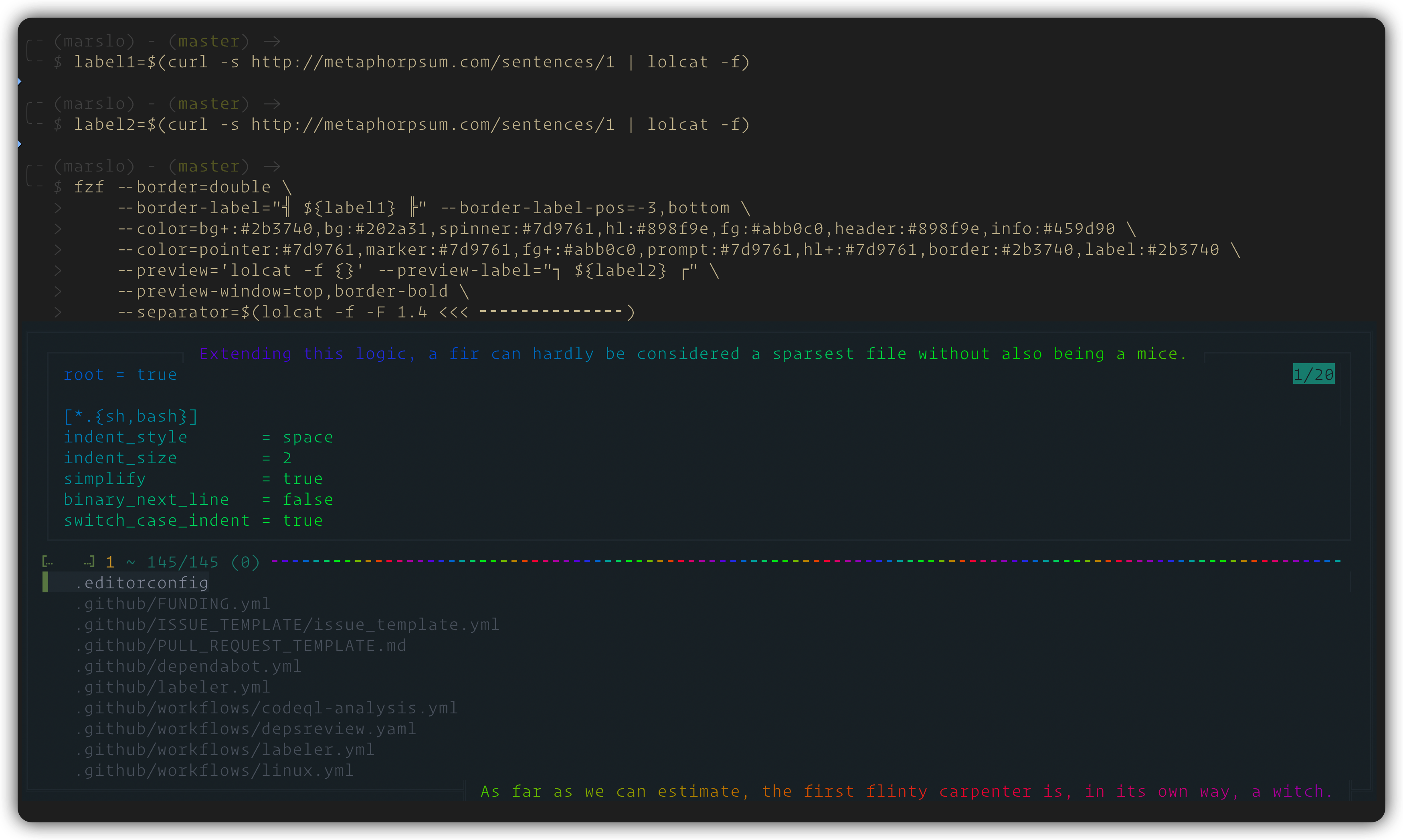
# With http://metaphorpsum.com/ and https://github.com/busyloop/lolcat
label1=$(curl -s http://metaphorpsum.com/sentences/1 | lolcat -f)
label2=$(curl -s http://metaphorpsum.com/sentences/1 | lolcat -f)

# Using colors from 'cosmic_latte'
# (See https://github.com/junegunn/fzf/blob/master/ADVANCED.md#generating-fzf-color-theme-from-vim-color-schemes)
$ fzf --border=double \
    --border-label="╣ ${label1} ╠" --border-label-pos=-3,bottom \
    --color=bg+:#2b3740,bg:#202a31,spinner:#7d9761,hl:#898f9e,fg:#abb0c0,header:#898f9e,info:#459d90 \
    --color=pointer:#7d9761,marker:#7d9761,fg+:#abb0c0,prompt:#7d9761,hl+:#7d9761,border:#2b3740,label:#2b3740 \
    --preview='lolcat -f {}' --preview-label="┓ ${label2} ┏" \
    --preview-window=top,border-bold \
    --separator=$(lolcat -f -F 1.4 <<< ╸╸╸╸╸╸╸╸╸╸╸╸╸╸)
# others - https://github.com/junegunn/fzf/releases/tag/v0.63.0
$ GETTER='curl -s http://metaphorpsum.com/sentences/1'
$ fzf --style full --border --preview : \
      --bind "focus:bg-transform-header:$GETTER" \
      --bind "focus:+bg-transform-footer:$GETTER" \
      --bind "focus:+bg-transform-border-label:$GETTER" \
      --bind "focus:+bg-transform-preview-label:$GETTER" \
      --bind "focus:+bg-transform-input-label:$GETTER" \
      --bind "focus:+bg-transform-list-label:$GETTER" \
      --bind "focus:+bg-transform-header-label:$GETTER" \
      --bind "focus:+bg-transform-footer-label:$GETTER" \
      --bind "focus:+bg-transform-ghost:$GETTER" \
      --bind "focus:+bg-transform-prompt:$GETTER"
config
ctrl-r
FZF_CTRL_R_OPTS="--preview 'echo {}'"
FZF_CTRL_R_OPTS+=" --preview-window up:3:hidden:wrap"
FZF_CTRL_R_OPTS+=" --bind 'ctrl-/:toggle-preview'"
FZF_CTRL_R_OPTS+=" --bind 'ctrl-y:execute-silent(echo -n {2..} | pbcopy)+abort'"
FZF_CTRL_R_OPTS+=" --color header:italic"
FZF_CTRL_R_OPTS+=" --header 'Press CTRL-Y to copy command into clipboard'"
export FZF_CTRL_R_OPTS

# or
export FZF_CTRL_R_OPTS="
  --preview 'echo {}' --preview-window up:3:hidden:wrap
  --bind 'ctrl-/:toggle-preview'
  --bind 'ctrl-y:execute-silent(echo -n {2..} | pbcopy)+abort'
  --color header:italic
  --header 'Press CTRL-Y to copy command into clipboard'"
__fzf_history__$ type __fzf_history__ __fzf_history__ is a function __fzf_history__ () { local output opts script; opts="--height ${FZF_TMUX_HEIGHT:-40%} --bind=ctrl-z:ignore ${FZF_DEFAULT_OPTS-} -n2..,.. --scheme=history --bind=ctrl-r:toggle-sort ${FZF_CTRL_R_OPTS-} +m --read0"; script='BEGIN { getc; $/ = "\n\t"; $HISTCOUNT = $ENV{last_hist} + 1 } s/^[ *]//; print $HISTCOUNT - $. . "\t$_" if !$seen{$_}++'; output=$(set +o pipefail builtin fc -lnr -2147483648 | last_hist=$(HISTTIMEFORMAT='' builtin history 1) command perl -n -l0 -e "$script" | FZF_DEFAULT_OPTS="$opts" $(__fzfcmd) --query "$READLINE_LINE") || return; READLINE_LINE=${output#*' '}; if [[ -z "$READLINE_POINT" ]]; then echo "$READLINE_LINE"; else READLINE_POINT=0x7fffffff; fi } $ fcf __fzf_history__ /usr/local/Cellar/fzf/0.42.0/shell/key-bindings.bash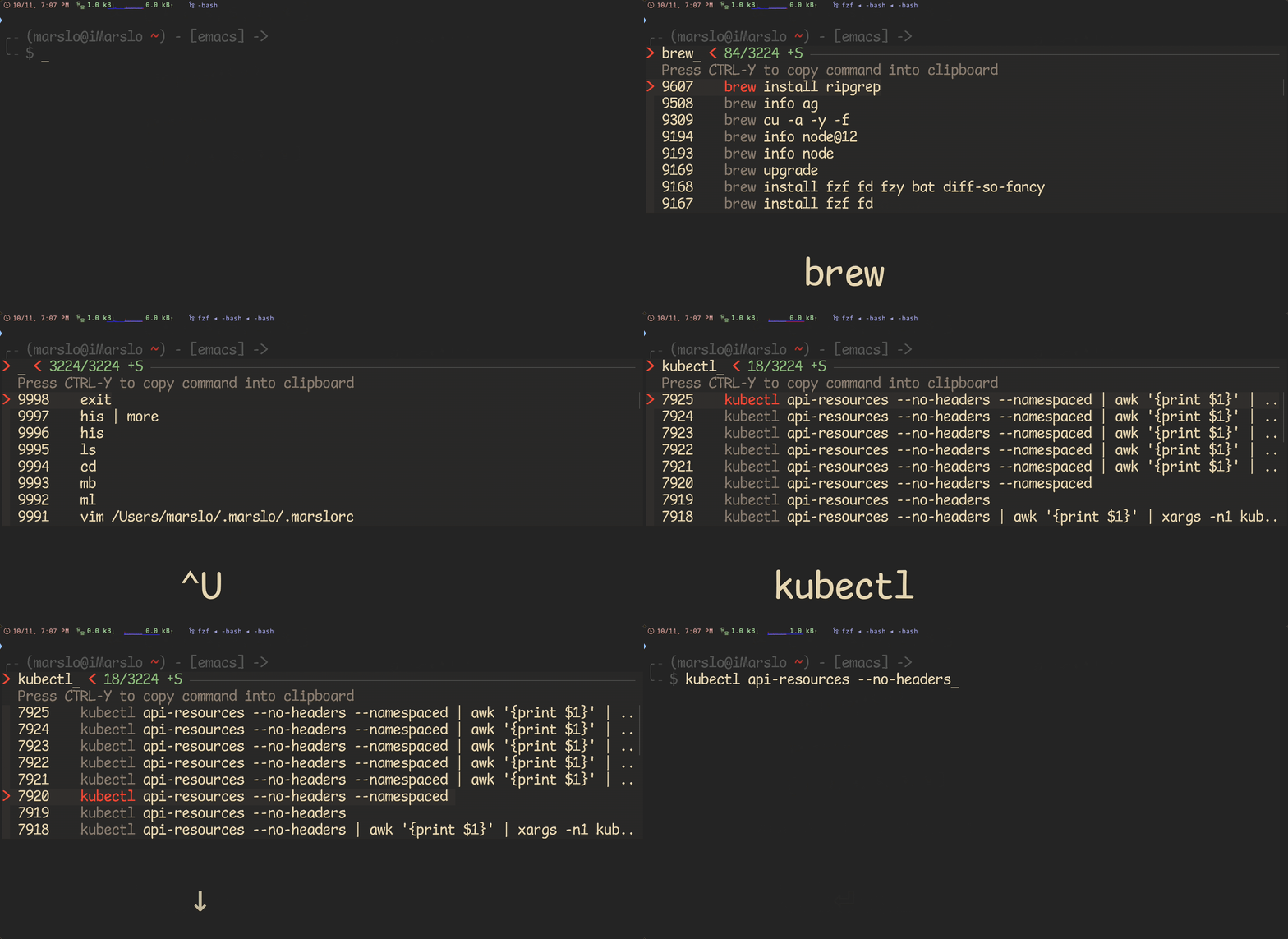
1.4.1.1.20 -- fzf ctrl-r
ctrl-t
[!NOTE|label:references:]
to disable/reset osx default ⌃+↑ and ⌃+↓
System Settings ⇢ Keyboard ⇢ Keyboard Shutcuts... ⇢ Mission Control
System Settings ⇢ Desktop & Dock ⇢ Shortcuts...


# preview file content using bat (https://github.com/sharkdp/bat)
FZF_CTRL_T_OPTS="--preview 'bat -n --color=always {}'"
FZF_CTRL_T_OPTS+=" --bind 'ctrl-/:change-preview-window(down|hidden|)'"
FZF_CTRL_T_OPTS+=" --bind 'ctrl-p:preview-up,ctrl-n:preview-down'"
FZF_CTRL_T_OPTS+=" --header 'CTRL-N/CTRL-P or CTRL-↑/CTRL-↓ to view contents'"
export FZF_CTRL_T_OPTS

# or
export FZF_CTRL_T_OPTS="
  --preview 'bat -n --color=always {}'
  --bind 'ctrl-p:preview-up,ctrl-n:preview-down'
  --bind 'ctrl-/:change-preview-window(down|hidden|)'"
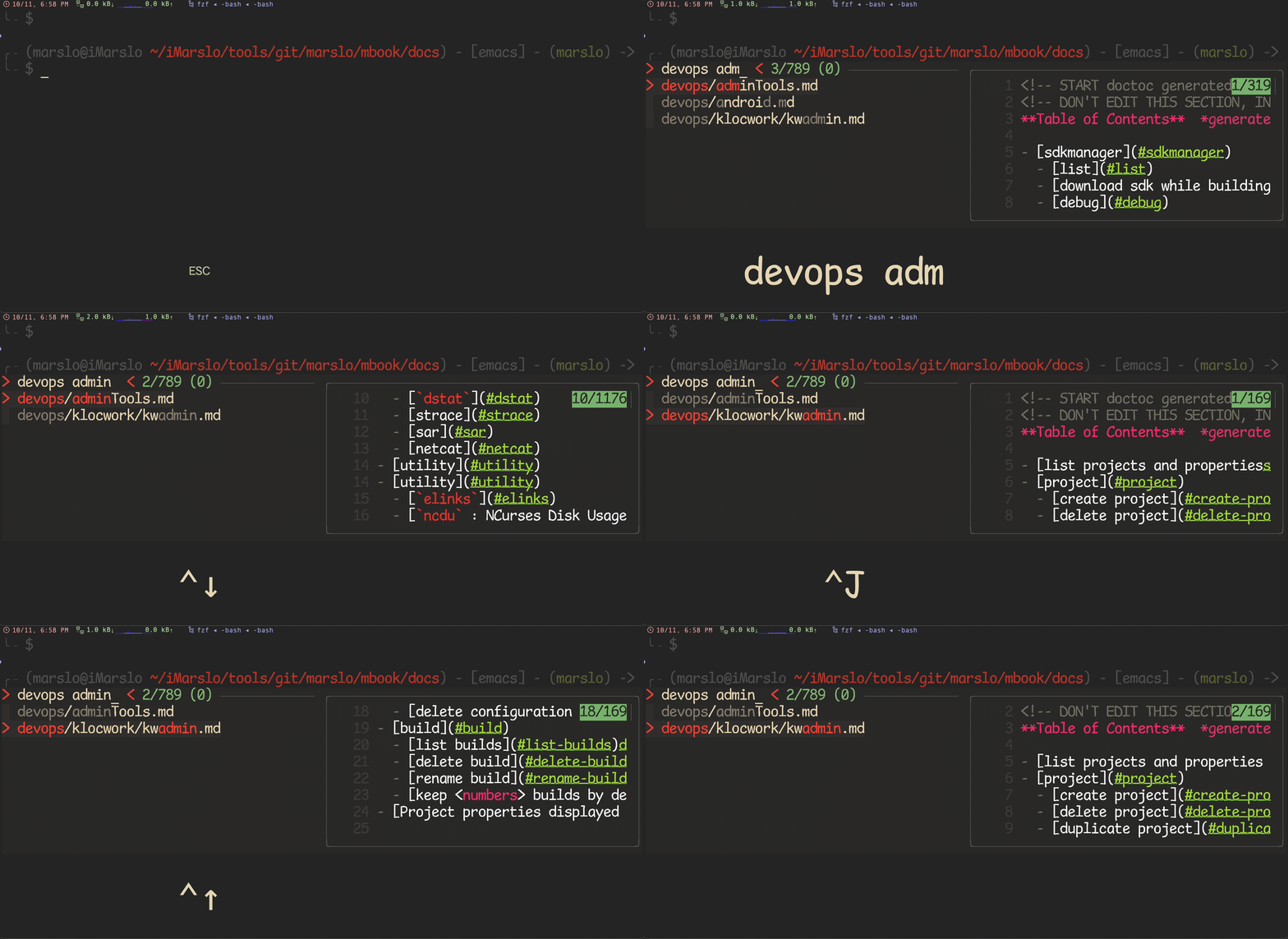
__fzf_select__$ type __fzf_select__ __fzf_select__ is a function __fzf_select__ () { local cmd opts; cmd="${FZF_CTRL_T_COMMAND:-"command find -L . -mindepth 1 \\( -path '*/.*' -o -fstype 'sysfs' -o -fstype 'devfs' -o -fstype 'devtmpfs' -o -fstype 'proc' \\) -prune -o -type f -print -o -type d -print -o -type l -print 2> /dev/null | command cut -b3-"}"; opts="--height ${FZF_TMUX_HEIGHT:-40%} --bind=ctrl-z:ignore --reverse --scheme=path ${FZF_DEFAULT_OPTS-} ${FZF_CTRL_T_OPTS-} -m"; eval "$cmd" | FZF_DEFAULT_OPTS="$opts" $(__fzfcmd) "$@" | while read -r item; do printf '%q ' "$item"; done } $ fcf __fzf_select__ __fzf_select__ 19 /Users/marslo/.marslo/utils/fzf/shell/key-bindings.bas $ mdfind key-bindings.bas /Users/marslo/iMarslo/tools/git/marslo/mbook/docs/devops/adminTools.md /usr/local/Cellar/fzf/0.42.0/shell/key-bindings.bash-
# another ctrl-t script to select a directory and paste it into line
__fzf_select_dir () {
  builtin typeset READLINE_LINE_NEW="$(
    command find -L . \( -path '*/\.*' -o -fstype dev -o -fstype proc \) \
            -prune \
            -o -type f -print \
            -o -type d -print \
            -o -type l -print 2>/dev/null \
    | command sed 1d \
    | command cut -b3- \
    | env fzf -m
  )"

  if [[ -n $READLINE_LINE_NEW ]]; then
    builtin bind '"\er": redraw-current-line'
    builtin bind '"\e^": magic-space'
    READLINE_LINE=${READLINE_LINE:+${READLINE_LINE:0:READLINE_POINT}}${READLINE_LINE_NEW}${READLINE_LINE:+${READLINE_LINE:READLINE_POINT}}
    READLINE_POINT=$(( READLINE_POINT + ${#READLINE_LINE_NEW} ))
  else
    builtin bind '"\er":'
    builtin bind '"\e^":'
  fi
}

builtin bind -x '"\C-x1": __fzf_select_dir'
builtin bind '"\C-t": "\C-x1\e^\er"'
theme
# junegunn/seoul256.vim (dark)
export FZF_DEFAULT_OPTS='--color=bg+:#3F3F3F,bg:#4B4B4B,border:#6B6B6B,spinner:#98BC99,hl:#719872,fg:#D9D9D9,header:#719872,info:#BDBB72,pointer:#E12672,marker:#E17899,fg+:#D9D9D9,preview-bg:#3F3F3F,prompt:#98BEDE,hl+:#98BC99'

# junegunn/seoul256.vim (light)
export FZF_DEFAULT_OPTS='--color=bg+:#D9D9D9,bg:#E1E1E1,border:#C8C8C8,spinner:#719899,hl:#719872,fg:#616161,header:#719872,info:#727100,pointer:#E12672,marker:#E17899,fg+:#616161,preview-bg:#D9D9D9,prompt:#0099BD,hl+:#719899'

# morhetz/gruvbox
export FZF_DEFAULT_OPTS='--color=bg+:#3c3836,bg:#32302f,spinner:#fb4934,hl:#928374,fg:#ebdbb2,header:#928374,info:#8ec07c,pointer:#fb4934,marker:#fb4934,fg+:#ebdbb2,prompt:#fb4934,hl+:#fb4934'

# arcticicestudio/nord-vim
export FZF_DEFAULT_OPTS='--color=bg+:#3B4252,bg:#2E3440,spinner:#81A1C1,hl:#616E88,fg:#D8DEE9,header:#616E88,info:#81A1C1,pointer:#81A1C1,marker:#81A1C1,fg+:#D8DEE9,prompt:#81A1C1,hl+:#81A1C1'

# tomasr/molokai
export FZF_DEFAULT_OPTS='--color=bg+:#293739,bg:#1B1D1E,border:#808080,spinner:#E6DB74,hl:#7E8E91,fg:#F8F8F2,header:#7E8E91,info:#A6E22E,pointer:#A6E22E,marker:#F92672,fg+:#F8F8F2,prompt:#F92672,hl+:#F92672'
generating fzf color theme from vim color schemes
let g:fzf_colors =
\ { 'fg':         ['fg', 'Normal'],
  \ 'bg':         ['bg', 'Normal'],
  \ 'preview-bg': ['bg', 'NormalFloat'],
  \ 'hl':         ['fg', 'Comment'],
  \ 'fg+':        ['fg', 'CursorLine', 'CursorColumn', 'Normal'],
  \ 'bg+':        ['bg', 'CursorLine', 'CursorColumn'],
  \ 'hl+':        ['fg', 'Statement'],
  \ 'info':       ['fg', 'PreProc'],
  \ 'border':     ['fg', 'Ignore'],
  \ 'prompt':     ['fg', 'Conditional'],
  \ 'pointer':    ['fg', 'Exception'],
  \ 'marker':     ['fg', 'Keyword'],
  \ 'spinner':    ['fg', 'Label'],
  \ 'header':     ['fg', 'Comment'] }

:echo fzf#wrap()
:call append('$', printf('export FZF_DEFAULT_OPTS="%s"', matchstr(fzf#wrap().options, "--color[^']*")))
tips
move cursor to position
[!TIP]
$ seq 100 | fzf --sync --bind 'start:pos(N)'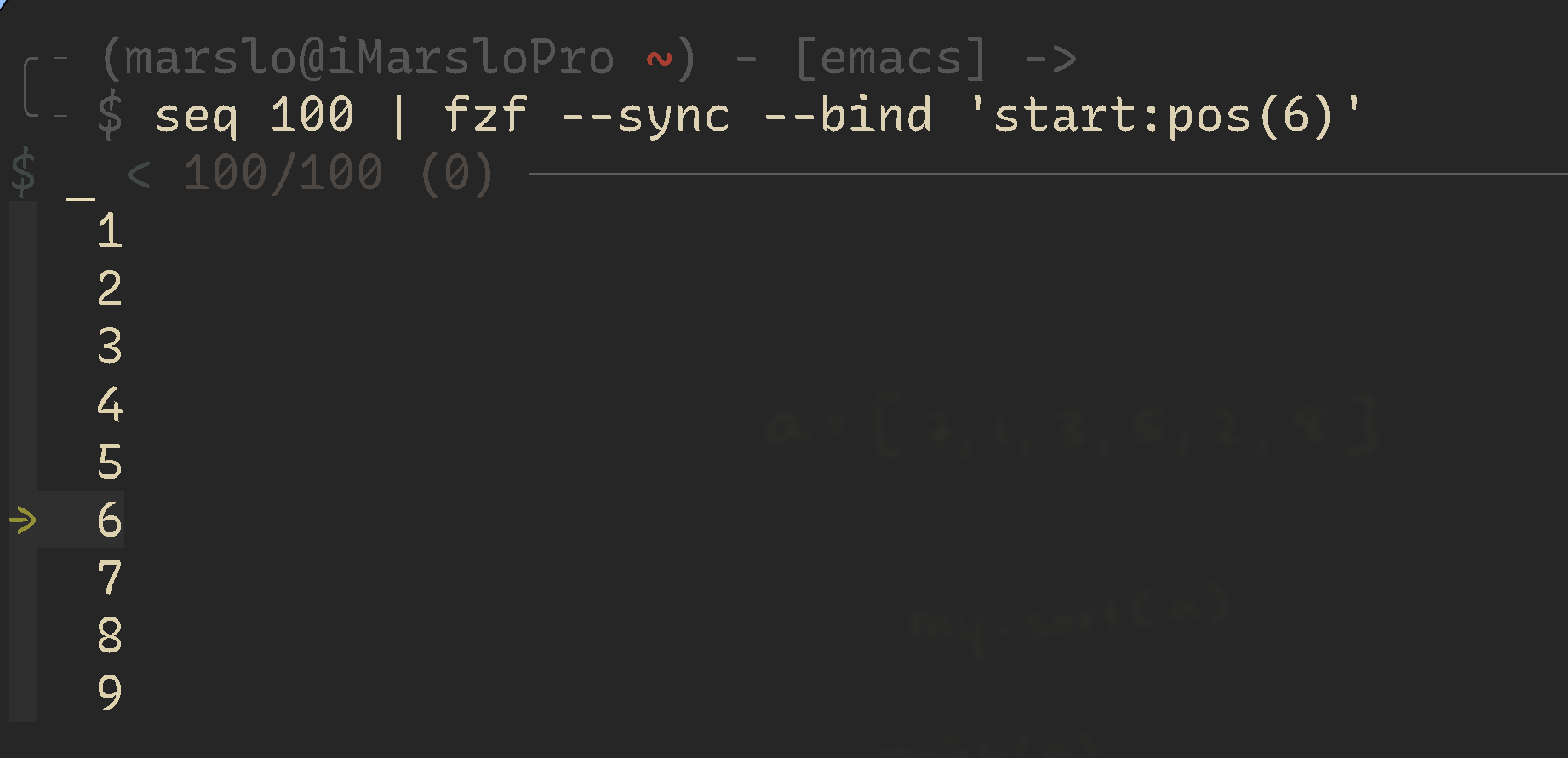
1.4.1.1.22 -- fzf start pos 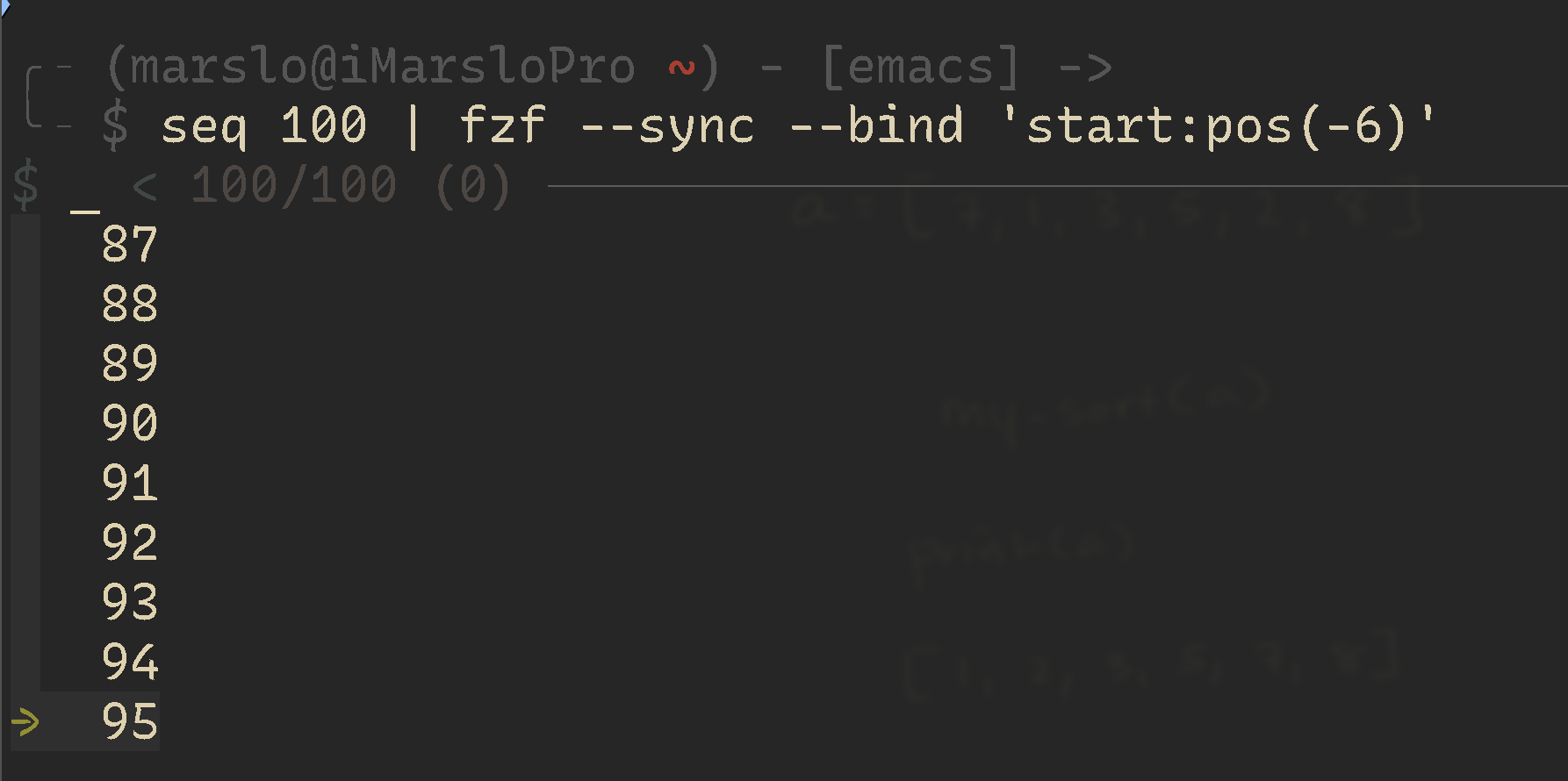
1.4.1.1.23 -- fzf start pos
select by column
[!NOTE]
$ seq 20 | pr -ts' ' --column 4 1 6 11 16 2 7 12 17 3 8 13 18 4 9 14 19 5 10 15 20 $ seq 20 | pr -ts' ' --column 4 | fzf --sync --bind 'start:select-all+become:cat {+f2}' 6 7 8 9 10 $ seq 20 | pr -ts' ' --column 4 | fzf --sync --bind 'start:select-all+become:echo {+2}' 6 7 8 9 10--with-nth[!NOTE]
$ echo {a..z} | fzf --with-nth='1..3'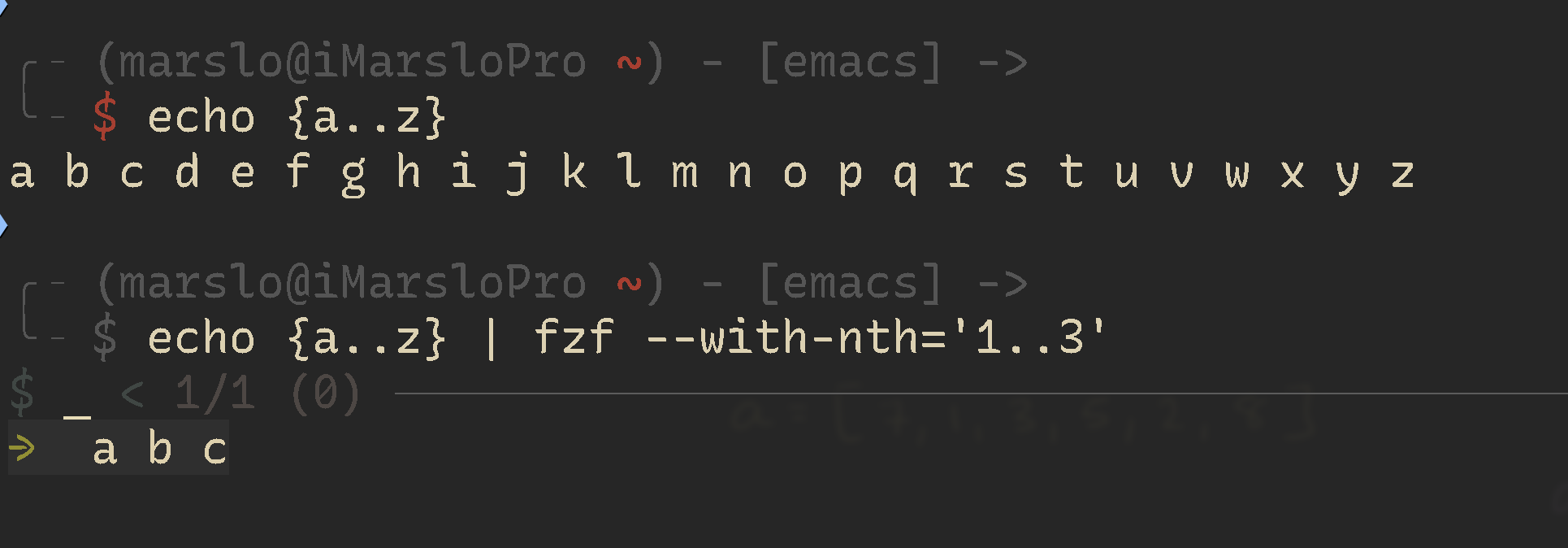
1.4.1.1.24 -- fzf --with-nth # https://github.com/junegunn/fzf/issues/1323#issuecomment-499615418 # for git comment show $ git log --pretty=oneline | fzf --ansi --delimiter=' ' --no-multi --preview='git show --color=always {1}' --with-nth=2.. | cut --delimiter=' ' --field=1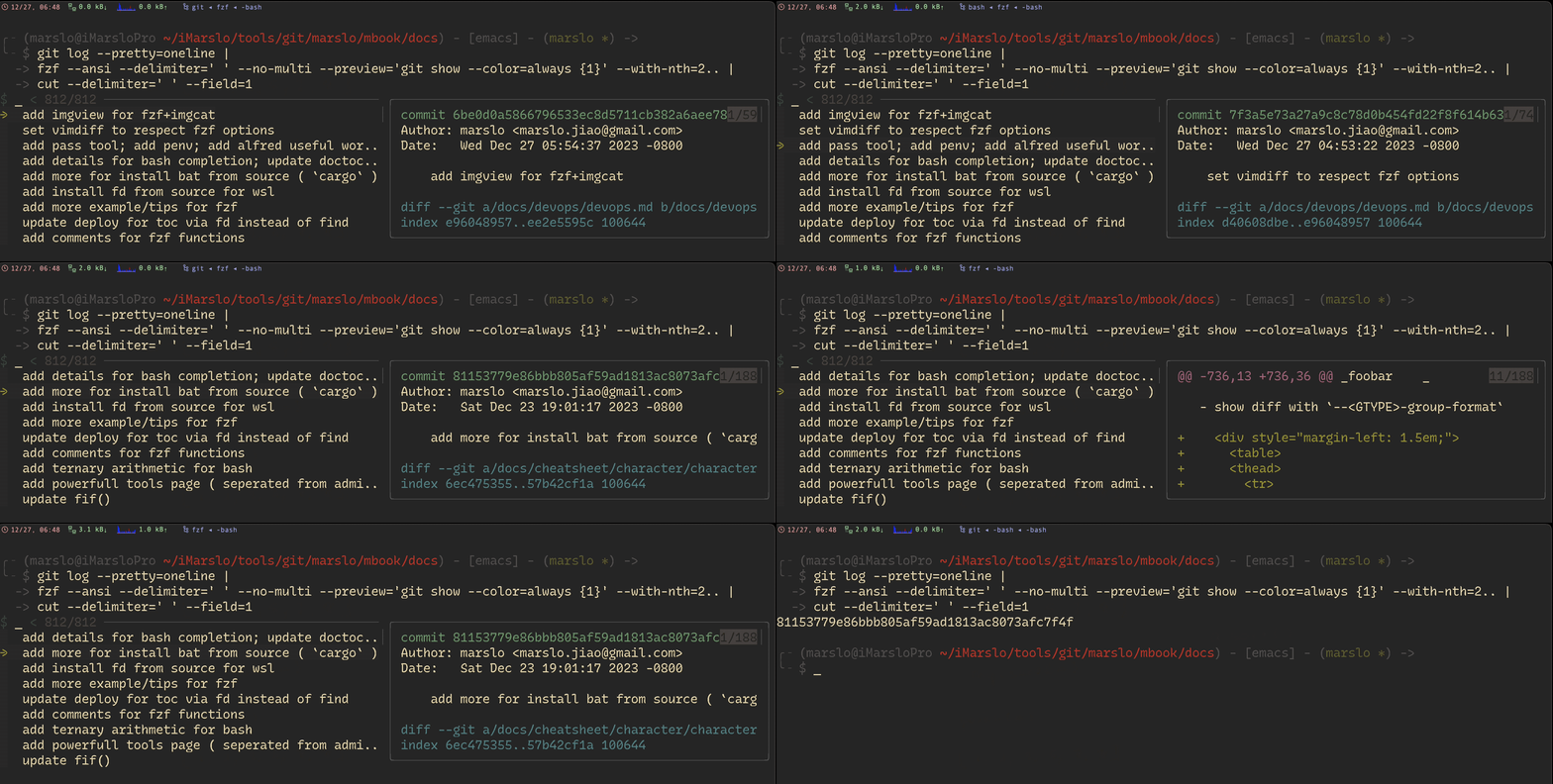
1.4.1.1.25 -- git with-nth for git comments $ echo -e 'first line\tfirst preview\nsecond line\tsecond preview' | fzf --delimiter='\t' --with-nth=1 --preview='echo {2}'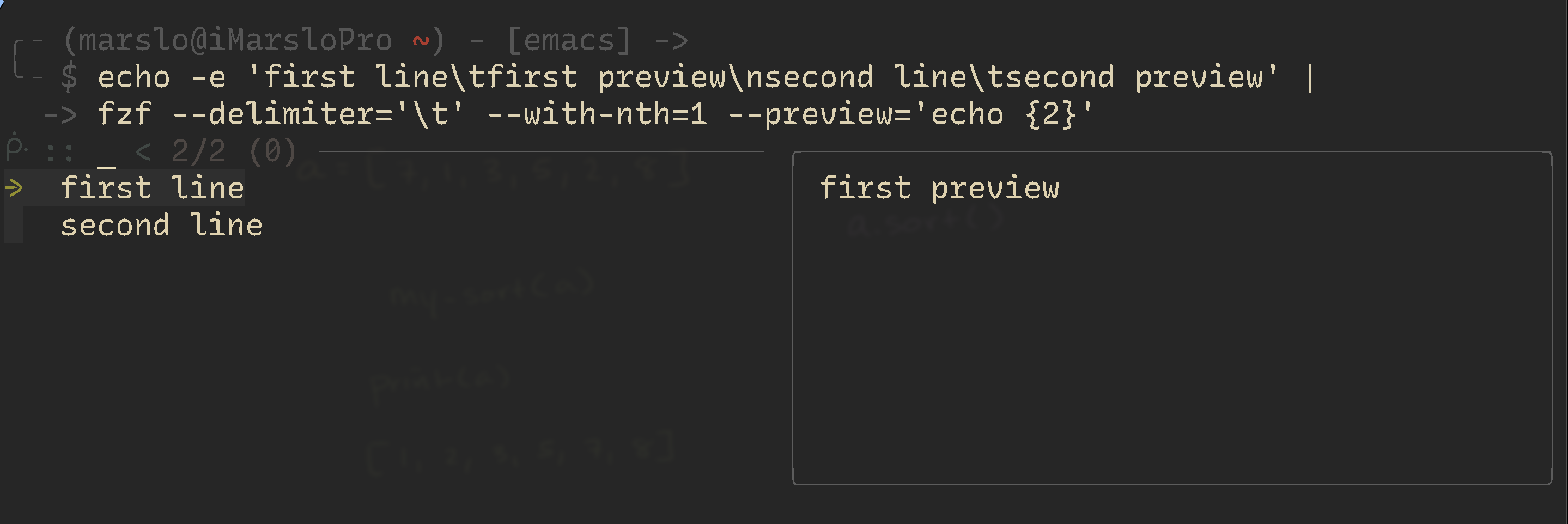
1.4.1.1.26 -- fzf --with-nth for preview --track$ git log --oneline --graph --color=always | nl | fzf --ansi --track --no-sort --layout=reverse-list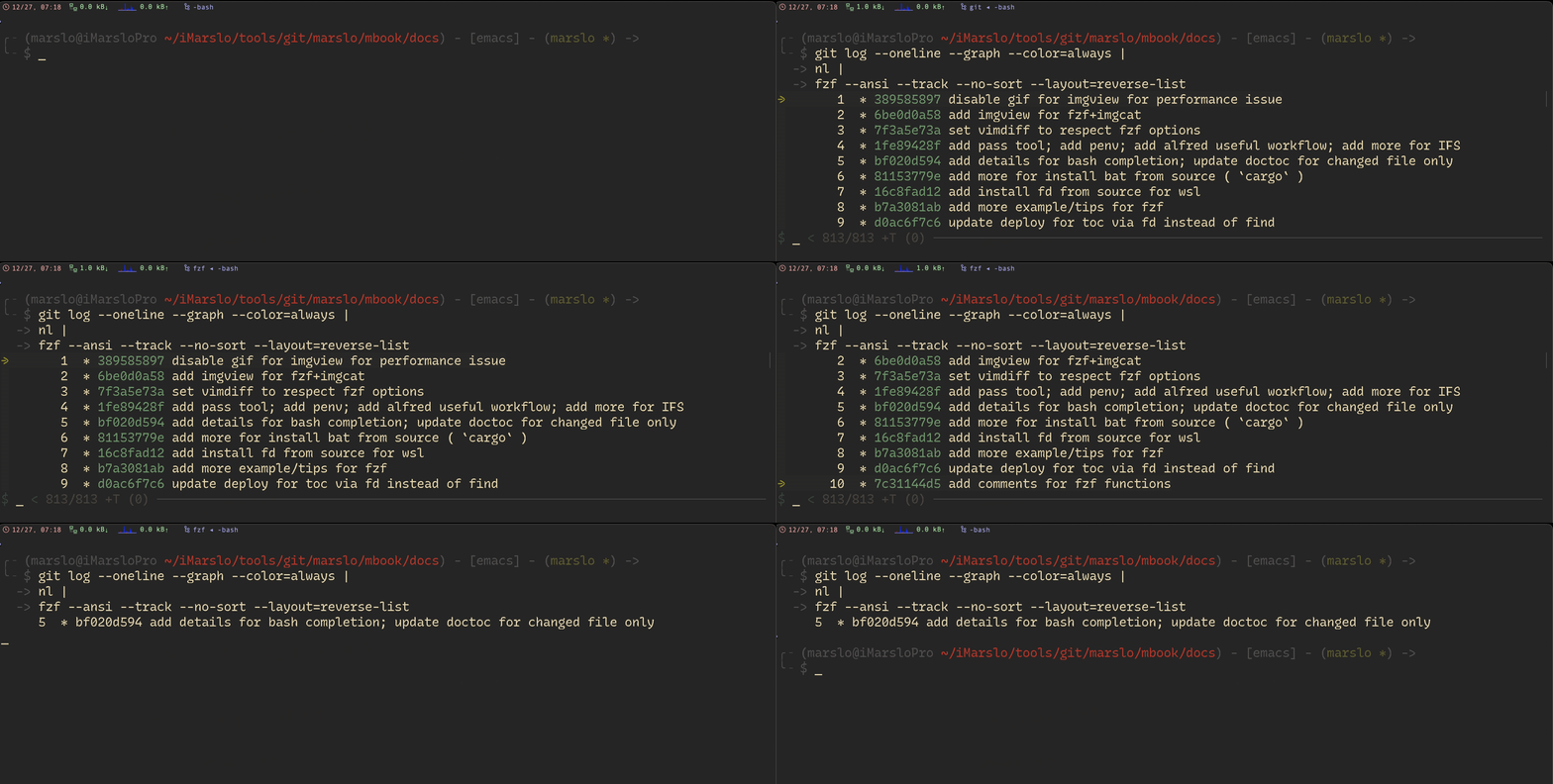
1.4.1.1.27 -- fzf --track for git select-all
$ seq 3 | fzf --multi --sync --bind start:last+select-all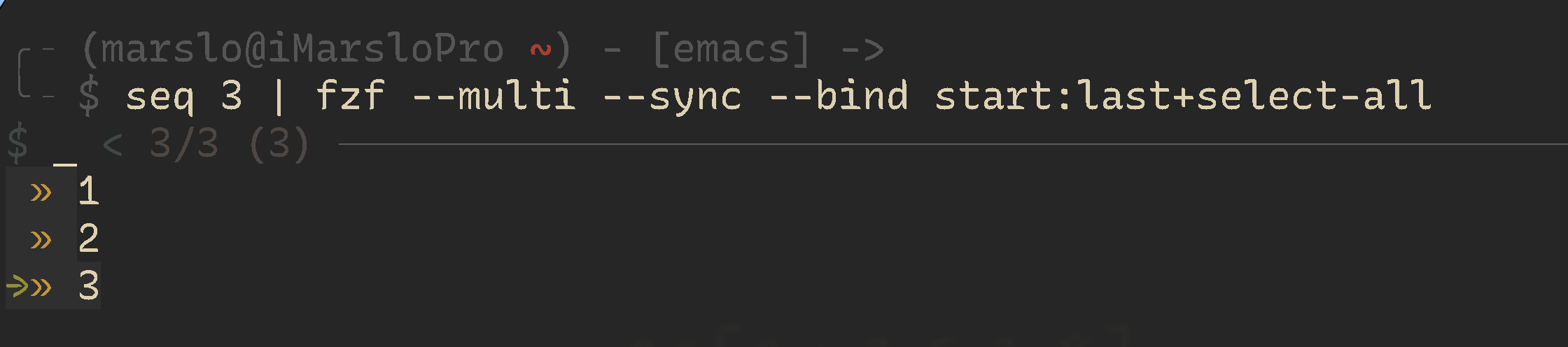
1.4.1.1.28 -- fzf select-all
select-n
[!TIP]
# select top 2 and move down
$ seq 10 | fzf --multi --sync --reverse --bind start:select+down+select+down

# select top 2
$ seq 10 | fzf --multi --sync --reverse --bind start:select+down+select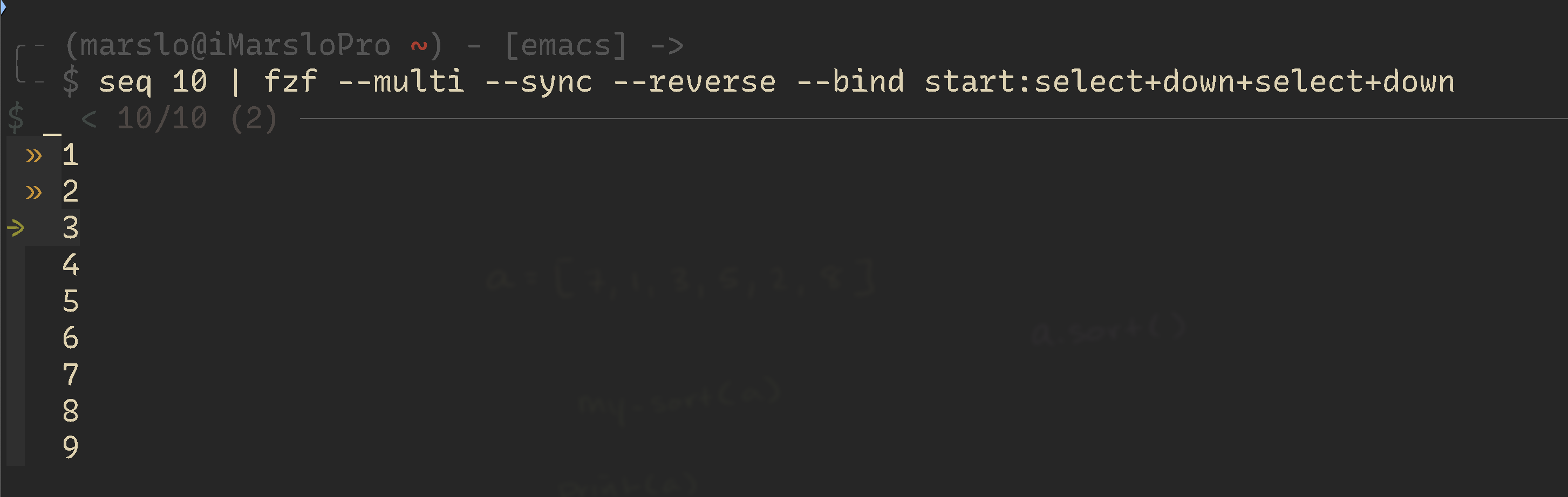
1.4.1.1.29 -- select and move down 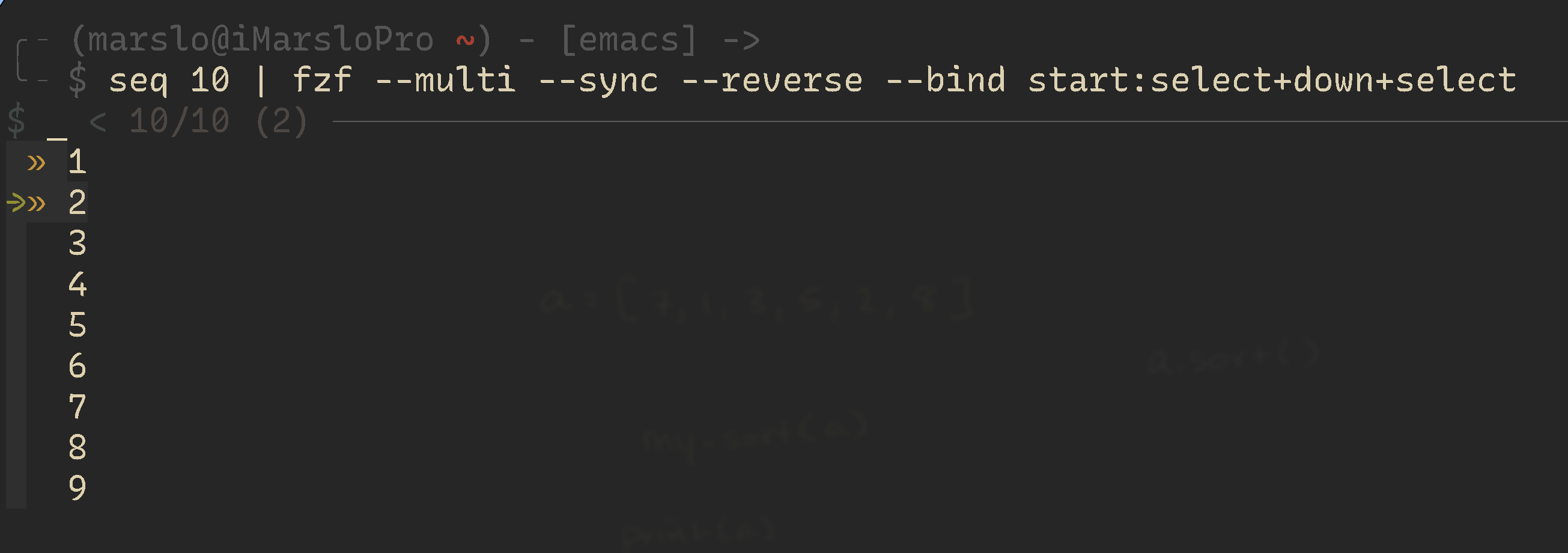
1.4.1.1.30 -- select for git
[!NOTE]
# cannot be used to grab a sha as an argument.
fshow() {
  git log --color=always \
      --format="%C(auto)%h%d %s %C(black)%C(bold)%cr" "$@" |
  fzf --ansi --no-sort --reverse --tiebreak=index --bind=ctrl-s:toggle-sort \
      --bind "ctrl-o:execute(git show --color=always {1})"
}
view history by fzf, show revision number finally
$ git log --pretty=oneline \ | fzf --ansi --delimiter=' ' --no-multi --preview='git show --color=always {1}' --with-nth=2.. \ | cut --delimiter=' ' --field=1 # or $ git log --pretty=oneline --all \ | fzf --ansi --no-multi --preview='git show --color=always {1}' --with-nth=2.. \ | awk '{print $1}'-
[!NOTE]
function pr-checkout() {
  local jq_template pr_number

  jq_template='"'\
    '#\(.number) - \(.title)'\
    '\t'\
    'Author: \(.user.login)\n'\
    'Created: \(.created_at)\n'\
    'Updated: \(.updated_at)\n\n'\
    '\(.body)'\
    '"'

  pr_number=$(
    gh api 'repos/:owner/:repo/pulls' |
    jq ".[] | $jq_template" |
    sed -e 's/"\(.*\)"/\1/' -e 's/\\t/\t/' |
    fzf \
      --with-nth=1 \
      --delimiter='\t' \
      --preview='echo -e {2}' \
      --preview-window=top:wrap |
    sed 's/^#\([0-9]\+\).*/\1/'
  )

  if [ -n "$pr_number" ]; then
    gh pr checkout "$pr_number"
  fi
}
creating feature branches from JIRA issues
function create-branch() { # The function expects that username and password are stored using secret-tool. # To store these, use # secret-tool store --label="JIRA username" jira username # secret-tool store --label="JIRA password" jira password local jq_template query username password branch_name jq_template='"'\ '\(.key). \(.fields.summary)'\ '\t'\ 'Reporter: \(.fields.reporter.displayName)\n'\ 'Created: \(.fields.created)\n'\ 'Updated: \(.fields.updated)\n\n'\ '\(.fields.description)'\ '"' query='project=BLOG AND status="In Progress" AND assignee=currentUser()' username=$(secret-tool lookup jira username) password=$(secret-tool lookup jira password) branch_name=$( curl \ --data-urlencode "jql=$query" \ --get \ --user "$username:$password" \ --silent \ --compressed \ 'https://jira.example.com/rest/api/2/search' | jq ".issues[] | $jq_template" | sed -e 's/"\(.*\)"/\1/' -e 's/\\t/\t/' | fzf \ --with-nth=1 \ --delimiter='\t' \ --preview='echo -e {2}' \ --preview-window=top:wrap | cut -f1 | sed -e 's/\. /\t/' -e 's/[^a-zA-Z0-9\t]/-/g' | awk '{printf "%s/%s", $1, tolower($2)}' ) if [ -n "$branch_name" ]; then git checkout -b "$branch_name" fi }-
$ fzf --listen --sync --bind 'focus:transform-header:curl -s localhost:$FZF_PORT?limit=0 | jq .' --height 100% --style[!NOTE|label:references:]
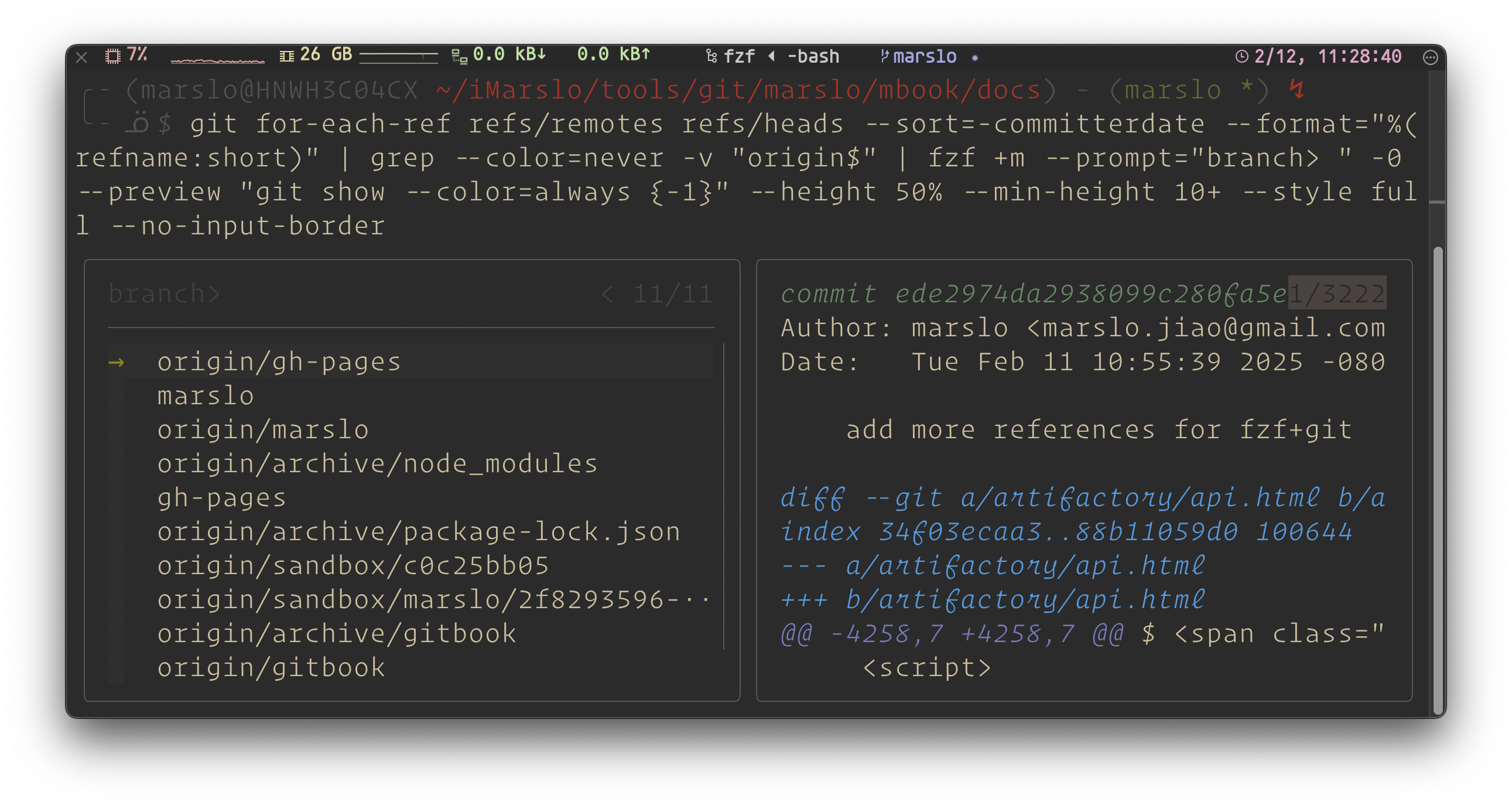
1.4.1.1.31 -- fzf style
show debug info
local -x openWebUrl='
  clear
  echo "=== Debugging browser redirection ==="
  echo "1. directory: $1"

  url=$(git -C "$1" config --get remote.origin.url)
  echo "2. Git Remote: ${url:-[empty, no remote repository is associated!]}"

  if [[ -n "$url" ]]; then
    web=$(echo "$url" | sed -E "s|^git@([^:]+):|https://\1/|; s|^ssh://git@([^/]+)/|https://\1/|; s|\.git$||")
    echo "3. web link: ${web}"
    echo "try open ..."
    open "${web}"
  fi

  echo ""
  read -r -s -n 1 -p "debug finished. Press any key to return to fzf..."
'

$ fzf ... \
      --bind "ctrl-k:execute(bash -c \"\${openWebUrl}; echo URL: \$url; echo WEB: \${web}; read -p 'Press Enter...'\" _ {2})" \
# or
$ fzf ... \
      --bind "ctrl-k:execute(bash -c \"\${openWebUrl} {2}\" _ {2})"
fzf with git
[!NOTE|label:references:]