check info
path
$ xcode-select --print-path
/Applications/Xcode.app/Contents/Developer
version
[!NOTE|label:list all tools pkgs]
- Determine xcode command line tools version
$ /usr/sbin/pkgutil --pkgs | grep -i tools
com.apple.pkg.CLTools_SDK_macOS13
com.apple.pkg.CLTools_SDK_macOS12
com.apple.pkg.CLTools_Executables
com.apple.pkg.CLTools_SDK_macOS14
com.apple.pkg.CLTools_SwiftBackDeploy
com.apple.pkg.CLTools_macOS_SDK
com.microsoft.package.Proofing_Tools
$ xcodebuild -version
Xcode 15.2
Build version 15C500b

$ /usr/sbin/pkgutil --pkg-info=com.apple.pkg.CLTools_Executables | grep version
version: 15.3.0.0.1.1708646388

# full content
$ /usr/sbin/pkgutil --pkg-info=com.apple.pkg.CLTools_Executables
package-id: com.apple.pkg.CLTools_Executables
version: 15.3.0.0.1.1708646388
volume: /
location: /
install-time: 1709684830
# osx 10.8-
$ /usr/sbin/pkgutil --pkg-info=com.apple.pkg.DeveloperToolsCLI
sdk
sdk path
$ /usr/bin/xcrun --show-sdk-path
/Library/Developer/CommandLineTools/SDKs/MacOSX.sdk

$ /usr/bin/xcrun --sdk macosx --show-sdk-path
/Applications/Xcode.app/Contents/Developer/Platforms/MacOSX.platform/Developer/SDKs/MacOSX14.2.sdk

$ /usr/bin/xcrun --sdk macosx --show-sdk-platform-path
/Applications/Xcode.app/Contents/Developer/Platforms/MacOSX.platform

$ /usr/bin/xcodebuild -version $(xcodebuild -showsdks | awk '/^$/{p=0};p; /macOS SDKs:/{p=1}' | tail -1 | cut -f3) Path
/Applications/Xcode.app/Contents/Developer/Platforms/MacOSX.platform/Developer/SDKs/MacOSX14.2.sdk
-
# default
$ xcode-select --print-path
/Applications/Xcode.app/Contents/Developer

# switch
$ sudo xcode-select --switch /Library/Developer/CommandLineTools
$ xcode-select --print-path
/Library/Developer/CommandLineTools

# reset
$ sudo xcode-select --reset
$ xcode-select --print-path
/Applications/Xcode.app/Contents/Developer
sdk version
[!TIP|label:references:]
command lines for get info:
SDKVersionPathPlatformVersionPlatformPathBuildIDProductBuildVersionProductCopyrightProductNameProductUserVisibleVersionProductVersioniOSSupportVersionsample:
$ /usr/bin/xcodebuild -sdk $(/usr/bin/xcrun --sdk macosx --show-sdk-path) -version SDKVersion
14.2
$ /usr/bin/xcodebuild -sdk $(/usr/bin/xcrun --sdk macosx --show-sdk-path) -version Path
/Applications/Xcode.app/Contents/Developer/Platforms/MacOSX.platform/Developer/SDKs/MacOSX14.2.sdk
$ /usr/bin/xcodebuild -sdk $(/usr/bin/xcrun --sdk macosx --show-sdk-path) -version PlatformVersion
14.2
$ /usr/bin/xcodebuild -sdk $(/usr/bin/xcrun --sdk macosx --show-sdk-path) -version PlatformPath
/Applications/Xcode.app/Contents/Developer/Platforms/MacOSX.platform
$ /usr/bin/xcodebuild -sdk $(/usr/bin/xcrun --sdk macosx --show-sdk-path) -version BuildID
A541C0AE-820A-11EE-A7B4-597349BFF88C
$ /usr/bin/xcodebuild -sdk $(/usr/bin/xcrun --sdk macosx --show-sdk-path) -version ProductBuildVersion
23C53
$ /usr/bin/xcodebuild -sdk $(/usr/bin/xcrun --sdk macosx --show-sdk-path) -version ProductCopyright
1983-2023 Apple Inc.
$ /usr/bin/xcodebuild -sdk $(/usr/bin/xcrun --sdk macosx --show-sdk-path) -version ProductName
macOS
$ /usr/bin/xcodebuild -sdk $(/usr/bin/xcrun --sdk macosx --show-sdk-path) -version ProductUserVisibleVersion
14.2
$ /usr/bin/xcodebuild -sdk $(/usr/bin/xcrun --sdk macosx --show-sdk-path) -version ProductVersion
14.2
$ /usr/bin/xcodebuild -sdk $(/usr/bin/xcrun --sdk macosx --show-sdk-path) -version iOSSupportVersion
17.2
$ /usr/bin/xcrun --sdk macosx --show-sdk-version
14.2

# or
$ /usr/bin/xcodebuild -sdk /Applications/Xcode.app/Contents/Developer/Platforms/MacOSX.platform/Developer/SDKs/MacOSX14.2.sdk -version SDKVersion
14.2

$ /usr/bin/xcrun --sdk macosx --show-sdk-build-version
23C53

# or
$ /usr/bin/xcodebuild -sdk /Applications/Xcode.app/Contents/Developer/Platforms/MacOSX.platform/Developer/SDKs/MacOSX14.2.sdk -version ProductBuildVersion
23C53

$ /usr/bin/xcrun --sdk macosx --show-sdk-platform-version
14.2
# or
$ /usr/bin/xcodebuild -sdk /Applications/Xcode.app/Contents/Developer/Platforms/MacOSX.platform/Developer/SDKs/MacOSX14.2.sdk -version PlatformVersion
14.2
list all sdk versions
[!NOTE|label:references:]
- get sdk params
$ /usr/bin/xcodebuild -showsdks | awk '/^$/{p=0};p; /macOS SDKs:/{p=1}' | tail -1 | cut -f3
-sdk macosx14.2
/usr/bin/xcodebuild -showsdks$ xcodebuild -showsdks DriverKit SDKs: DriverKit 23.2 -sdk driverkit23.2 iOS SDKs: iOS 17.2 -sdk iphoneos17.2 iOS Simulator SDKs: Simulator - iOS 17.2 -sdk iphonesimulator17.2 macOS SDKs: macOS 14.2 -sdk macosx14.2 macOS 14.2 -sdk macosx14.2 tvOS SDKs: tvOS 17.2 -sdk appletvos17.2 tvOS Simulator SDKs: Simulator - tvOS 17.2 -sdk appletvsimulator17.2 visionOS SDKs: visionOS 1.0 -sdk xros1.0 visionOS Simulator SDKs: Simulator - visionOS 1.0 -sdk xrsimulator1.0 watchOS SDKs: watchOS 10.2 -sdk watchos10.2 watchOS Simulator SDKs: Simulator - watchOS 10.2 -sdk watchsimulator10.2
/usr/bin/xcodebuild -sdk -version$ /usr/bin/xcodebuild -sdk -version DriverKit23.2.sdk - DriverKit 23.2 (driverkit23.2) SDKVersion: 23.2 Path: /Applications/Xcode.app/Contents/Developer/Platforms/DriverKit.platform/Developer/SDKs/DriverKit23.2.sdk PlatformVersion: 23.2 PlatformPath: /Applications/Xcode.app/Contents/Developer/Platforms/DriverKit.platform iPhoneOS17.2.sdk - iOS 17.2 (iphoneos17.2) SDKVersion: 17.2 Path: /Applications/Xcode.app/Contents/Developer/Platforms/iPhoneOS.platform/Developer/SDKs/iPhoneOS17.2.sdk PlatformVersion: 17.2 PlatformPath: /Applications/Xcode.app/Contents/Developer/Platforms/iPhoneOS.platform BuildID: 8142513E-8212-11EE-A6F2-082C27C73D12 ProductBuildVersion: 21C52 ProductCopyright: 1983-2023 Apple Inc. ProductName: iPhone OS ProductVersion: 17.2 iPhoneSimulator17.2.sdk - Simulator - iOS 17.2 (iphonesimulator17.2) SDKVersion: 17.2 Path: /Applications/Xcode.app/Contents/Developer/Platforms/iPhoneSimulator.platform/Developer/SDKs/iPhoneSimulator17.2.sdk PlatformVersion: 17.2 PlatformPath: /Applications/Xcode.app/Contents/Developer/Platforms/iPhoneSimulator.platform BuildID: 8142513E-8212-11EE-A6F2-082C27C73D12 ProductBuildVersion: 21C52 ProductCopyright: 1983-2023 Apple Inc. ProductName: iPhone OS ProductVersion: 17.2 MacOSX14.sdk - macOS 14.2 (macosx14.2) SDKVersion: 14.2 Path: /Applications/Xcode.app/Contents/Developer/Platforms/MacOSX.platform/Developer/SDKs/MacOSX14.sdk PlatformVersion: 14.2 PlatformPath: /Applications/Xcode.app/Contents/Developer/Platforms/MacOSX.platform BuildID: A541C0AE-820A-11EE-A7B4-597349BFF88C ProductBuildVersion: 23C53 ProductCopyright: 1983-2023 Apple Inc. ProductName: macOS ProductUserVisibleVersion: 14.2 ProductVersion: 14.2 iOSSupportVersion: 17.2 MacOSX14.2.sdk - macOS 14.2 (macosx14.2) SDKVersion: 14.2 Path: /Applications/Xcode.app/Contents/Developer/Platforms/MacOSX.platform/Developer/SDKs/MacOSX14.2.sdk PlatformVersion: 14.2 PlatformPath: /Applications/Xcode.app/Contents/Developer/Platforms/MacOSX.platform BuildID: A541C0AE-820A-11EE-A7B4-597349BFF88C ProductBuildVersion: 23C53 ProductCopyright: 1983-2023 Apple Inc. ProductName: macOS ProductUserVisibleVersion: 14.2 ProductVersion: 14.2 iOSSupportVersion: 17.2 AppleTVOS17.2.sdk - tvOS 17.2 (appletvos17.2) SDKVersion: 17.2 Path: /Applications/Xcode.app/Contents/Developer/Platforms/AppleTVOS.platform/Developer/SDKs/AppleTVOS17.2.sdk PlatformVersion: 17.2 PlatformPath: /Applications/Xcode.app/Contents/Developer/Platforms/AppleTVOS.platform BuildID: 4675A566-8211-11EE-99FD-6142F6FFFD3A ProductBuildVersion: 21K354 ProductCopyright: 1983-2023 Apple Inc. ProductName: Apple TVOS ProductVersion: 17.2 AppleTVSimulator17.2.sdk - Simulator - tvOS 17.2 (appletvsimulator17.2) SDKVersion: 17.2 Path: /Applications/Xcode.app/Contents/Developer/Platforms/AppleTVSimulator.platform/Developer/SDKs/AppleTVSimulator17.2.sdk PlatformVersion: 17.2 PlatformPath: /Applications/Xcode.app/Contents/Developer/Platforms/AppleTVSimulator.platform BuildID: 4675A566-8211-11EE-99FD-6142F6FFFD3A ProductBuildVersion: 21K354 ProductCopyright: 1983-2023 Apple Inc. ProductName: Apple TVOS ProductVersion: 17.2 XROS1.0.sdk - visionOS 1.0 (xros1.0) SDKVersion: 1.0 Path: /Applications/Xcode.app/Contents/Developer/Platforms/XROS.platform/Developer/SDKs/XROS1.0.sdk PlatformVersion: 1.0 PlatformPath: /Applications/Xcode.app/Contents/Developer/Platforms/XROS.platform BuildID: 12C63F4E-8060-11EE-9FFA-B80B914DE5F9 ProductBuildVersion: 21N301 ProductCopyright: 1983-2023 Apple Inc. ProductName: xrOS ProductVersion: 1.0 iOSSupportVersion: 17.1 XRSimulator1.0.sdk - Simulator - visionOS 1.0 (xrsimulator1.0) SDKVersion: 1.0 Path: /Applications/Xcode.app/Contents/Developer/Platforms/XRSimulator.platform/Developer/SDKs/XRSimulator1.0.sdk PlatformVersion: 1.0 PlatformPath: /Applications/Xcode.app/Contents/Developer/Platforms/XRSimulator.platform BuildID: 12C63F4E-8060-11EE-9FFA-B80B914DE5F9 ProductBuildVersion: 21N301 ProductCopyright: 1983-2023 Apple Inc. ProductName: xrOS ProductVersion: 1.0 iOSSupportVersion: 17.1 WatchOS10.2.sdk - watchOS 10.2 (watchos10.2) SDKVersion: 10.2 Path: /Applications/Xcode.app/Contents/Developer/Platforms/WatchOS.platform/Developer/SDKs/WatchOS10.2.sdk PlatformVersion: 10.2 PlatformPath: /Applications/Xcode.app/Contents/Developer/Platforms/WatchOS.platform BuildID: FBDD719C-820F-11EE-B817-4780FBEA8434 ProductBuildVersion: 21S355 ProductCopyright: 1983-2023 Apple Inc. ProductName: Watch OS ProductVersion: 10.2 WatchSimulator10.2.sdk - Simulator - watchOS 10.2 (watchsimulator10.2) SDKVersion: 10.2 Path: /Applications/Xcode.app/Contents/Developer/Platforms/WatchSimulator.platform/Developer/SDKs/WatchSimulator10.2.sdk PlatformVersion: 10.2 PlatformPath: /Applications/Xcode.app/Contents/Developer/Platforms/WatchSimulator.platform BuildID: FBDD719C-820F-11EE-B817-4780FBEA8434 ProductBuildVersion: 21S355 ProductCopyright: 1983-2023 Apple Inc. ProductName: Watch OS ProductVersion: 10.2 Xcode 15.2 Build version 15C500bsystem_profiler SPDeveloperToolsDataType$ /usr/sbin/system_profiler SPDeveloperToolsDataType Developer: Developer Tools: Version: 15.2 (15C500b) Location: /Applications/Xcode.app Applications: Xcode: 15.2 (22503) Instruments: 15.2 (64562.5) SDKs: DriverKit: 23.2: iOS: 17.2: (21C52) iOS Simulator: 17.2: (21C52) macOS: 14.2: (23C53) tvOS: 17.2: (21K354) tvOS Simulator: 17.2: (21K354) visionOS: 1.0: (21N301) visionOS Simulator: 1.0: (21N301) watchOS: 10.2: (21S355) watchOS Simulator: 10.2: (21S355)
get more
$ cat /Library/Developer/CommandLineTools/SDKs/MacOSX.sdk/SDKSettings.json | jq -r

# or
$ /usr/libexec/PlistBuddy -c print /Applications/Xcode.app/Contents/Developer/Platforms/MacOSX.platform/Info.plist
Dict {
    FamilyName = macOS
    CFBundleIdentifier = com.apple.platform.macosx
    DefaultProperties = Dict {
        DEPLOYMENT_TARGET_SETTING_NAME = MACOSX_DEPLOYMENT_TARGET
        DEFAULT_COMPILER = com.apple.compilers.llvm.clang.1_0
        GCC_WARN_64_TO_32_BIT_CONVERSION[arch=*64] = YES
        COMPRESS_PNG_FILES = NO
        STRIP_PNG_TEXT = NO
    }
    AdditionalInfo = Dict {
        DTXcodeBuild = $(XCODE_PRODUCT_BUILD_VERSION)
        DTPlatformVersion = 14.2
        DTCompiler = $(GCC_VERSION)
        DTSDKName = $(SDK_NAME)
        BuildMachineOSBuild = $(MAC_OS_X_PRODUCT_BUILD_VERSION)
        DTPlatformName = macosx
        DTXcode = $(XCODE_VERSION_ACTUAL)
        DTPlatformBuild = $(PLATFORM_PRODUCT_BUILD_VERSION)
        DTSDKBuild = $(SDK_PRODUCT_BUILD_VERSION)
        LSMinimumSystemVersion = $($(DEPLOYMENT_TARGET_SETTING_NAME))
        CFBundleSupportedPlatforms = Array {
            MacOSX
        }
    }
    CFBundleVersion = 14.2
    Description = macOS
    Name = macosx
    Version = 14.2
    MinimumSDKVersion = 13.0
    Icon = Icon.icns
    Identifier = com.apple.platform.macosx
    FamilyIdentifier = macosx
    CFBundleShortVersionString = 14.2
    Type = Platform
    FamilyDisplayName = macOS
    CFBundleDevelopmentRegion = English
    CFBundleName = macOS Platform
}
install and setup
install
- Install from App Store
Offline Package
$ xip --expand Xcode_x.x.x.xip
$ sudo mv ./Xcode.app /Applications/Xcode.app
switch xcode version
$ sudo xcode-select -switch /Applications/Xcode_11.2_beta_2.app

# check version
$ /usr/bin/xcodebuild -version
setup
$ sudo /usr/bin/xcodebuild -license accept
enable developer mode
$ /usr/sbin/DevToolsSecurity -enable

# check status
$ /usr/sbin/DevToolsSecurity -status
Developer mode is currently enabled.
commandline tools
[!NOTE|label:references:]
- check installation status:
$ /usr/bin/xcode-select -p
install commandline tools
$ /usr/bin/xcode-select --install
xcode-select: note: install requested for command line developer tools
upgrade commandline tools
$ /usr/sbin/softwareupdate --all --install --force # or $ sudo rm -rf /Library/Developer/CommandLineTools $ sudo /usr/bin/xcode-select -select --install- more details
$ defaults read /Library/Preferences/com.apple.SoftwareUpdate
{
    AutomaticallyInstallMacOSUpdates = 1;
    LastAttemptBuildVersion = "10.15.7 (19H2)";
    LastAttemptSystemVersion = "10.15.7 (19H2)";
    LastBackgroundSuccessfulDate = "2020-10-10 06:15:40 +0000";
    LastCatalogChangeDate = "2020-10-10 14:13:29 +0000";
    LastFullSuccessfulDate = "2020-10-10 14:14:38 +0000";
    LastRecommendedMajorOSBundleIdentifier = "";
    LastRecommendedUpdatesAvailable = 0;
    LastResultCode = 2;
    LastSessionSuccessful = 1;
    LastSuccessfulDate = "2020-10-10 14:14:38 +0000";
    LastUpdatesAvailable = 0;
    PrimaryLanguages =     (
        "en-CN",
        en
    );
    RecommendedUpdates =     (
    );
    SkipLocalCDN = 0;
}
- more details
list history
$ softwareupdate --history
components installation
[!TIP|label:references:]
$ for pkg in /Applications/Xcode.app/Contents/Resources/Packages/*.pkg; do
    test -f "${pkg}" && printf '%-30s package: %s\n' "$(basename ${pkg})" \
                        "$( /usr/sbin/installer -pkginfo -verbose -pkg "${pkg}" 2>/dev/null | sed -rn 's/^Package\s+:\s*(.+)$/\1/p' )";
  done
CoreTypes.pkg                  package: CoreTypes
MobileDevice.pkg               package: MobileDevice
MobileDeviceDevelopment.pkg    package: MobileDeviceDevelopment
XcodeSystemResources.pkg       package: XcodeSystemResources

$ for pkg in /Applications/Xcode.app/Contents/Resources/Packages/*.pkg; do
    printf '%-30s %s\n' "$( command basename "${pkg}" )" \
    "$( /usr/bin/tar -xOf "${pkg}" PackageInfo 2>/dev/null | command grep -oE 'identifier="[^"]*"' | head -1 )"
  done
CoreTypes.pkg                  identifier="com.apple.pkg.CoreTypes.1940D10"
MobileDevice.pkg               identifier="com.apple.pkg.MobileDevice"
MobileDeviceDevelopment.pkg    identifier="com.apple.pkg.MobileDeviceDevelopment"
XcodeSystemResources.pkg       identifier="com.apple.pkg.XcodeSystemResources"
$ for pkg in /Applications/Xcode.app/Contents/Resources/Packages/*.pkg; do
    sudo installer -pkg "${pkg}" -target /;
  done
example:
$ ls -Altrh /Applications/Xcode.app/Contents/Resources/Packages/
total 180512
-rw-r--r--   1 root  wheel    87K Mar 10  2017 MobileDeviceDevelopment.pkg
-rw-r--r--   1 root  wheel   5.4M Sep 30 05:28 XcodeSystemResources.pkg
-rw-r--r--   1 root  wheel    11K Sep 30 05:28 XcodeExtensionSupport.pkg
-rw-r--r--   1 root  wheel    83M Sep 30 05:28 MobileDevice.pkg

$ for pkg in /Applications/Xcode.app/Contents/Resources/Packages/*.pkg; do
    sudo installer -pkg "${pkg}" -target /;
  done
installer: Package name is MobileDevice
installer: Upgrading at base path /
installer: The upgrade was successful.
installer: Package name is MobileDeviceDevelopment
installer: Installing at base path /
installer: The install was successful.
installer: Package name is XcodeExtensionSupport
installer: Installing at base path /
installer: The install was successful.
installer: Package name is XcodeSystemResources
installer: Installing at base path /
installer: The install was successful.
developer tools
pkgutil
[!NOTE]
pkgutil– Query and manipulate macOS Installer packages and receipts.
$ /usr/sbin/pkgutil --pkg-info=com.apple.pkg.CLTools_Executables
already installed
$ /usr/sbin/pkgutil --pkg-info=com.apple.pkg.CLTools_Executables
package-id: com.apple.pkg.CLTools_Executables
version: 14.3.1.0.1.1683849156
volume: /
location: /
install-time: 1688011857
not been installed
$ pkgutil --pkg-info=com.apple.pkg.CLTools_Executables
No receipt for 'com.apple.pkg.CLTools_Executables' found at '/'.
# all CLTools related packages
$ /usr/sbin/pkgutil --pkgs | grep -i 'cltools'
com.apple.pkg.CLTools_SDK_macOS13
com.apple.pkg.CLTools_SDK_macOS12
com.apple.pkg.CLTools_Executables
com.apple.pkg.CLTools_SDK_macOS_LMOS
com.apple.pkg.CLTools_SDK_macOS14
com.apple.pkg.CLTools_SDK_macOS_NMOS
com.apple.pkg.CLTools_SDK_macOS110
com.apple.pkg.CLTools_SwiftBackDeploy
com.apple.pkg.CLTools_macOS_SDK

# what is installed in CLTools_Executables (files)
$ /usr/sbin/pkgutil --files com.apple.pkg.CLTools_Executables
$ /usr/sbin/pkgutil --files com.apple.pkg.CLTools_Executables 2>/dev/null | command wc -l
5363

# the root directory of the payload
$ /usr/sbin/pkgutil --files com.apple.pkg.CLTools_Executables 2>/dev/null | head -3
Library
Library/Developer
Library/Developer/CommandLineTools
apple shim
[!TIP] shim A.K.A. stub / trampoline
shim is A tiny Mach-O executable that, at runtime, useslibxcselect.dylibto locate the real tool inside the active developer directory (Xcode or the Command Line Tools) and thenexecs it
# differentiate
$ file /opt/homebrew/Cellar/git/HEAD-e9019fc/bin/git
/opt/homebrew/Cellar/git/HEAD-e9019fc/bin/git: Mach-O 64-bit arm64 executable, flags:<NOUNDEFS|DYLDLINK|TWOLEVEL|PIE>

$ file /usr/bin/git
/usr/bin/git: Mach-O universal binary with 2 architectures: [x86_64:\012- Mach-O 64-bit x86_64 executable, flags:<NOUNDEFS|DYLDLINK|TWOLEVEL|PIE>] [\012- arm64e (caps: 0x2):\012- Mach-O 64-bit arm64e (caps: PAC00) executable, flags:<NOUNDEFS|DYLDLINK|TWOLEVEL|PIE>]
# details
$ otool -L /usr/bin/git
/usr/bin/git:
  /usr/lib/libxcselect.dylib (compatibility version 1.0.0, current version 1.0.0)          # the forwarding engine — proves it's an xcode-select shim
  /usr/lib/libSystem.B.dylib (compatibility version 1.0.0, current version 1356.0.0)

# show the SAME inode - `78`
$ /bin/ls -li /usr/bin/git /usr/bin/clang /usr/bin/swift
1152921500312571562 -rwxr-xr-x  78 root  wheel  118640 Jul 22 14:57 /usr/bin/clang
1152921500312571562 -rwxr-xr-x  78 root  wheel  118640 Jul 22 14:57 /usr/bin/git
1152921500312571562 -rwxr-xr-x  78 root  wheel  118640 Jul 22 14:57 /usr/bin/swift
#                               ^
#                               + inode

# show name list (symbols) of the shim
$ dyld_info -arch arm64e -imports /usr/bin/git
/usr/bin/git [arm64e]:
    -imports:
      0x0000  _xcselect_invoke_xcrun  (from libxcselect)
      0x0001  __NSGetExecutablePath  (from libSystem)
      0x0002  __NSGetProgname  (from libSystem)
      0x0003  ___error  (from libSystem)
      0x0004  ___stack_chk_fail  (from libSystem)
      0x0005  _dispatch_once  (from libSystem)
      0x0006  _getattrlist  (from libSystem)
      0x0007  _strcmp  (from libSystem)
      0x0008  _strdup  (from libSystem)
      0x0009  _strrchr  (from libSystem)
      0x000A  ___stack_chk_guard  (from libSystem)
      0x000B  __NSConcreteGlobalBlock  (from libSystem)
# - or -
$ dyld_info -arch x86_64 -imports /usr/bin/git
# - or -
$ nm -u /usr/bin/git 2>&1 | command grep -v '^$' | command grep -nE 'xcselect|NSGet|strcmp|strdup|strrchr|dispatch'

# find all shims in `/usr/bin`
$ find /usr/bin -inum "$( /usr/bin/stat -f '%i' /usr/bin/git )" | wc -l
78
how it works
/usr/bin/git   (shim shared by 78 hard links)
  └─ libxcselect resolves the active developer directory:
       1. env var DEVELOPER_DIR, else
       2. xcode-select -p   (/var/db/xcode_select_link)
  └─ locates the real git under that directory -> exec, forwarding argv unchanged
       1. pointing at CLT → exec /Library/Developer/CommandLineTools/usr/bin/git          # sudo xcode-select --switch /Library/Developer/CommandLineTools
       2. pointing at Xcode → exec /Applications/Xcode.app/Contents/Developer/usr/bin/git # sudo xcode-select --switch /Applications/Xcode.app/Contents/Developer
troubleshooting
xcode-select: error: tool 'xcodebuild' requires Xcode
$ sudo xcode-select -s /Library/Developer/CommandLineTools
$ xcodebuild -version
xcode-select: error: tool 'xcodebuild' requires Xcode, but active developer directory '/Library/Developer/CommandLineTools' is a command line tools instance

$ sudo xcode-select -s /Applications/Xcode.app/Contents/Developer
$ xcodebuild -version
Xcode 15.2
Build version 15C500b
Symbol not found: _XPCTypeBool
[!NOTE]
_XPCTypeBoolissue is due toCoreDevice(XcodeSystemResources.pkg) wasn't been registered. To fix can execute:$ sudo installer -pkg /Applications/Xcode.app/Contents/Resources/Packages/XcodeSystemResources.pkg -target /
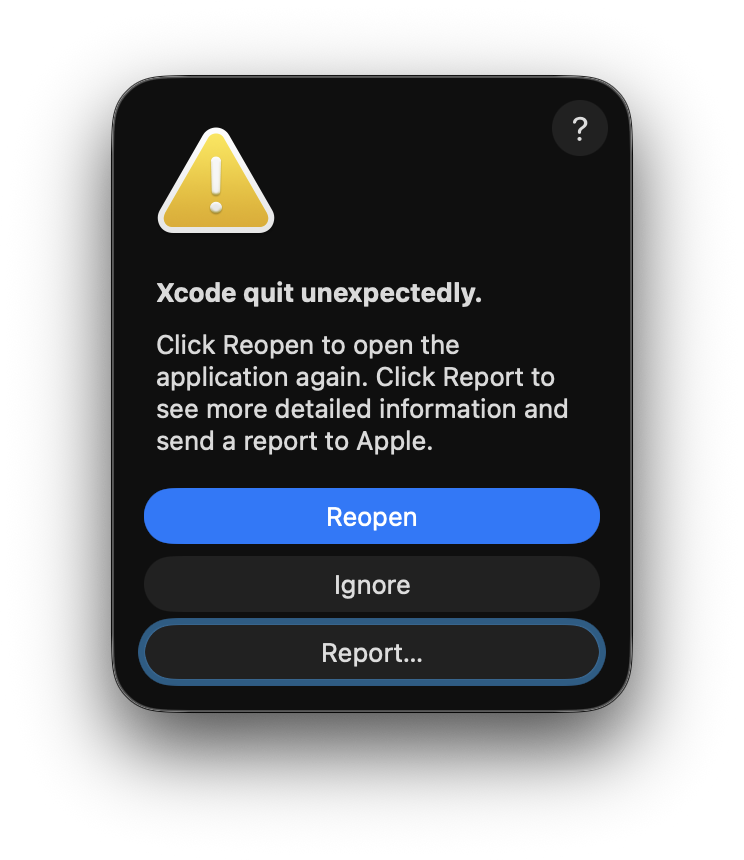
error log
$ /usr/bin/git --version
Error loading required libraries. If there is an ongoing installation please wait for it to complete. Otherwise reinstall. (dlopen(@rpath/libxcodebuildLoader.dylib, 0x0001): Symbol not found: _XPCTypeBool
  Referenced from: <9AE16A95-2414-31C4-BB7F-672E0C9AE66B> /Library/Developer/PrivateFrameworks/CoreDevice.framework/Versions/A/CoreDevice
  Expected in:     <37B53E42-0118-3C9B-BFA8-73DB82BC3B85> /Library/Apple/System/Library/PrivateFrameworks/Mercury.framework/Versions/A/Mercury)
Error loading required libraries. If there is an ongoing installation please wait for it to complete. Otherwise reinstall. (dlopen(@rpath/libxcodebuildLoader.dylib, 0x0001): Symbol not found: _XPCTypeBool
  Referenced from: <9AE16A95-2414-31C4-BB7F-672E0C9AE66B> /Library/Developer/PrivateFrameworks/CoreDevice.framework/Versions/A/CoreDevice
  Expected in:     <37B53E42-0118-3C9B-BFA8-73DB82BC3B85> /Library/Apple/System/Library/PrivateFrameworks/Mercury.framework/Versions/A/Mercury)
git: error: sh -c '/Applications/Xcode.app/Contents/Developer/usr/bin/xcodebuild -sdk /Applications/Xcode.app/Contents/Developer/Platforms/MacOSX.platform/Developer/SDKs/MacOSX.sdk -find git 2> /dev/null' failed with exit code 65280: (null) (errno=No such file or directory)
xcode-select: Failed to locate 'git', and no install could be requested (perhaps no UI is present). Please install manually from 'developer.apple.com'.

# or
$ /Applications/Xcode.app/Contents/Developer/usr/bin/xcodebuild -sdk /Applications/Xcode.app/Contents/Developer/Platforms/MacOSX.platform/Developer/SDKs/MacOSX.sdk -find git
Error loading required libraries. If there is an ongoing installation please wait for it to complete. Otherwise reinstall. (dlopen(@rpath/libxcodebuildLoader.dylib, 0x0001): Symbol not found: _XPCTypeBool
  Referenced from: <9AE16A95-2414-31C4-BB7F-672E0C9AE66B> /Library/Developer/PrivateFrameworks/CoreDevice.framework/Versions/A/CoreDevice
  Expected in:     <37B53E42-0118-3C9B-BFA8-73DB82BC3B85> /Library/Apple/System/Library/PrivateFrameworks/Mercury.framework/Versions/A/Mercury)

# or
$ /Applications/Xcode.app/Contents/Developer/usr/bin/xcodebuild -find git --version
Error loading required libraries. If there is an ongoing installation please wait for it to complete. Otherwise reinstall. (dlopen(@rpath/libxcodebuildLoader.dylib, 0x0001): Symbol not found: _XPCTypeBool
  Referenced from: <9AE16A95-2414-31C4-BB7F-672E0C9AE66B> /Library/Developer/PrivateFrameworks/CoreDevice.framework/Versions/A/CoreDevice
  Expected in:     <37B53E42-0118-3C9B-BFA8-73DB82BC3B85> /Library/Apple/System/Library/PrivateFrameworks/Mercury.framework/Versions/A/Mercury)
solution
[!NOTE|label:switch xcode-select to xcode]
$ sudo xcodebuild -runFirstLaunch
xcode-select: error: tool 'xcodebuild' requires Xcode, but active developer directory '/Library/Developer/CommandLineTools' is a command line tools instance
# fix the issue by switching to Xcode
$ sudo xcode-select -s /Applications/Xcode.app/Contents/Developer
# fix
$ sudo xcodebuild -runFirstLaunch
Error loading required libraries. If there is an ongoing installation please wait for it to complete. Otherwise reinstall. (dlopen(@rpath/libxcodebuildLoader.dylib, 0x0001): Symbol not found: _XPCTypeBool
  Referenced from: <9AE16A95-2414-31C4-BB7F-672E0C9AE66B> /Library/Developer/PrivateFrameworks/CoreDevice.framework/Versions/A/CoreDevice
  Expected in:     <37B53E42-0118-3C9B-BFA8-73DB82BC3B85> /Library/Apple/System/Library/PrivateFrameworks/Mercury.framework/Versions/A/Mercury)
Install Started
1%.........20.........40.........60.........80.......Install Succeeded

# or with license acceptance + pkg registration
$ for pkg in /Applications/Xcode.app/Contents/Resources/Packages/*.pkg; do
    sudo installer -pkg "${pkg}" -target /
  done
$ sudo xcodebuild -license accept

# check
$ /Applications/Xcode.app/Contents/Developer/usr/bin/xcodebuild -sdk /Applications/Xcode.app/Contents/Developer/Platforms/MacOSX.platform/Developer/SDKs/MacOSX.sdk -find git
/Applications/Xcode.app/Contents/Developer/usr/bin/git
$ /Applications/Xcode.app/Contents/Developer/usr/bin/xcodebuild -find git
/Applications/Xcode.app/Contents/Developer/usr/bin/git

$ /usr/bin/xcodebuild -checkFirstLaunchStatus 2>&1 && echo 'yes' || echo 'no'
yes
download via wget
[!TIP|label:chrome extensions]
- Get cookies.txt Clean -
ahmnmhfbokciafffnknlekllgcnafnie- Get cookies.txt LOCALLY -
cclelndahbckbenkjhflpdbgdldlbecc- @deprecated Get cookies.txt -
njabckikapfpffapmjgojcnbfjonfjfg
get cookies.txt
- install google chrome extension
- login developer.apple.com
- select cookies.txt and download
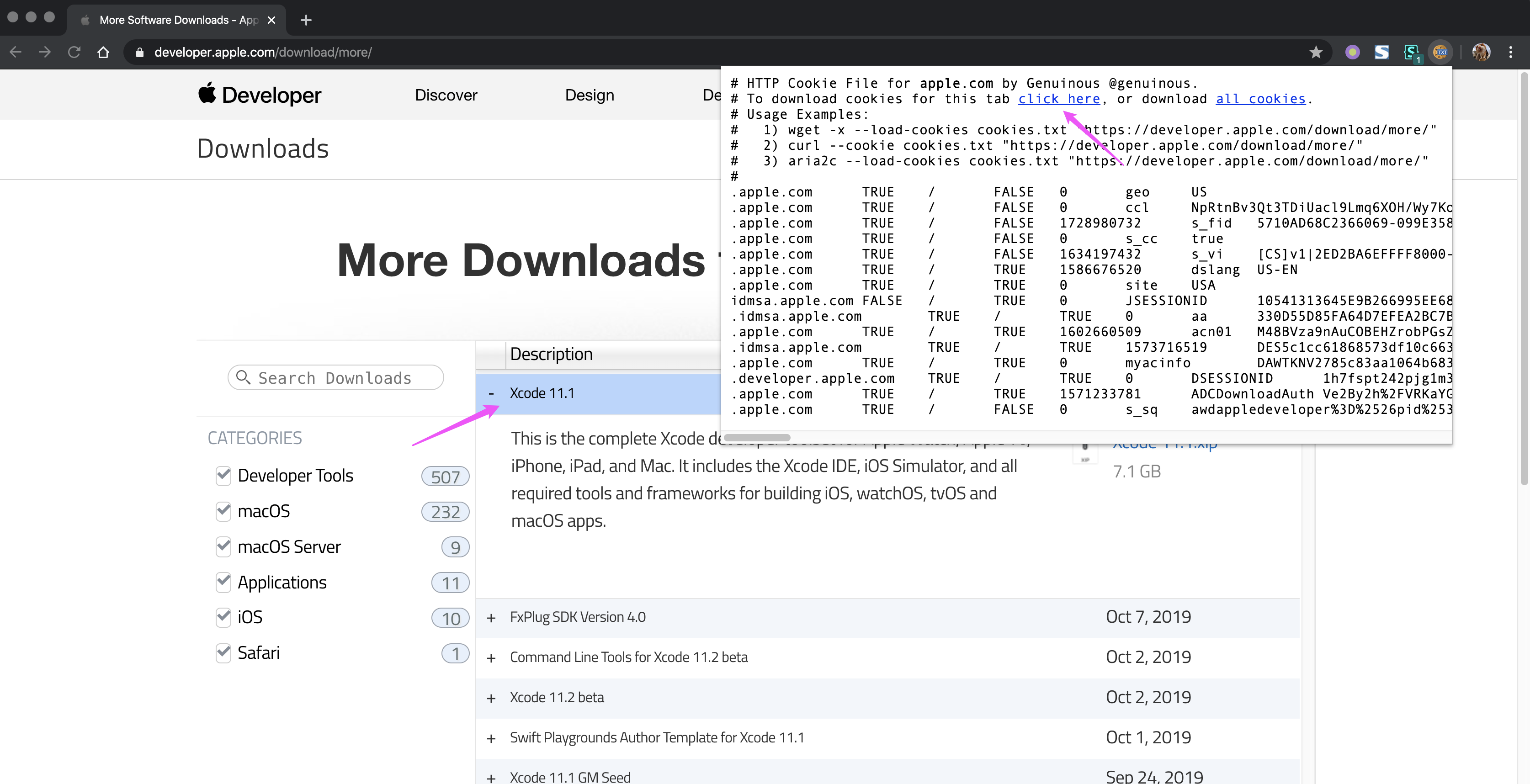
1.8.1.3.2 -- download cookies.txt get xcode download url and right click and select Copy Link Address:
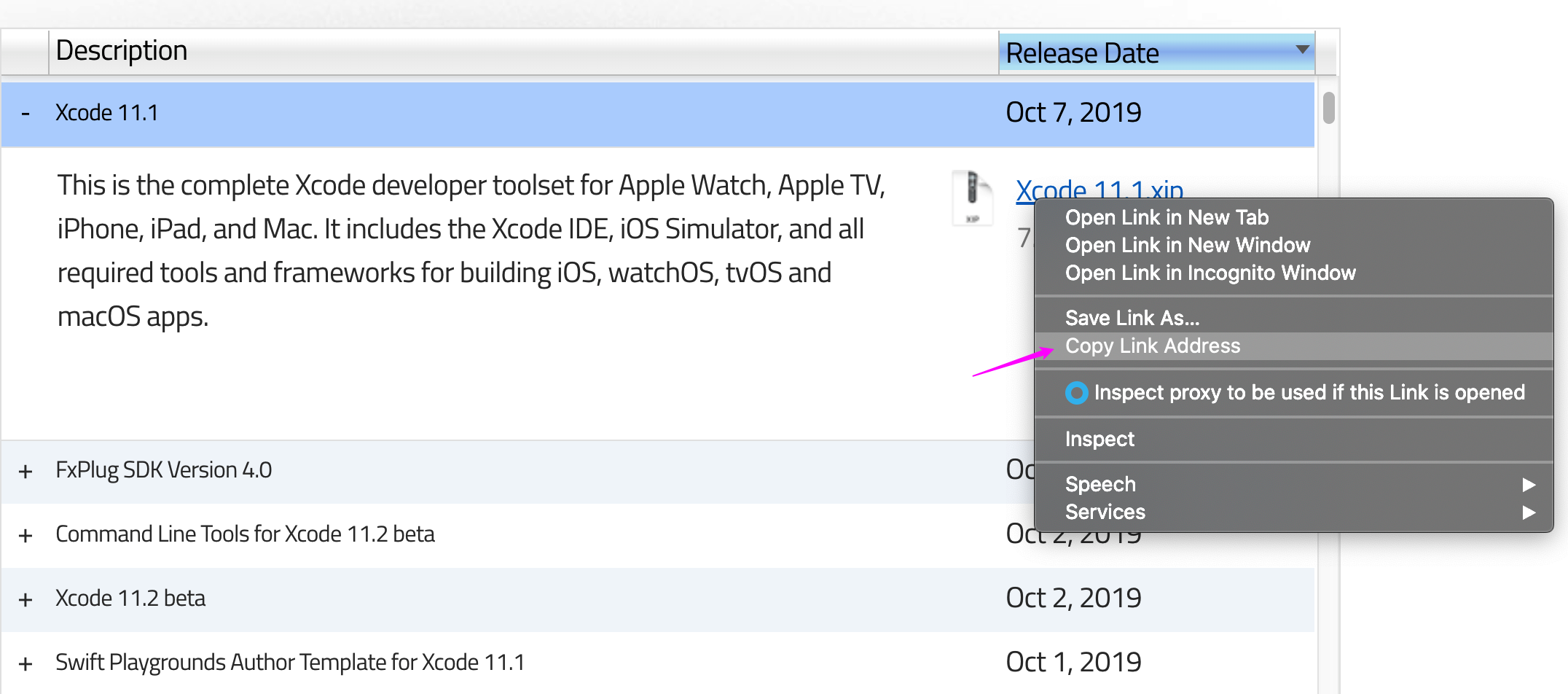
1.8.1.3.3 -- copy link address download xcode (inspired from here and here)
$ wget --cookies=on \
       --load-cookies=cookies.txt \
       --keep-session-cookies \
       --save-cookies=cookies.txt \
       https://download.developer.apple.com/Developer_Tools/Xcode_11.2_beta_2/Xcode_11.2_beta_2.xip
example
$ wget --cookies=on \
       --load-cookies=cookies.txt \
       --keep-session-cookies \
       --save-cookies=cookies.txt \
       https://download.developer.apple.com/Developer_Tools/Xcode_11.2_beta_2/Xcode_11.2_beta_2.xip
--2019-10-15 07:55:18--  https://download.developer.apple.com/Developer_Tools/Xcode_11.2_beta_2/Xcode_11.2_beta_2.xip
Resolving download.developer.apple.com (download.developer.apple.com)... 17.253.17.207, 17.253.17.211
Connecting to download.developer.apple.com (download.developer.apple.com)|17.253.17.207|:443... connected.
HTTP request sent, awaiting response... 200 OK
Length: 7805079698 (7.3G) [application/octet-stream]
Saving to: ‘Xcode_11.2_beta_2.xip’

100%[===========================================================================================================>] 7,805,079,698  112MB/s   in 70s

2019-10-15 07:53:07 (106 MB/s) - ‘Xcode_11.2_beta_2.xip’ saved [7805079698/7805079698]

$ ls -altrh Xcode_11.2_beta_2.xip
-rw-rw-r-- 1 devops devops 7.3G Oct  9 13:27 Xcode_11.2_beta_2.xip
-
$ xip --expand Xcode_11.2_beta_2.xip
xip: signing certificate was "Software Update" (validation not attempted)
xip: expanded items from "~/Xcode_11.2_beta_2.xip"

$ mv ~/Xcode.app /Applications/Xcode.app
appendix
xcode
| XCODE | URL |
|---|---|
| 12.3 beta | https://download.developer.apple.com/Developer_Tools/Xcode_12.3_beta/Xcode_12.3_beta.xip |
| 12.2 | https://download.developer.apple.com/Developer_Tools/Xcode_12.2/Xcode_12.2.xip |
| 12.2beta2 | https://download.developer.apple.com/Developer_Tools/Xcode_12.2_beta_2/Xcode_12.2_beta_2.xip |
| 12.0.1 | https://download.developer.apple.com/Developer_Tools/Xcode_12.0.1/Xcode_12.0.1.xip |
| 12 beta 5 | https://download.developer.apple.com/Developer_Tools/Xcode_12_beta_5/Xcode_12_beta_5.xip |
| 11.6 | https://download.developer.apple.com/Developer_Tools/Xcode_11.6/Xcode_11.6.xip |
| 11.5 beta 2 | https://download.developer.apple.com/Developer_Tools/Xcode_11.5_beta_2/Xcode_11.5_beta_2.xip |
| 11.5 beta | https://download.developer.apple.com/Developer_Tools/Xcode_11.5_beta/Xcode_11.5_beta.xip |
| 11.4.1 | https://download.developer.apple.com/Developer_Tools/Xcode_11.4.1/Xcode_11.4.1.xip |
| 11.4 | https://download.developer.apple.com/Developer_Tools/Xcode_11.4/Xcode_11.4.xip |
| 11.4 beta 3 | https://download.developer.apple.com/Developer_Tools/Xcode_11.4_beta_3/Xcode_11.4_beta_3.xip |
| 11.4 beta 2 | https://download.developer.apple.com/Developer_Tools/Xcode_11.4_beta_2/Xcode_11.4_beta_2.xip |
| 11.4 beta | https://download.developer.apple.com/Developer_Tools/Xcode_11.4_beta/Xcode_11.4_beta.xip |
| 11.3.1 | https://download.developer.apple.com/Developer_Tools/Xcode_11.3.1/Xcode_11.3.1.xip |
| 11.2 beta 2 | https://download.developer.apple.com/Developer_Tools/Xcode_11.2_beta_2/Xcode_11.2_beta_2.xip |
| 11.1 | https://download.developer.apple.com/Developer_Tools/Xcode_11.1/Xcode_11.1.xip |
| 11.2 beta | https://download.developer.apple.com/Developer_Tools/Xcode_11.2_beta/Xcode_11.2_beta.xip |
| 11 | https://download.developer.apple.com/Developer_Tools/Xcode_11/Xcode_11.xip |
| 10.3 | https://download.developer.apple.com/Developer_Tools/Xcode_10.3/Xcode_10.3.xip |
| 10.2.1 | https://download.developer.apple.com/Developer_Tools/Xcode_10.2.1/Xcode_10.2.1.xip |
| 10.2 | https://download.developer.apple.com/Developer_Tools/Xcode_10.2/Xcode_10.2.xip |
| 10.1 | https://download.developer.apple.com/Developer_Tools/Xcode_10.1/Xcode_10.1.xip |
command line tool
| COMMAND LINE TOOL | URL |
|---|---|
| 12.3 beta | https://download.developer.apple.com/Developer_Tools/Xcode_12.3_beta/Xcode_12.3_beta.xip |
| 12.2 | https://download.developer.apple.com/Developer_Tools/Command_Line_Tools_for_Xcode_12.2/Command_Line_Tools_for_Xcode_12.2.dmg |
| 12.0 | https://download.developer.apple.com/Developer_Tools/Command_Line_Tools_for_Xcode_12/Command_Line_Tools_for_Xcode_12.dmg |
| 11.4.1 | https://download.developer.apple.com/Developer_Tools/Command_Line_Tools_for_Xcode_11.4.1/Command_Line_Tools_for_Xcode_11.4.1.dmg |
| 11.4 | https://download.developer.apple.com/Developer_Tools/Command_Line_Tools_for_Xcode_11.4/Command_Line_Tools_for_Xcode_11.4.dmg |
| 11.4 beta 3 | https://download.developer.apple.com/Developer_Tools/Command_Line_Tools_for_Xcode_11.4_beta_3/Command_Line_Tools_for_Xcode_11.4_beta_3.dmg |
| 11.4 beta 2 | https://download.developer.apple.com/Developer_Tools/Command_Line_Tools_for_Xcode_11.4_beta_2/Command_Line_Tools_for_Xcode_11.4_beta_2.dmg |
| 11.3.1 | https://download.developer.apple.com/Developer_Tools/Command_Line_Tools_for_Xcode_11.3.1/Command_Line_Tools_for_Xcode_11.3.1.dmg |
| 11.2 beta 2 | https://download.developer.apple.com/Developer_Tools/Command_Line_Tools_for_Xcode_11.2_beta_2/Command_Line_Tools_for_Xcode_11.2_beta_2.dmg |
| 11.1 | https://download.developer.apple.com/Developer_Tools/Command_Line_Tools_for_Xcode_11.2_beta/Command_Line_Tools_for_Xcode_11.2_beta.dmg |
| 11 | https://download.developer.apple.com/Developer_Tools/Command_Line_Tools_for_Xcode_11/Command_Line_Tools_for_Xcode_11.dmg |
| 10.3 | https://download.developer.apple.com/Developer_Tools/Command_Line_Tools_macOS_10.14_for_Xcode_10.3/Command_Line_Tools_macOS_10.14_for_Xcode_10.3.dmg |
| 10.2.1 | https://download.developer.apple.com/Developer_Tools/Command_Line_Tools_macOS_10.14_for_Xcode_10.2.1.dmg/Command_Line_Tools_macOS_10.14_for_Xcode_10.2.1.dmg |
| 10.2 | https://download.developer.apple.com/Developer_Tools/Command_Line_Tools_macOS_10.14_for_Xcode_10.2/Command_Line_Tools_macOS_10.14_for_Xcode_10.2.dmg |
| 10.1 for macOS 10.14 | https://download.developer.apple.com/Developer_Tools/Command_Line_Tools_macOS_10.14_for_Xcode_10.1/Command_Line_Tools_macOS_10.14_for_Xcode_10.1.dmg |
| 10.1 for macOS 10.13 | https://download.developer.apple.com/Developer_Tools/Command_Line_Tools_macOS_10.13_for_Xcode_10.1/Command_Line_Tools_macOS_10.13_for_Xcode_10.1.dmg |
additional tools
| ADDITIONAL TOOL | URL |
|---|---|
| 11.4 | https://download.developer.apple.com/Developer_Tools/Additional_Tools_for_Xcode_11.4/Additional_Tools_for_Xcode_11.4.dmg |
| 11.4 beta 2 | https://download.developer.apple.com/Developer_Tools/Additional_Tools_for_Xcode_11.4_beta_2/Additional_Tools_for_Xcode_11.4_beta_2.dmg |
| 11 | https://download.developer.apple.com/Developer_Tools/Additional_Tools_for_Xcode_11/Additional_Tools_for_Xcode_11.dmg |
| 10.1 | https://download.developer.apple.com/Developer_Tools/Additional_Tools_for_Xcode_10.1/Additional_Tools_for_Xcode_10.1.dmg |