[!TIP|label:references:]
terminology
extensions
[!TIP|label:references:]
| EXTENSION | NAME | DESCRIPTION |
|---|---|---|
.ca |
Certificate Authority | - |
.key |
Private Key | - |
.csr.req.p10 |
Certificate Signing Request | - |
.crt |
Certificate | used for certificates, may be encoded as binary DER or as ASCII PEM, usually an X509v3 certificate |
.cer |
Certificate | alternate form of .crt (Microsoft Convention), DER encoded or base64[PEM] encoded |
.pem |
Privacy Enhanced Mail | indicates a base64 encoding with header and footer lines |
.crl |
Certificate Revocation List | defined within the X.509v3 certificate specifications, and this is usually DER encoded |
.p8.pkcs8 |
PKCS#8 Private Keys | PKCS#8 defines a way to encrypt private keys using |
.p12.pfx |
PKCS#12 defined key store | commonly password protected. It can contain trusted certificates, private key(s) and their certificate chain(s) |
.p7b.p7c |
PKCS#7/CMS message | it is often used as a way to handle the certificates which make up a 'chain' or 'bundle' as a single |
jks |
Java Key Store | Java Key Store (JKS) is a repository of security certificates, either authorization certificates or public key certificates, plus corresponding private keys, used for instance in SSL encryption. |
algorithms
symmetric encryption
3DESAES
asymmetric encryption
RSADSAECCECDSAHash AlgorithmsMD5SHA-1SHA-2SHA-3
certs
generate csr
[!NOTE|label:references:]
# generate key
$ openssl genrsa -out dashboard.key 2048

# generate csr
$ openssl req -sha256 \
              -new \
              -key dashboard.key \
              -out dashboard.csr \
              -subj '/C=US/ST=California/L=Santa Clara/O=Company Name, Inc./CN=dashboard.kubernetes.com'
- or generate key and csr in one command
$ openssl req -new -newkey rsa:2048 -nodes -keyout dashboard.key -out dashboard.csr -subj '/C=US/ST=California/L=Santa Clara/O=Company Name, Inc./CN=dashboard.kubernetes.com'
sign the csr
[!TIP|label:references:]
$ echo subjectAltName = DNS: server.sample.com,IP: 10.110.136.104 >> extfile.cnf
$ echo extendedKeyUsage = serverAuth >> extfile.cnf
$ openssl x509 -req \
               -days 365 \
               -sha256 \
               -CAcreateserial \
               -CA ca.crt \                            # the CA crt
               -CAkey ca.key \                         # the CA key
               -in server.csr \
               -out server.crt \
               -extfile extfile.cnf                    # the external file
Sign a certificate request using the CA certificate above and add user certificate extensions
$ openssl x509 -req -in req.pem -extfile openssl.cnf -extensions v3_usr \
          -CA cacert.pem -CAkey key.pem -CAcreateserial

# Set a certificate to be trusted for SSL client use and change set its alias to "Steve's Class 1 CA"
$ openssl x509 -in cert.pem            -addtrust clientAuth -setalias "Steve's Class 1 CA" -out trust.pem
# or
$ openssl x509 -in steve.cer -trustout -addtrust clientAuth -setalias "Steve's Class 1 CA" -out steve.pem
or generate crt with key in one command
$ openssl req -x509 -nodes -days 365 -newkey rsa:2048 -keyout nginx-selfsigned.key -out nginx-selfsigned.crt
nginx configure
[!NOTE|label:references:]
modify/create nginx configure
$ cat /etc/nginx/sites-enabled/server.sample.com
server {
    listen 80;
    listen 443 ssl;

    ssl_certificate     /etc/nginx/certs/server.pem;
    ssl_certificate_key /etc/nginx/certs/server.key;
    ssl_protocols       TLSv1 TLSv1.1 TLSv1.2 TLSv1.3;
    ssl_ciphers         HIGH:!aNULL:!MD5;

    server_name server.sample.com;

    location / {
        proxy_pass http://localhost:8080;
        proxy_http_version 1.1;
        proxy_set_header Upgrade $http_upgrade;
        proxy_set_header Connection 'upgrade';
        proxy_set_header Host $host;
        proxy_cache_bypass $http_upgrade;
    }
}
test and reload
$ nginx -t
$ nginx -s reload
$ sudo systemctl restart nginx.service

# more
$ which -a nginx
/usr/sbin/nginx
/sbin/nginx
usage
show content
certificate request ( csr )
# show content of a certificate request
#    csr: request
#          v
$ openssl req -in certificate.csr -noout -text

# subject name
$ openssl req -in certificate.csr -noout -subject

# verify
$ openssl req -in certificate.csr -noout -verify
certificate ( pem, crt, cer )
# show content of a certificate
#    x509: certificate
#          v
$ openssl x509 -in certificate.pem -noout -text

# show serial number of a certificate
$ openssl x509 -in certificate.pem -noout -serial

# show subject name
$ openssl x509 -in certificate.pem -noout -subject

# show subject name in RFC2253 format
$ openssl x509 -in certificate.pem -noout -subject -nameopt RFC2253

# show subject name in oneline support UTF8
$ openssl x509 -in certificate.pem -noout -subject -nameopt oneline,-esc_msb

# show SHA-1 fingerprint
$ openssl x509 -sha1 -in certificate.pem -noout -fingerprint
convert
[!NOTE|label:references:]
from cer
to crt
# DER encoded ( binary )
$ openssl x509 -inform DER -in certificate.cer -out certificate.crt

# PEM encoded ( human readable )
$ openssl x509 -inform PEM -in certificate.cer -out certificate.crt
to pem
$ openssl x509 -inform DER -in certificate.cer -out certificate.pem -outform PEM
$ openssl x509 -inform PEM -in certificate.cer -out certificate.pem -outform PEM
from a pkcs#12 ( .pfx/.p12 )
[!NOTE|label:references:]
to pem
$ openssl pkcs12 -in certificate.pfx -out certificate.pem -nodes

## -nocerts
$ openssl pkcs12 -in filename.pfx -nocerts -out key.pem
$ openssl pkcs12 -export -out certificate.pfx -inkey privateKey.key -in certificate.crt -certfile CACert.crt

## -clcerts
$ openssl pkcs12 -in filename.pfx -clcerts -nokeys -out certificate.pem
from crt
[!NOTE|label:references:]
to pem
## PEM encoded
$ openssl x509 -in certificate.crt -out certificate.pem -outform PEM

## DER encoded
$ openssl x509 -in certificate.crt -out certificate.der -outform DER

## from DER encoded to PEM encoded
$ openssl x509 -in certificate.der -inform DER -out output.pem -outform PEM
remove password from extracted private key
$ openssl rsa -in key.pem -out key.pem
from certificate
- to certificate request
$ openssl x509 -x509toreq -in certificate.crt -out certificate.csr -signkey privateKey.key
# or
$ openssl x509 -x509toreq -in certificate.pem -out req.pem -signkey key.pem
convert from windows certmgr.msc
[!NOTE|label:export with powershell script (base64 decoding) - run as administrator:] generate base64 encoded crt file with powershell script automatically:
$TargetDir = "C:\certs\"                 # define the target directory to export the certs
$CertName  = 'Company Root CA*'          # define the cert name to match
if (!(Test-Path $TargetDir)) { New-Item -ItemType Directory -Path $TargetDir | Out-Null }

# scan both stores (same merged view as certmgr.msc), filter by subject, dedup by thumbprint
$Certs = Get-ChildItem -Path Cert:\CurrentUser\Root, Cert:\LocalMachine\Root |
         Where-Object { $_.Subject -like "CN=$CertName" } |
         Sort-Object -Property Thumbprint -Unique

if (-not $Certs) { Write-Warning "no cert matched '$CertName'"; return }

foreach ($Cert in $Certs) {
    $CleanName = $Cert.Subject -replace '[^a-zA-Z0-9_-]', '_'
    $CleanName = $CleanName.Substring(0, [System.Math]::Min(40, $CleanName.Length))
    $FilePath  = Join-Path $TargetDir "$CleanName-$($Cert.Thumbprint).crt"
    $Base64    = [System.Convert]::ToBase64String($Cert.RawData, "InsertLineBreaks")                # base-64 encoded - no need to convert to crt again
    Set-Content -Path $FilePath -Value "-----BEGIN CERTIFICATE-----`r`n$Base64`r`n-----END CERTIFICATE-----" -Encoding Ascii
    Write-Host "exported: $FilePath"
}
verify:
> openssl x509 -in "C:\certs\CN_Company_Root_CA_V1-96D31D8654A54852988A057BB4BDDF6D075F16DC.crt" -noout -subject -fingerprint
subject=CN = Company Root CA V1
SHA1 Fingerprint=96:D3:1D:86:**:**:**:**:**:**:**:**:**:**:**:6D:07:5F:16:DC
export multiple and create bundle pem (run as administrator):
$TargetDir   = "C:\certs\"
$CertPattern = '^CN=Company (Root|SC Issuing) CA V*'          # match Root CA + SC Issuing CA
$BundlePath  = Join-Path $TargetDir "company-ca-bundle.pem"   # merged output
if (!(Test-Path $TargetDir)) { New-Item -ItemType Directory -Path $TargetDir | Out-Null }

$Stores = 'Cert:\CurrentUser\Root', 'Cert:\LocalMachine\Root',
          'Cert:\CurrentUser\CA',   'Cert:\LocalMachine\CA'

$Certs = Get-ChildItem -Path $Stores |
         Where-Object { $_.Subject -match $CertPattern } |
         Sort-Object -Property Thumbprint -Unique

if (-not $Certs) { Write-Warning "no cert matched '$CertPattern'"; return }

$now       = Get-Date
$PemBlocks = @()                                              # collect valid certs for the bundle

foreach ($Cert in $Certs) {
    # skip expired / not-yet-valid certs
    if ($Cert.NotAfter -lt $now) {
        Write-Warning ("skip EXPIRED     : {0} [{1}] expired {2:yyyy-MM-dd}" -f $Cert.Subject, $Cert.Thumbprint, $Cert.NotAfter)
        continue
    }
    if ($Cert.NotBefore -gt $now) {
        Write-Warning ("skip NOT-YET-VALID: {0} [{1}] valid from {2:yyyy-MM-dd}" -f $Cert.Subject, $Cert.Thumbprint, $Cert.NotBefore)
        continue
    }

    $CleanName = $Cert.Subject -replace '[^a-zA-Z0-9_-]', '_'
    $CleanName = $CleanName.Substring(0, [System.Math]::Min(40, $CleanName.Length))
    $FilePath  = Join-Path $TargetDir "$CleanName-$($Cert.Thumbprint).crt"
    $Base64    = [System.Convert]::ToBase64String($Cert.RawData, "InsertLineBreaks")
    $Pem       = "-----BEGIN CERTIFICATE-----`r`n$Base64`r`n-----END CERTIFICATE-----"

    # 1) per-cert file
    Set-Content -Path $FilePath -Value $Pem -Encoding Ascii
    Write-Host ("exported: {0}  (expires {1:yyyy-MM-dd})" -f $FilePath, $Cert.NotAfter)

    # 2) accumulate for the merged bundle
    $PemBlocks += $Pem
}

# write the merged bundle (overwrite each run)
if ($PemBlocks.Count -gt 0) {
    Set-Content -Path $BundlePath -Value ($PemBlocks -join "`r`n") -Encoding Ascii
    Write-Host ("bundle  : {0}  ({1} certs)" -f $BundlePath, $PemBlocks.Count)
} else {
    Write-Warning "no valid cert exported; bundle not created"
}
and setup NODE_EXTRA_CA_CERTS environment variable if necessary:
setx NODE_EXTRA_CA_CERTS "C:\certs\company-ca-bundle.pem"
- win + r ->
certmgr.msc Certifacts - Current User->Trusted Root Certification Authorities->Certificates-> the wanted CAright-click ->
openor double-click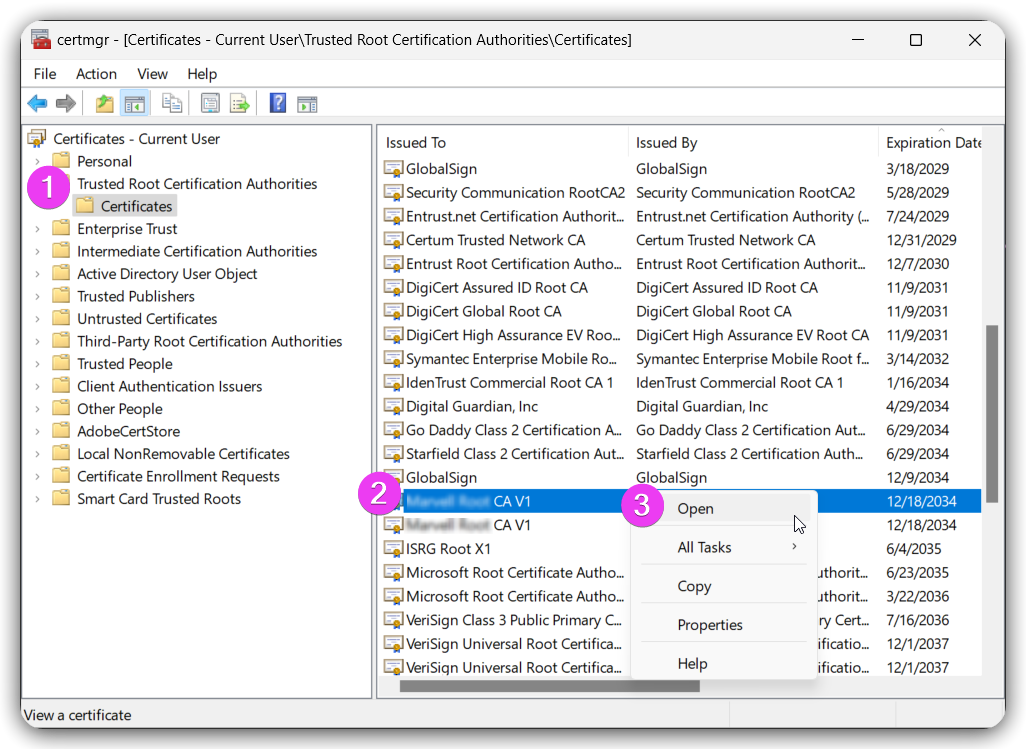
1.2.11.7.1 -- certmgr-1 Details->Copy to File...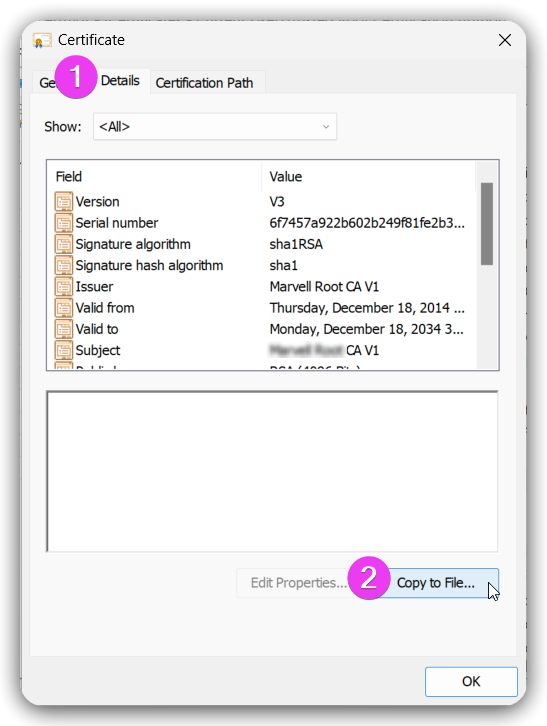
1.2.11.7.2 -- certmgr-2 Certificate Export Wizard ->
Next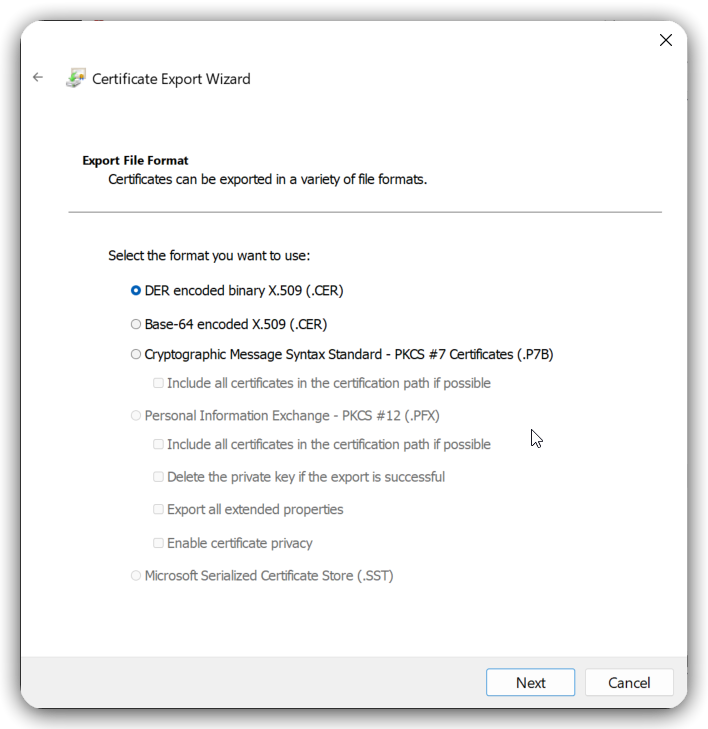
1.2.11.7.3 -- certmgr-3 convert to crt
DER encoded binary X.509 (.CER)$ openssl x509 -inform DER -in certificate.cer -out certificate.crtBase-64 encoded X.509 (.CER)$ openssl x509 -inform PEM -in certificate.cer -out certificate.crtCryptographic Message Syntax Standard - PKCS #7 Certificates (.P7B)[!NOTE|label:references:]
$ openssl pkcs7 -inform DER -in certificate.p7b -out certificate.crt
# or
$ openssl pkcs7 -print_certs -in certificate.p7b -out certificate.crt
import to Linux
[!NOTE|label:references:]
$ sudo cp certificate.crt /usr/local/share/ca-certificates/
$ sudo chmod 755 /usr/local/share/ca-certificates/certificate.crt
$ sudo update-ca-certificates